
CyberpowerPC's Compal NBLB2: Affordable Gaming
- Posted in
- Laptops
- AMD
- Intel
- CyberPowerPC
- Compal
It Isn't a Shark, Compal
Let me explain: the shark is one of nature's perfect predators, and has thus undergone very little evolution over the preceding millennia compared to other species. It hasn't changed because it hasn't really needed to; the Big Buddha stamped that project "complete" some time ago. Compal's NBLB2, on the other hand, looks like the relic of a bygone era. Notebook styling has changed fairly substantially over the past few years—heck even in the past year—but you wouldn't know it from looking at this one.


The lid marks the return of everyone's favorite: glossy black plastic. There's no pattern, just solid black, and it looks nice enough but the industry has started moving away from this kind of styling for a reason. Our CyberpowerPC unit has a company logo on the top left (or is it bottom right?) corner.
When you pop the notebook open you find that same wonderful glossy black plastic in the same place we've kvetched about before: all around the screen bezel. Oh well, at least they're consistent, and it makes more sense than ASUS using the glossy plastic only on the screen bezel. The hinges for the screen feel fairly strong, and the webcam is exactly where you'd expect it.
Moving down to the body, we find a patterned silver glossy plastic shell and what has to be the first 10-key-free 15.6" notebook keyboard we've seen in a while. The real estate saved to the right of the keyboard is used for the power button, the USB charging toggle, and the fingerprint reader, while the left side is barren. Above the keyboard are the speakers along with a bar of touch-sensitive buttons that didn't actually do anything in our review unit.
And the keyboard itself? A quaint sort of "old-style" layout (read: tried and true) using generic matte plastic keys. Compared to the chiclet-style keyboards we're getting accustomed to seeing these days, the NBLB2's oldest-school keyboard feels a little mushy despite having a comfortable layout. There's a little flex in the center of the keyboard, too; not enough to become a serious issue but still noticeable.
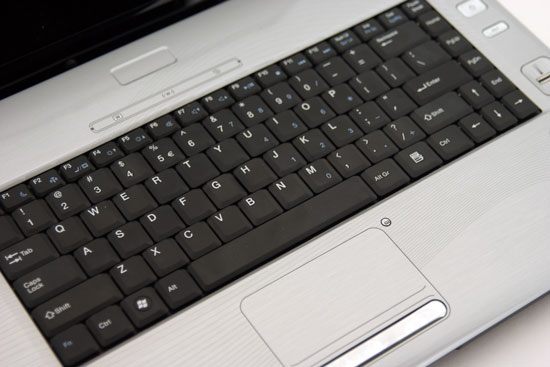
The touchpad below it, on the other hand, feels brutally cheap. Cordoned off from the rest of the palmrest by a printed outline and nothing else, the texture is unpleasant and tracking is difficult. The toggle button next to it is handy at least, and will probably see use long enough to turn the touchpad off for good. Beneath it is a single rocker that serves as the left and right mouse buttons and is about as much fun to use. This is a bad design that's in dire need of updating, but depending on how you intend to use the notebook it's not a dealbreaker.
Unfortunately, the port selection also betrays Compal's general unwillingness to update their design. The four USB 2.0 ports and HDMI port are welcome, and having a hard wireless toggle switch instead of handling it in software is a nice throwback, but the infrared port is horribly outdated. Worse, without FireWire, USB 3.0, eSATA, or ExpressCard, you're stuck using either USB 2.0 or your network to transfer files to and from the hard drive. Frankly I'm surprised there isn't a PC card slot on this notebook.
Compal may have studiously continued to update this notebook's internals over the past couple of years, but the overall design feels borderline ancient in an industry that moves forward as fast as this one. AVADirect didn't want to send us one of these at all and to an extent I can understand why, but I'm not sure the notebooks Clevo makes are much of an improvement. Overall build quality of the Compal is actually a little better (Clevo notebooks feel like they have more of a candy shell than any kind of actual construction), but the design is staggeringly dated.
Originally published at https://www.anandtech.com/show/4068/cyberpowerpcs-compal-nblb2-affordable-gaming (Wayback Machine).