
HP Envy 17: HP's MacBook Pro Killer?
Touring the HP Envy 17
My initial take on the HP Envy 17's styling was that they were cribbing liberally from Apple's MacBook Pro series, and earlier Envy notebooks definitely lived up to this. As the series has matured, though, it's acquired a lot of its own identity. So for those of you who thought otherwise stellar notebooks like Dell's refreshed XPS lineup were too pug ugly to actually use on a daily basis, HP's Envy is for you.
The happy news to report is that barring one terrible location, the Envy is gloss free. The lid has a nice, textured finish and a glowing HP logo, and it's all fairly well understated. It's not a fingerprint magnet, and is actually remarkably easy to keep clean, boding well for the notebook's longevity.


Of course, once you flip it open you see gloss where you hate to see it, but at least HP has an excuse: the glossy finish of the screen extends from edge to edge in HP's "Ultra BrightView Infinity" display. It looks nice enough but I'm still not entirely sure it's worth the trade-off, since the screen bezel (and all this does, really, is mask the bezel) is one of the major places a notebook is liable to pick up fingerprints. Still, it's attractive and hard to harp on too much.
HP claims the body of the Envy 17 is "laser-etched aluminum" and I believe it: the inside is just as attractive as the lid, and just as comfortable to use. To look at all of it, the Envy 17 is at least a beautiful piece of industrial design, but it's here where HP screws the pooch (or at least takes it to second base.) The keyboard is comfortable with a minimal amount of flex, but the layout is questionable. HP and Dell have recently elected to switch the function keys to being shortcuts and toggles instead of F1-F12. That in itself isn't a huge crime, but the difference is that I can pop into the BIOS on my Studio 17 and switch them back to what they're supposed to do. HP doesn't make it that easy on you. The arrow keys are also a poor design; the up and down arrows are half-sized while the left and right are full-sized. I can understand not wanting to leave negative space in the keyboard design, but this wasn't the right way to do it. There's also no Num Lock, with HP squeezing document navigation keys in that way. Losing the Num Lock isn't a major sacrifice for most users, but I get the feeling there are going to be at least a couple users pulling their hair out over this.
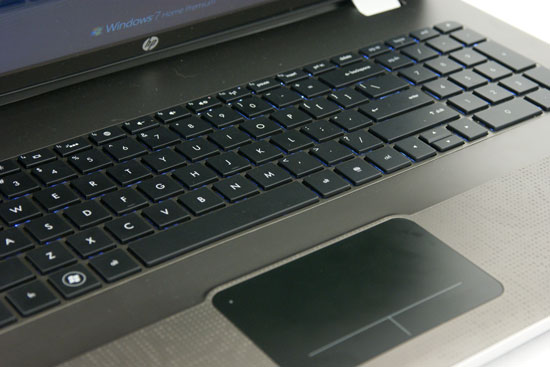
And then there's the touchpad. Once again we have PC designers following Apple's lead without bothering to really understand it (though to be fair, I'm in the minority that hates Apple's unified touchpad to begin with). On a Mac where there's really only the one big mouse button, making the whole touchpad depress makes more sense, but PC users are used to being able to right-click. We need two buttons, and the unified design here feels awkward to use. It's a better implementation than I've seen elsewhere but it still doesn't improve on just having a touchpad and two buttons.
The rest of the body has an aluminum trim around the sides and back that's attractive and houses the Beats Audio speakers. Credit where credit is due, these are among the better notebook speakers I've heard and certainly beat how hollow the otherwise quality Dell Studio 17 speakers are, but I found when cranking up the volume that the music began to distort. It's something I've heard on other notebooks, even through the speaker jack, where it seems like the notebook is trying to boost the bass in software. When you hit the threshold of how high the system's volume can go, the whole thing distorts because the system was just selectively raising the volume at the low end. At a reasonable volume the Envy 17 sounds great if a little hollow and tinny (don't know what to tell you, they're notebook speakers), but don't push it.
Finally, the bottom is decked in the typical black matte plastic, and that's fine. What's a little frustrating is the fact that in order to get to the memory bay, you have to remove the hard drive cover first: the two plastic panels are actually layered. A minor nuisance but a nuisance nonetheless.
Originally published at https://www.anandtech.com/show/4060/hp-envy-17-hps-macbook-pro-killer (Wayback Machine).