
HP EliteBook 8740w: IPS on the Go
Enterprise Class and the Death of Gloss
If there's one thing we can be thankful for when dealing with an enterprise class notebook, it's that not an ounce of glossy plastic can be found anywhere on the chassis. Workstations tend to be a bit more austere, though the HP EliteBook 8740w at least seems to add a little more style than most.


What you'll notice first is the brushed aluminum used on the lid and the inside of the body, framing the plastic keyboard. The screen bezel is thankfully matte black, with the webcam in its usual position above the screen and an ambient light sensor below. If there's one complaint I have, it's the use of a touch-based control/shortcut bar just above the keyboard. I've never been a fan of touch-control and don't understand why it's become so popular when tactile feedback just feels better.
As for the keyboard itself, the layout is comfortable and logical, but it's another case of a possibly inappropriate style creeping into an enterprise notebook. The raised key surfaces aren't uncomfortable, but these are the same keys that HP uses on consumer desktop keyboards, and they seem out of place here compared to the function-before-form keyboard layouts of competing Lenovo or Dell notebooks. There's even light flex in the center of the keyboard, although the backlighting is very welcome. In the grand scheme the keyboard is a minor complaint not likely to aggravate too many users, but it does seem out of place.
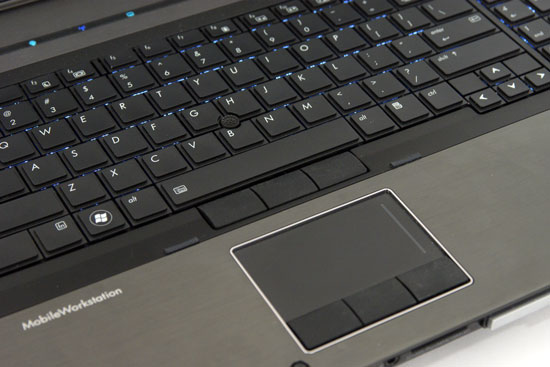
HP also includes both a trackpoint and touchpad, and both of these function well and are comfortable to use. I've heard people complain that HP's trackpoint is a distant second to Lenovo's, but the one in the 8740w doesn't seem appreciably better or worse than the one I've been using in my own ThinkPad. A particularly nice feature is the integration of a middle mouse button for both; it may not be the most attractive thing in the world, but it's useful and doesn't really detract at all.
From there the rest of the notebook seems to be built like a tank, just as one would hope. During a conference call with HP they were quick to point out that the notebook had been reliability tested to the 810G military standard, subjecting it to a three foot drop along with dust and humidity. I can believe it's that reliable. Screen flex is minimal, and apart from the keyboard the rest of the unit feels like it could be used as a murder weapon. The lid even has a mechanical latch to hold the notebook closed.
Overall, though, we can appreciate HP's willingness to try and inject style into a notebook market that tends to be staggeringly spartan. The gunmetal coloring is attractive without making the 8740w appear gaudy, and though the surfaces of the keys of the keyboard seem a little inappropriate, they're not deal-breakers. At least HP is trying.
Before we get into the performance metrics, it does bear mentioning that the 8740w brings a lot of workstation-class support to the table. HP's Power Assistant software offers fine-grained control over the system and can even estimate power consumption and savings depending on which power mode you're running. Also included is HP QuickWeb, the usual instant-on feature that lets you browse the internet without booting into Windows, but most interesting is HP Quicklook 3. Quicklook 3 is integrated into Outlook, and lets you access your mail and information in Outlook without ever booting into Windows. We can see this as being a fairly useful feature, although probably more useful in a notebook that doesn't weigh eight pounds.
Originally published at https://www.anandtech.com/show/4049/hp-elitebook-8740w-ips-on-the-go (Wayback Machine).