
Corsair Graphite Series 600T: Cool and Quiet
- Posted in
- Cases/Cooling/PSUs
- Corsair
- 600T
The 600T Externally
A jaunt around the externals of the Corsair Graphite Series 600T reveals something a little more curvaceous than we've come to expect from modern enclosures. Outside of the Cooler Master Cosmos the 600T seems to take at least one or two design cues from (as good a place as any), most cases tend to have sharp angles and very few curves. The 600T on the other hand features rounded edges around most of the design. By the same token, while most cases tend to be shades of black or silver, the 600T employs a gunmetal coloring that suits it well.


We'll start from the front and work our way around. The 600T features four external 5.25" bays but surprisingly no 3.5"; it's safe to assume Corsair figures you can always adapt a front panel card reader (or your ancient floppy drive) to fit in a 5.25" bay. The entire front of the case is ventilated, and the panel in front of the massive 200mm intake fan pops off, allowing you to clean the grate and dust out of the fan. That 200mm fan (and its brother in the top of the case) is the source of some consternation in other reviews: it's quiet, but it doesn't seem to move that much air, and I know some reviewers found the bright white LED lighting a little obnoxious. That's definitely going to be a matter of taste.
When we crawl up the front to the top of the case, we see one of the major progressions in modern cases: the I/O, power, and reset buttons are at the top front of the 600T. It's a smart move since most of us tend to keep our cases on the floor these days. Corsair offers a healthy selection of I/O here: a generous four USB 2.0 ports, microphone and headphone jacks, a 6-pin Firewire port, and something of a rarity right now: a USB 3.0 port. That USB 3.0 port doesn't use the USB 3.0 header that's been showing up on some recent motherboards, though; it's powered by an extension cable that routs to the back of the case and plugs into the motherboard's I/O cluster. This isn't the most elegant solution in the world, but it gets the job done and it's flexible enough that you can always just plug it into a rear USB 2.0 port if your board doesn't support 3.0 and get a fifth front port. If I had one complaint about the I/O cluster, though, it's the inclusion of Firewire but not eSATA. I use both but if I had to make a choice for the average user, I'd err on the side of eSATA.
Parked in the middle of all these ports is the 600T's integrated fan controller. If you've read any other reviews of the 600T, allow me to reiterate what they said: this thing just doesn't seem to do that much. If you plug in all of the fans in the case (the controller is actually completely independent of the case fans and you can choose to avoid using it entirely), you will find that the difference between the lowest and highest settings is like night and later that night. You'll only hear the difference in a quiet room, and as you'll see later, the highest setting doesn't appreciably improve cooling performance.
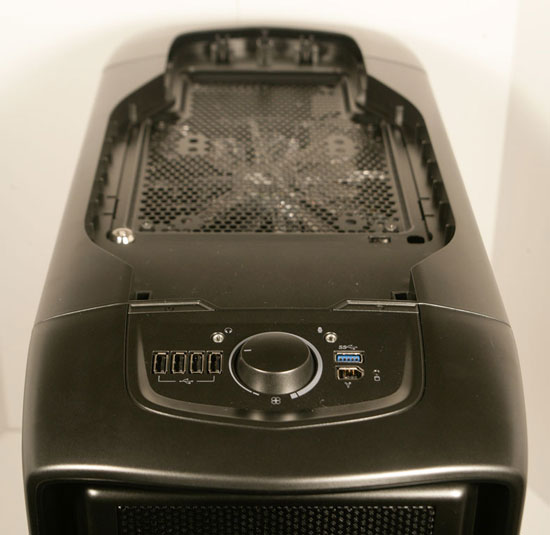
Speaking of which, the top of the case has a second removable grate covering the second 200mm fan, this one an exhaust. Again, this grate is easy to remove but also fairly secure.
The rear of the case reveals the exhaust fan, a more standard 120mm affair, along with two important distinctions. First, Corsair outfits the case with eight expansion slots instead of seven. It's a small but noteworthy inclusion that makes the case well-suited to multi-GPU systems. Second is the increasingly common bottom-mounted power supply. The power supply's cooling is essentially completely cut off from the rest of the system, and there's a vent in the bottom of the case (with a removable filter) for the power supply's fan. This isn't a problem either; the case is built on a raised base that keeps all but the shaggiest of carpeting from clogging up the vent.
Finally on the sides we have one of my favorite features of the 600T: as you'll find when we check out the internals, the 600T is a largely tool-less affair, and the side panels are very secure but use latches that pop them right off. It's a nice change of pace from having to slide the side panel back on and then secure it, even with thumbscrews, to the back. These panels make getting into and out of the 600T an absolute breeze.
Originally published at https://www.anandtech.com/show/4028/corsair-graphite-series-600t-cool-and-quiet (Wayback Machine).