
ASUS MS238H Review - Slim and Affordable
Power Consumption
The ASUS MS238H specifications note that power use is typically under 33 watts. We measure with a Kill-A-Watt at the wall after the power adapter. Thankfully our measurements confirm and exceed that number, with a maximum draw at max brightness of 27 watts, and minimum draw of 15 watts at minimum brightness.
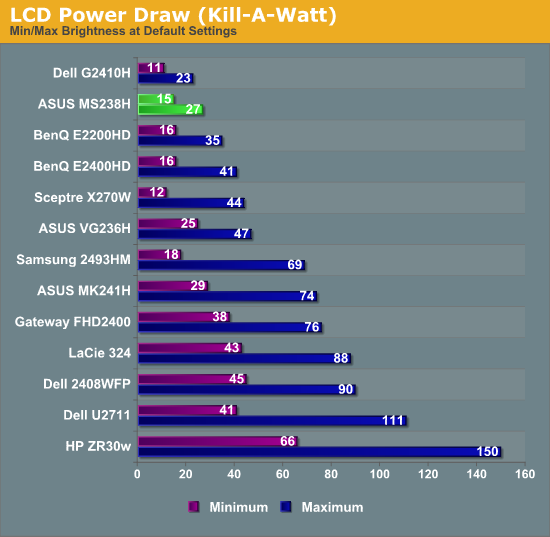 ;
The MS238H still can't quite best Dell's green-focused G2410H though, but what's a difference of 4 watts among friends? I mentioned earlier that the MS238H lacks an internal power supply - no doubt this is done to keep the profile as thin as possible. Instead, there's an external DC adapter.
Conclusions and Final Thoughts
I spent an almost embarrassingly long time with the MS238H, and on the whole I came away pretty impressed with the display. It isn't as flashy or feature-packed as the IPS panel displays we're used to tackling, but what it does, it does well. For $170, you get a 23-inch 1080P display with HDMI inputs that's slim and lightweight, with the added bonus of a 3.5mm headphone jack for HDMI audio and an all around eco-friendly package. Color quality isn't bad after calibration, and if you can live without height and pivot adjustments and a limited range of tilt, the minimalist and unique stand the MS238H uses is actually pretty novel. Overall the whole display is a mainstream package - it's priced accordingly and doesn't really have any extras beyond such a unique industrial design.

That isn't to say the MS238H isn't without some things that could use improvement. We've been beating this dead horse for a while now, but the explosion of 1920x1080 displays seems to have completely killed the old 16:10 1920x1200 display segment. In that regard, display manufacturers have actually taken a step backward in realizable resolution, but that's something essentially every manufacturer is guilty of. Other gripes are the high-gloss surface treatment for the display's bezel and cladding. It shows dust, and will build up static that attracts more dust if you don't wipe it with the right kind of cloth. If you're resting the display on a slick surface like glass, there's also the chance the stand will drift into the most reclined tilt position possible. Finally, I'd like to see another digital connection instead of VGA, be it DisplayPort, another HDMI port, or DVI-D. Additionally, it'd be nice if the MS238H got a tad brighter, even though 200 nits is totally reasonable for most work. Likewise, contrast rounds out the bottom of the pack.
The 23" mass market 1080P segment is definitely getting crowded, with prices ranging from $150 to $300 for displays with similar features. That said, for its price and featureset, I could really see the MS238H being useful as an easily transportable LAN party display for PC and console gamers alike. It's seriously thin and light, simple, inexpensive and doesn't require a lot of surface area. What more is there to want?
Originally published at https://www.anandtech.com/show/4001/asus-ms238h-review-slim-and-affordable (Wayback Machine).