
ASUS MS238H Review - Slim and Affordable
Viewing Angles
First up in our objective analysis are viewing angles. We're on a TN panel here and thus shouldn't expect much in the way of excellent viewing angles, however the MS238H actually performs very well, potentially thanks in part to WLED backlighting. ASUS advertises 170 degrees horizontal and 160 degrees vertical with a 10:1 contrast ratio. That's a bit low of a cutoff contrast ratio for viewing angle consideration, but in the horizontal direction the MS238H performs very well.


Vertically we see what we're used to with TN panels and get serious color distortion when viewed from extreme angles below the display, but not much when we view it from extreme angles above.
Color Gamut
Next up are the ever-important color quality metrics. As usual, we report two main quality metrics: color accuracy (Delta-E) and color gamut. Color gamut refers to the range of colors the display is able to represent with respect to some color space. In this case, our reference is the AdobeRGB 1998 color space, which is larger than the sRGB color space. Our percentages are thus reported with respect to AdobeRGB 1998, and larger is generally better unless you're dealing with sRGB content and colorspace-unaware software.
Color accuracy (Delta E) refers to the display’s ability to display the correct color requested by the GPU and OS. The difference between the color represented by the display, and the color requested by the GPU is our Delta-E, and lower is better here. In practice, a Delta E under 1.0 is perfect - the chromatic sensitivity of the human eye is not great enough to distinguish a difference. Moving up, a Delta E of 2.0 or less is generally considered fit for use in a professional imaging environment - it isn’t perfect, but it’s hard to gauge the difference. Finally, Delta E of 4.0 and above is considered visible with the human eye. Of course, the big consideration here is frame of reference; unless you have another monitor or some print samples like a Gretag Macbeth color checker card to compare your display with, you might not notice.
As I mentioned in our earlier reviews, we’ve updated our display test bench. We’ve deprecated the Monaco Optix XR Pro colorimeter in favor of an Xrite i1D2 since there are no longer up-to-date drivers for modern platforms.
For these tests, we calibrate the display and try to obtain the best Delta-E we can get at both 200 nits of brightness for normal use, and 100 nits for print brightness. We target D65 and a gamma of 2.2, but sometimes the best performance lies at native temperature and another gamma, so we try to find what absolute absolute best-case performance for each display. We also take an uncalibrated measurement to show performance out of the box using either the manufacturer supplied color profile, or a generic one with no LUT data. For all of these, dynamic contrast is disabled, and displays are left to settle for a half hour after making changes. Of course, the MS238H is LED backlit so settling time is essentially instantaneous, as compared to CCFLs that often take a half hour or more to settle.
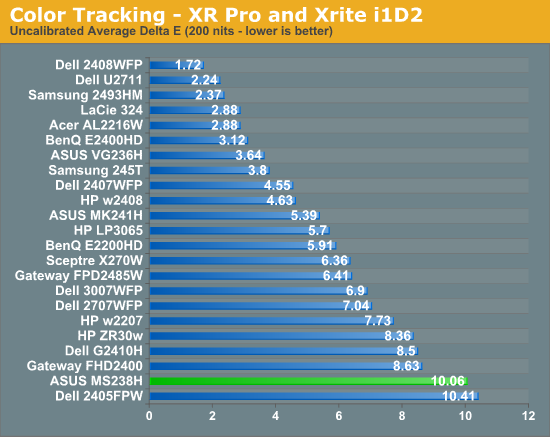
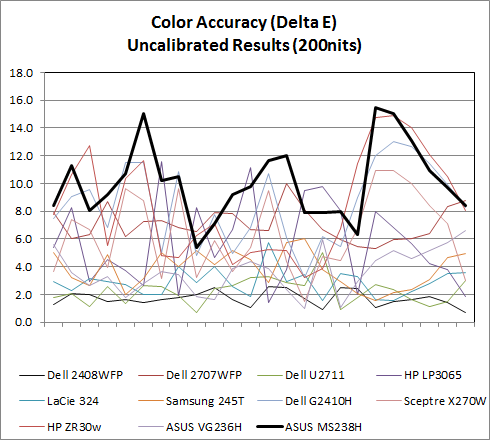
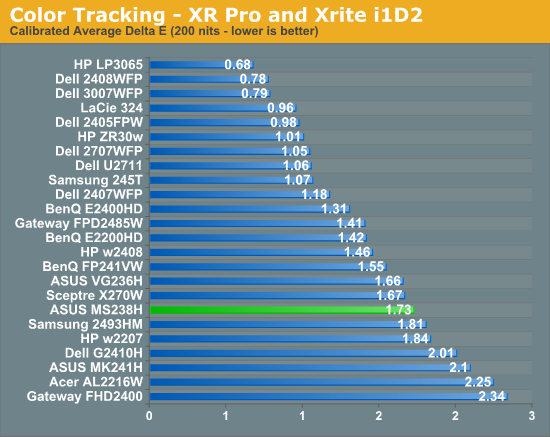
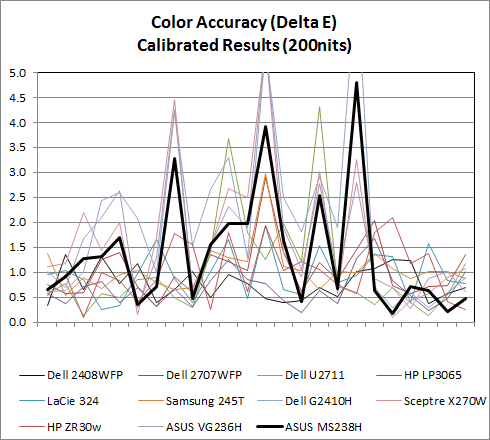
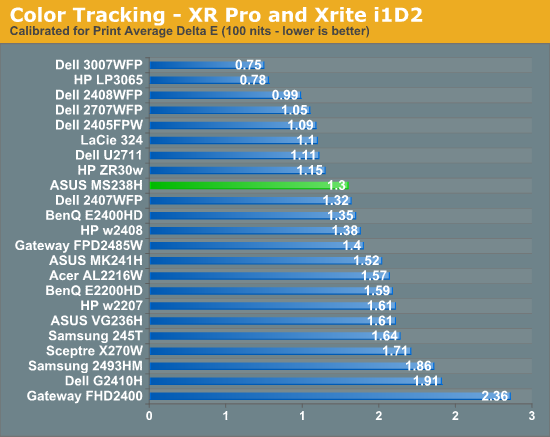
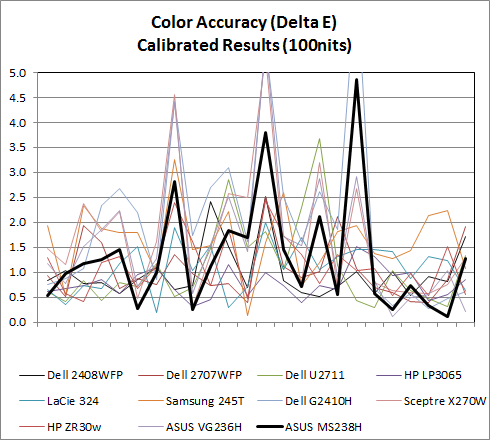
Uncalibrated and set to 200 nits, the MS238H is among the worst we've seen. Out of the box, the display is noticeably blueish. Initial measurements put white point around 7300K. After tweaking the RGB controls to nail D65, 200 nits, and a few calibration tweaks later, the MS238H actually performs pretty decent, with a Delta-E of 1.73. It's nothing stellar, but not bad considering our comparison is chock-full of IPS panels. Performance improves a bit at 100 nits, moving the MS238H almost up into IPS territory.
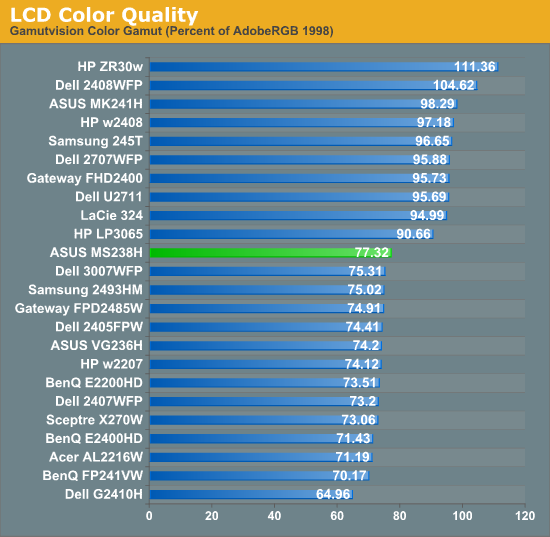
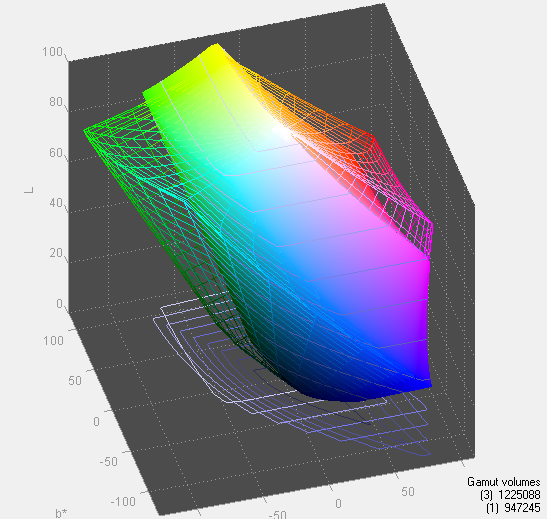
When it comes to gamut, the MS238H actually leads our stairstep-pattern of display results. Gamut could be better if the MS238H had RGB LED backlighting instead of WLED, but again this is a budget monitor with slim profile and power-sipping priorities.
Originally published at https://www.anandtech.com/show/4001/asus-ms238h-review-slim-and-affordable (Wayback Machine).