
The Windows Phone 7 Review
Video Playback
The video playback integration isn’t quite as impressive as the Zune audio experience on Windows Phone solely because there’s no Zune Pass equivalent for video. That’s of course the holy grail that we’re waiting for everyone with their toes in video to solve, but there aren’t any takers as of yet.
Windows Phone 7 supports mp4, m4v and wmv video formats (m4a, wma for audio). You’ll notice that the list overlaps with what Apple specifies for the iPhone. That’s right, without transcoding you can playback all non-DRM video content that’s in an iPhone-friendly format.
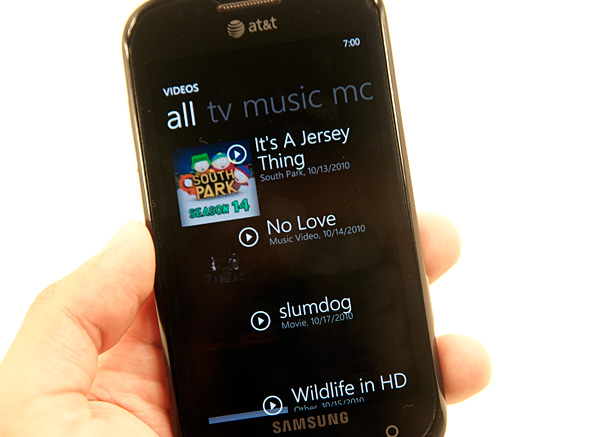
Your videos are grouped into personal, TV, music, movies and a category for all of them. As is the case with most tabs inside Windows Phone 7, these ones make a lot of sense. Any tagged content you download from the Zune Marketplace or sync goes into the TV, music and movies categories, and anything you record with the phone goes under personal.
All purchases/rentals in the Zune Video Marketplace happen in Microsoft Points. You have to first buy Microsoft points, then you get to spend them on content. Hooray.
When purchasing a TV show or movie you are presented with the option to view it on your PC or Windows Phone. The Zune application will deliver the appropriate version of the content accordingly. Once you’ve made your decision though, there doesn’t appear to be a way to go back.
Video playback on Windows Phone is very simple. The video player app has three controls: rewind, pause/play and fast forward. You can’t move your finger around the timeline bar to scrub through the video. Tapping the the forward/back buttons skips around in 30 second increments, while holding them down rewinds/fast forwards.
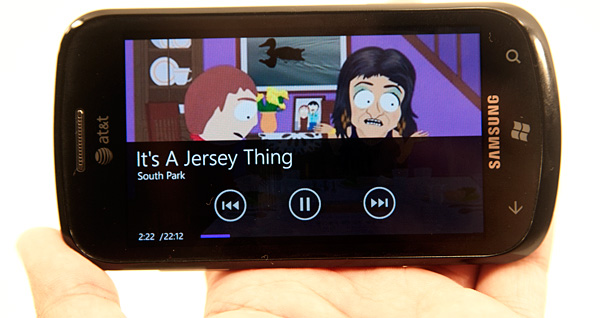
There’s no support for zooming ultra wide content to fit the screen, everything must be viewed in the original aspect ratio. I don’t have a problem with this, but my dad might. I prefer content in its original aspect ratio, while my dad is one of those people who wants the screen full of useful pixels - not black bars.
Like most anything in the OS, you can pin videos to the Start screen by tapping and holding on any video then selecting pin to start.
The app is very fast (notice a trend?) and does a good job of organizing your content. The biggest issue with the video player app is you can’t purchase content within it. You have to sync all videos from your PC. And allow me to reiterate: a Zune Pass for video content would be a dream come true.
Originally published at https://www.anandtech.com/show/3982/windows-phone-7-review (Wayback Machine).