
Lenovo ThinkPad X100e: When Build Quality Matters Most
System performance, with and without Upgrades
This part would probably be one of the less intriguing ones, so we've added a wrinkle. The ThinkPad X100e has been tested in both its factory-direct-to-you configuration—1GB of DDR2 and a 5400RPM Fujitsu hard disk drive—and with 4GB of DDR2 and an Intel X25-V 40GB SSD. It bears mentioning that these upgrades do add to the cost of the unit, making the already onerous pricetag even more difficult to swallow, but keep in mind that a decent solid state drive can go a long way towards improving the overall computing experience of any computer. If capacity isn't a major issue, good SSDs can be had for a hundred dollars or less these days and can make a dramatic difference in how enjoyable the computer is to use.
Since the Congo platform is old hat at this point, we've chosen two benchmarks to both get a sense of how the ThinkPad X100e falls in line with its contemporaries as well as determine just how much the upgrades have changed its performance. The two ThinkPad X100e results are highlighted, along with the MSI Wind U230 and Toshiba T235D. The latter represents AMD's Nile platform while the former is a Congo laptop "similar" to the X100e.
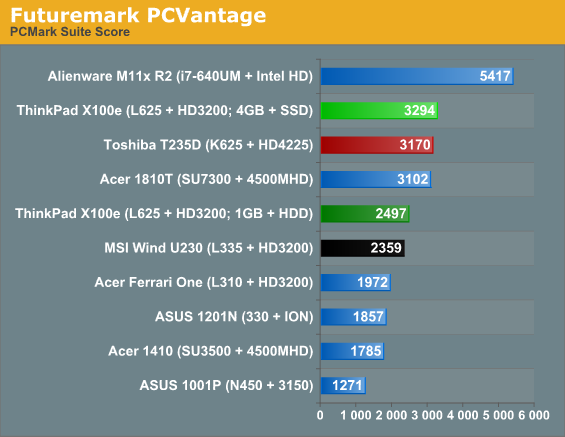
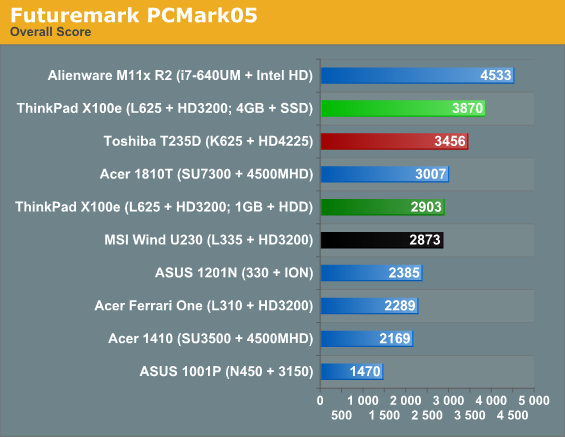
First things first: in its native configuration, the X100e beats the tar out of any Atom configuration, but it also beats each of the existing AMD configurations except for the newer Nile-based Toshiba T235D. Its closest competitor is the MSI Wind U230; Intel CULV-based units like the Acer 1810T and then the newer ULV Arrandales clean its clock, but that's to be expected.
Where it gets interesting is how the SSD in the X100e seems to throw both versions of PCMark completely out of whack: in each one, the score jumps nearly 30%. The system does feel much more responsive with the SSD installed, it's true, but what if we break down the PCMark Vantage scores?
| Lenovo ThinkPad X100e PCMark Vantage Subscores | ||
| Subscore | SSD + 4GB | HDD + 1GB |
| Suite | 3294 | 2497 |
| Memory | 1889 | 1437 |
| TV and Movies | 1858 | 1661 |
| Gaming | 2718 | 1441 |
| Music | 4492 | 2995 |
| Communications | 3176 | 2614 |
| Productivity | 5555 | 2137 |
| HDD Test | 16954 | 2875 |
Well, there's our culprit. Jarred had some choice words about how PCMark Vantage responds to SSDs, but suffice to say, the jump in the drive test score is jarring. There are two ways to interpret these scores, and both are correct to an extent: SSDs skew PCMark Vantage hopelessly, and upgrading the memory and drive of a notebook can substantially improve overall system performance. I will reiterate: the Intel X25-V SSD does make a major difference in how responsive the system feels.
Originally published at https://www.anandtech.com/show/3886/lenovo-thinkpad-x100e (Wayback Machine).