
Asus U33Jc: Much Ado About Bamboo
ASUS U33Jc - Application Performance
I’ll start off with a complaint: ASUS loads waaay too much bloatware on their systems. This came up in the U30Jc review too, but I’ll just reiterate my displeasure here. I really don’t need links to The New York Times, or Amazon’s Kindle Store, or eBay, or any of that other nonsense on my desktop, thanks. It’s not as bad as Sony used to be, but it’s getting there. Some of ASUS’ built in utilities are quite nice, like Power4Gear and the Notebook Hardware Control, but all of the third-party preinstalled software is stuff that needs to be removed immediately. As we showed in our U30 review, it can really kill performance and battery life if left on the system.
Now onto the benchmarks. After our review, ASUS upgraded the processor in the U30Jc to the 2.4GHz Core i3-370M, and the U33 carries that over, along with the Intel HD/Nvidia G310M plus Optimus combo. The U33Jc get’s a larger 500GB hard drive, while the U30 makes do with a 320GB drive, though both are 5400RPM units. Both have 4GB of DDR3 1066. With nearly identical specs, we should expect similar performance from the two.
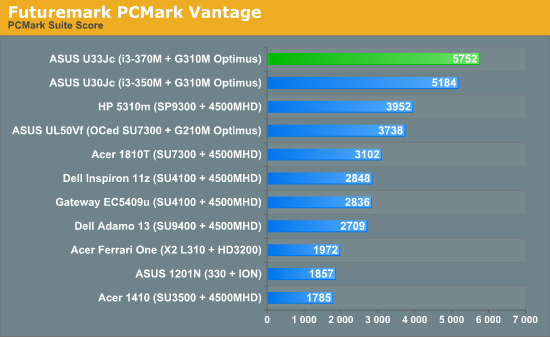
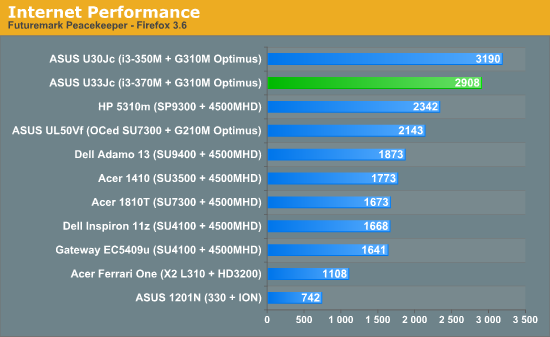
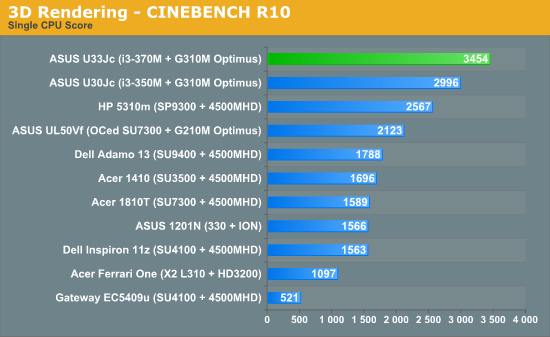
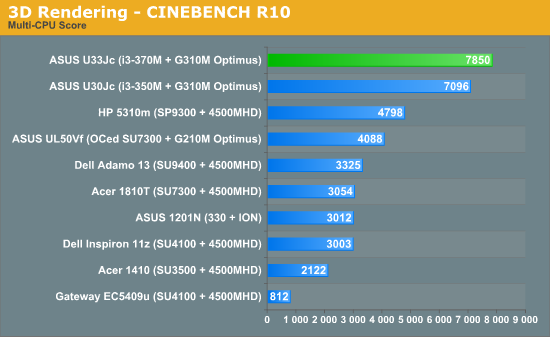
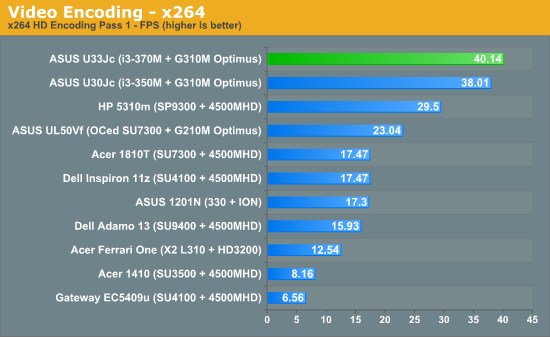
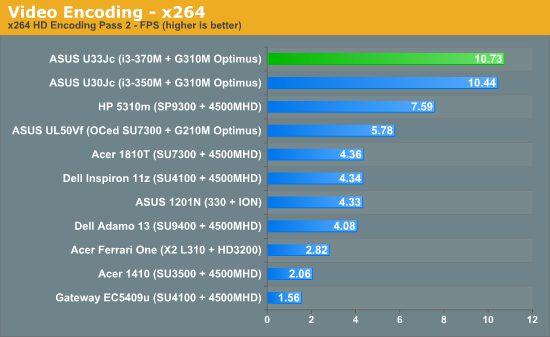
And similar it is. The U33 has slightly better overall processing performance than the U30 test unit we had, which can be attributed to the faster CPU in the U33 (our U30Jc unit was an older SKU that used a 2.26GHz i3-350M). We had some issues with the hard drive tests in PCMark05, but the PCMark Vantage score was a fair bit higher than the U30. We’ll update this section later on with the PCMark05 results, but for right now, the rest of the benchmarks indicate performance on par or slightly better than the U30, which makes the U33Jc the best performing sub-4 pound system right now.
Originally published at https://www.anandtech.com/show/3832/asus-u33jc-bamboo-for-the-masses (Wayback Machine).