
Samsung's N210: Where the Matte Finish Went
Application Performance and Battery Life
Anyone expecting Samsung to somehow reinvent the wheel with the N210 is going to be rightfully disappointed. The 1.66 GHz Intel Atom N450 processor and 1GB of DDR2 aren't setting the world on fire, and even adding a second gig in casual use only marginally improved overall system responsiveness. Likewise, the GMA 3150 can seem almost like a step back from the old school Atom's GMA 950 graphics (which could at least drive an HDMI port).
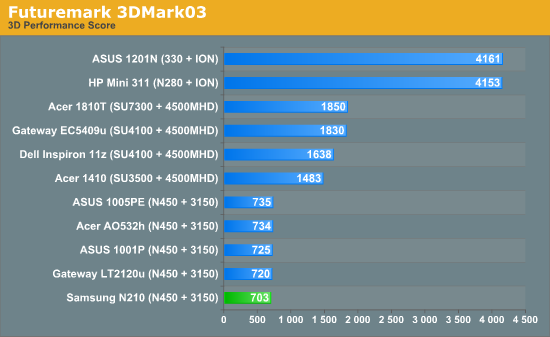
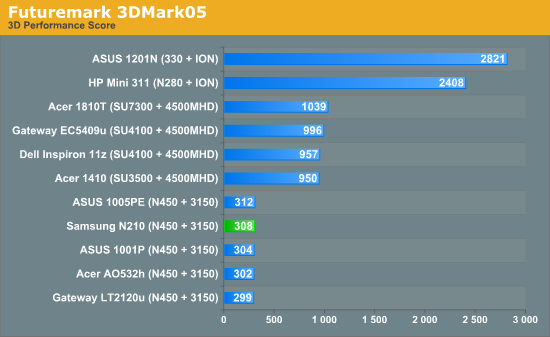
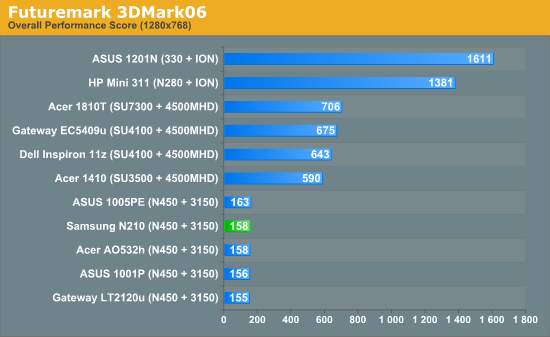
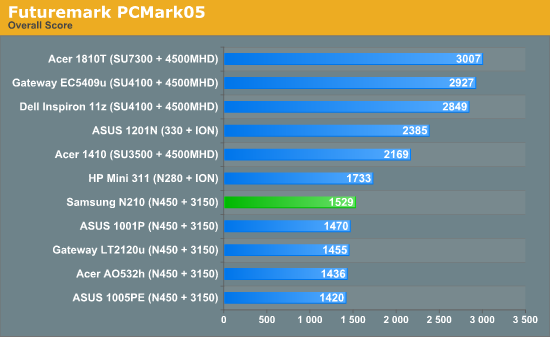
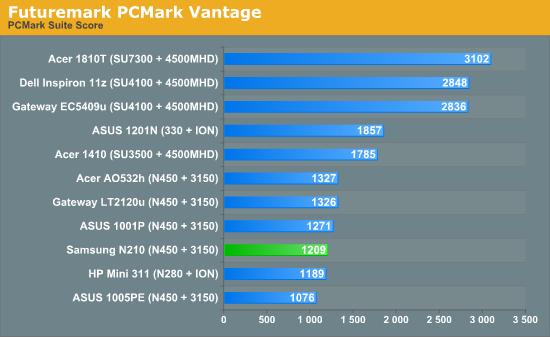
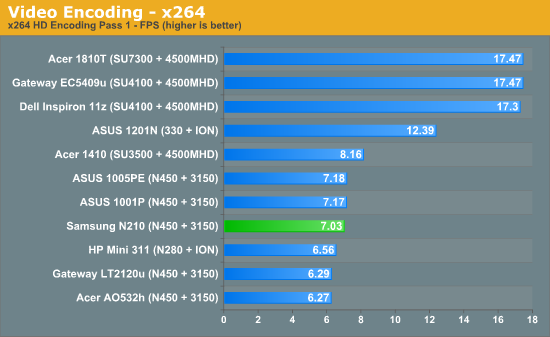
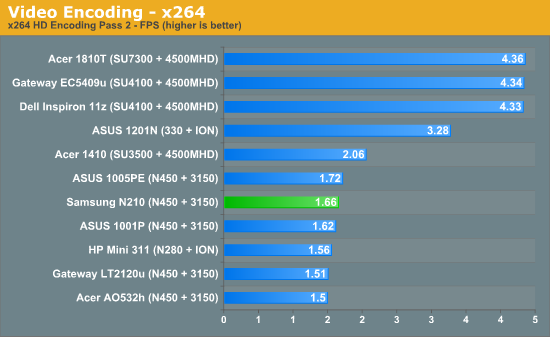
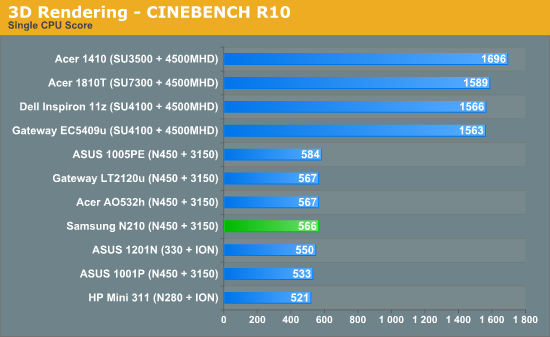
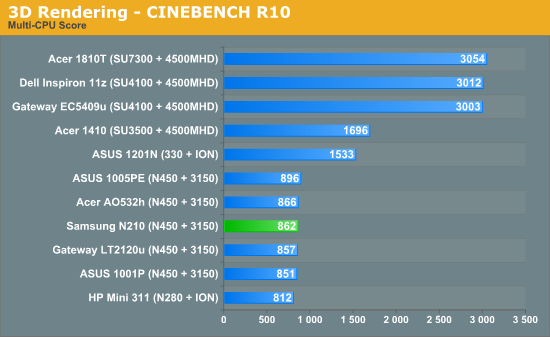
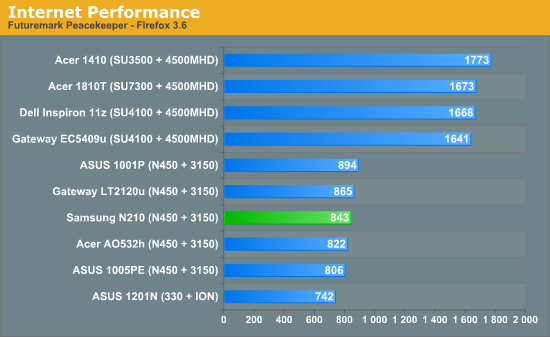
Performance is right where you expected it. Netbook performance is a known quantity these days, and the N210 doesn't have any secret sauce that extracts anything more from the Atom. It's best for word processing; even web surfing can seem a touch sluggish if you open more than a tab or two, and programs take a little longer to close. If you were computing during the era of Pentium II computers and recall how a faster processor actually meant a snappier machine, you'll find the Atom to be an unpleasant memory.
As a writer this is actually my first experience really digging in with the Atom and I have to say I was disappointed. I've had other editors make the jump to netbooks before realizing that the compromises made for performance were just too great and honestly I understand and agree. Even web surfing performance leaves a little something to be desired, and the fact that you can put a proper operating system on a netbook only continues the illusion that the Atom is somehow capable of doing anything other than making you wait while your program loads. One of the worst disappointments was trying out Torchlight with its famed "Netbook Mode," which should hereafter be referred to as the "Disappointment and Lies" mode for its stunning 15fps performance with everything disabled. The only pleasant surprise was seeing how well the netbook handled Audiosurf, but at the end of the day, Atom may wind up not being enough even for the least demanding user.
Another major problem the N210 has with performance is just the sheer amount of crap the netbook comes loaded with. McAfee, Samsung's "Hyperspace" Instant-On environment that doesn't actually load any faster than Windows 7 does, and a mountain of "utilities" that are, again, courtesy of Samsung. Someone in development over there had to realize the Atom can't handle this, and unless you're operating off of a clean Windows 7 installation the N210 is going to be frustratingly slow and unresponsive.
Of course, the performance isn't a complete loss: there's a trade-off in battery life, and the N210 generally excels if not stuns.
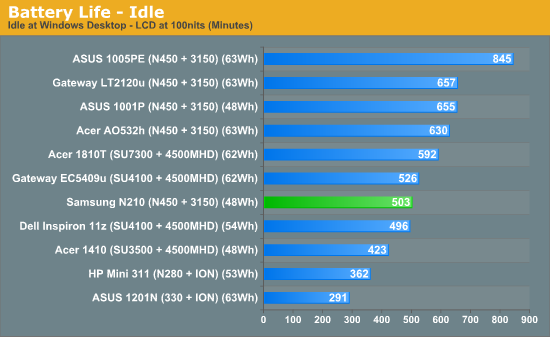
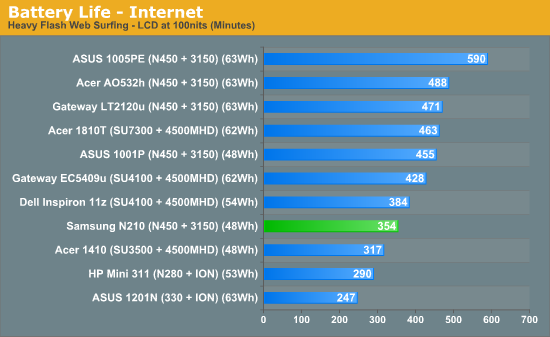
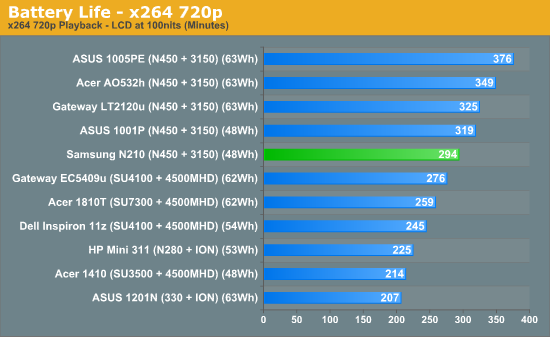
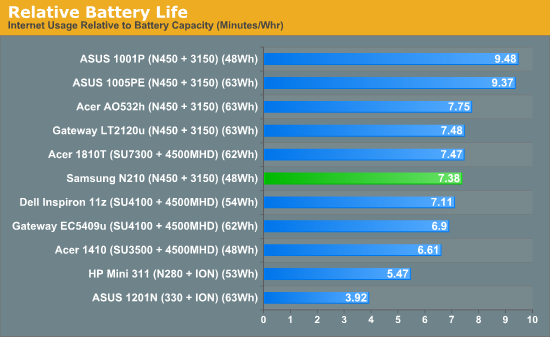
The N210's battery life pretty much falls in line with most other Pine Trail based netbooks, topping out at a touch over eight hours of useful life while being unable to compete with the downright Faustian level of battery life Asus's top-end Eee PCs can produce. Realistically, though, eight hours off the chain should be plenty for anyone.
Speaking of the chain, it's strange seeing a netbook with so little power draw come with such a tiny AC adapter that still requires a three-prong outlet. Sure, the adapter itself may be the size of a pack of gum, but it still needs that grounding prong to work. We tested a full on desktop-replacement Toshiba recently that only used a two-prong plug; why does a netbook need the full monty? Not a big deal, just a curiosity.
Originally published at https://www.anandtech.com/show/3811/samsung-n210-matte-finish-netbook (Wayback Machine).