
HD Video Decoding on GPUs with VLC 1.1.0
- Posted in
- Home Theater
- HTPC
Catalyst 10.6 does not provide any support for VLC's GPU acceleration methodology, but AMD seems to suggest that a update to fix this is coming soon. Knowing ATI's lethargy in fixing drivers for anything not related to gaming, we decided to ignore their GPUs for the time being.
[UPDATE 1: June 26, 2010: We heard back from AMD PR as well as the concerned VLC developer, and we are told that Catalyst 10.7 (expected by mid-July), and VLC 1.1.1 (expected in 3 - 4 days) enable acceleration on ATI GPUs also. Apparently, they have verified that the acceleration works in the labs, and are waiting on final QA. I am now willing to reconsider my earlier opinion on ATI's lethargy and hope that this sort of response is a sign of good things to come for AMD/ATI HTPC users.]
[UPDATE 2: July 2, 2010: AMD provided us with the pre-release Catalyst 10.7, and Jean-Baptiste gave us the VLC 1.1.1 build. On one of AMD's recent Radeon chipsets, GPU acceleration works better than Nvidia's. Also, it looks likely that Radeon 3xxx users will be unable to take advantage of VLC's acceleration. More details will follow once Catalyst 10.7 is officially released].
VLC developers couldn't test their acceleration methodology on the Intel IGPs at all. As end users, we decided to test it out for them.
We utilized 3 test beds for our evaluation
1. Intel IGP - Arrandale ClearVideo: Gateway NV5935u
2. Nvidia - Quadro FX2700M PureVideo VP2: Customised HP 8730w [ Core 2 Duo T9400 / 4GB RAM ]
3. Nvidia - GeForce G210M PureVideo VP4: Sony Vaio VPCCW13FX/R [ PDF ]
The DXVA capabilities of each platform are evident in the screenshots below.


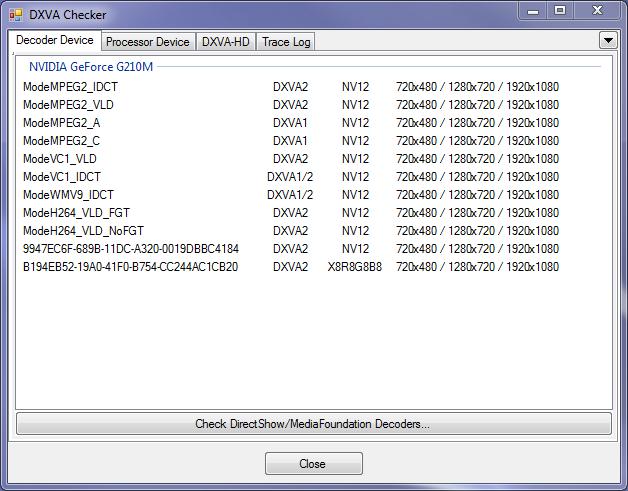
All machines were tested using VLC 1.1.0 on Microsoft Windows 7, using a 37" Toshiba Regza HDTV connected via HDMI through an Onkyo TX-SR606, at 1920x1080p resolution in Extend mode (with the primary screen running at 1366x768). One set of tests was run with GPU acceleration disabled, and another with GPU acceleration enabled. CPU usage was tracked for both runs and the maximum values over the course of playback compared.
GPU acceleration has been provided by VLC for MPEG-2, H.264 and VC-1. Since MPEG-2 is easily handled by even low performance processors, we decided to cover only H.264 and VC-1 in our test suite. Eight different streams were tested, with the following characteristics
1. L4.1 H.264 1080p30 @ 8.3 Mbps (M2TS)
2. L4.1 H.264 1080p24 @ 10.2 Mbps (MKV)
3. L5.1 H.264 1080p60 @ 10 Mbps - 8 reference frames (MKV)
4. L5.1 H.264 1080p24 @ 19 Mbps - 16 reference frames (MKV)
5. VC-1 Main Profile 1080p24 @ 8 Mbps (WMV9)
6. VC-1 Advanced Profile 1080p24 @ 18 Mbps (MKV)
7. VC-1 Advanced Profile 1440 x 576 @ 6 Mbps (WMV)
8. VC-1 Advanced Profile 720p60 @ 15 Mbps (WMV)
We decided not to use any interlaced media in the test suite since VLC does the deinterlacing on the CPU using SSE2 instructions even if GPU acceleration is enabled. This ensures that deinterlaced media playback remains consistent across different cards and driver versions.
The GPU acceleration support provided by VLC on Windows has a very different architecture compared to the one used by programs such as MPC-HC and Windows Media Player. As explained by one of the developers here, VLC prefers a slower method of GPU acceleration in order to maintain the framework aspect. It decodes on the GPU but gets the decoded data back for further processing. Therefore, CPU usage would be worse off when compared with playback using MPC-HC or Windows Media Player. For this reason, the only comparisons we make further down in this piece are within VLC (acceleration on vs. acceleration off), and not with other media playback programs.
Originally published at https://www.anandtech.com/show/3786/hd-video-decoding-on-gpus-with-vlc-110 (Wayback Machine).