
Two OMAP 3430 Phones: Nokia N900 and Motorola Droid
Messaging and Skype
Messaging on the N900 is done in a very WebOS fashion - IMs and SMS alike are managed by the OS and aggregated into a central application called "conversations". I signed in with Google Talk and Skype, and the integration is seamless. But what's most impressive is how Skype and Google Talk handle calling. Maemo considers Google Talk and Skype VOIP and IM enabled accounts, and after they're added, you can make and receive calls over Skype, and do the same with Google Talk. Although we tested with PR 1.1, PR 1.2 further builds on this by enabling video calling for Skype (between PC and other skype video clients), and Google Talk (with the PC web client, or any other XMPP Jingle video client, including the N900, N810, and N800). There's also support for SIP video calls.

But the best part is that VOIP calls are treated just like a normal call. In fact, for a while, I was completely confused by Skype because I expected it to live by itself somewhere - similar to how it works on other platforms. But that's not how it works at all - enter your account details, set your availability status, and you're ready to call and be called over Skype. In Europe, where international calling can be expensive and sometimes confusing, this is a huge feature.

Though video calling on Android through Qik, and FaceTime on iPhone 4 has been received to much fanfare, Maemo has quietly had video call support since launch. With PR 1.1, video calling was admittedly a bit of a challenge - requiring calls to be made from the PC client of Google Talk to the N900, with the PC initiating the voice call. Or requiring Fring for Skype video calls to work (which I could never get working, sadly), but PR 1.2 now makes this a core part of the operating system in a way that really does work.
Phone Dialer
The dialer is virtually the only application that's portrait and landscape on the N900. It's admittedly very barebones. Launching it, you're first presented with a list of recently made and received calls, a shortcut to the contacts application, or the dial pad. The dial pad unfortunately doesn't have any smart dialing functions like HTC usually includes, it's just a plain ol' keypad - you can however just start typing a contact's name and see their contact card.

There's turning control for the N900 which launches the phone application whenever it's turned vertical - I never tried this - or you can force the phone to always be landscape/portrait from a setting.
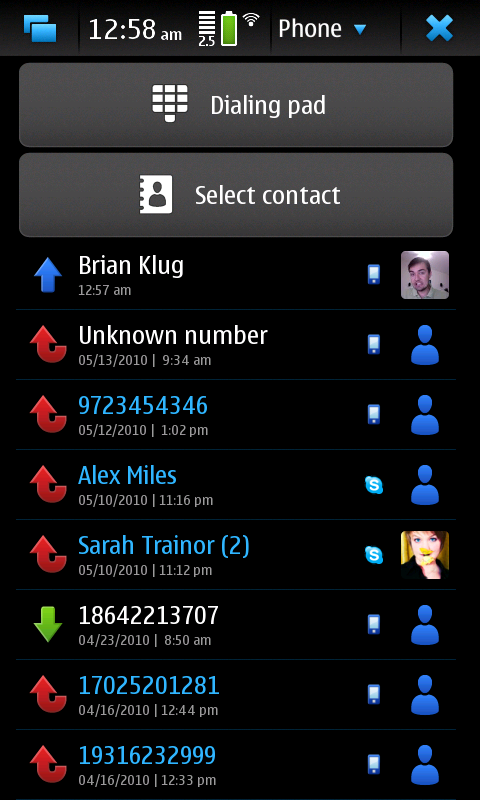
Fortunately, there's landscape and portrait of both, and they do what they're supposed to do. In the call-in-progress screen, there's the usual options for mute, speaker, dial pad, and end. When you're in a skype call, there's a skype logo in the top left of the user's avatar.

When the call is over cellular, there's a picture of a phone - self explanatory. Otherwise the call screen is virtually identical for the entire gamut of call types - VOIP over 3G/2.5G or WiFi, and normal 2G/3G calling. The integration is truly flawless - there's no excuse that other platforms haven't fully integrated VoIP like this. On the other hand, carriers would throw a fit and likely never subsidize, carry, or support the phone (which might explain the N900's lack of adoption in the US), but we can dream, can't we?
Originally published at https://www.anandtech.com/show/3764/two-omap-3430-phones-nokia-n900-and-motorola-droid (Wayback Machine).