
Apple's 13-inch MacBook Pro (Early 2010) Reviewed: Shaking the CPU/GPU Balance
- Posted in
- Mac
- Apple
- Intel
- MacBook Pro
- NVIDIA
Thermals: The Leg Test
At the end of my 2010 15-inch MacBook Pro review I mentioned that the bottom of the chassis can get uncomfortably warm. The higher peak power draw of the Core i5/i7 combined with the discrete GPU of the 15-inch MBP can result in more heat dissipated than the previous model.
The 13-inch MacBook Pro is built off a mature yielding 45nm Core 2 Duo CPU. Given how long Intel has been making this CPU it's safe to assume that this chip is running as cool as physically possible. While the mobile Core i5/i7 still have a lot of improving to go through. While the base of the 13-inch MBP can get warm under normal use (aluminum conducts heat very well...towards your lap), it's not as bad as the new 15-inch. I'd say it's pretty much on par with last year's models.
To quantify these differences I pointed an infrared thermometer at the bottom of a few MacBook Pros and reported the surface temperatures. They were taken in a room with an ambient temperature of 76F.
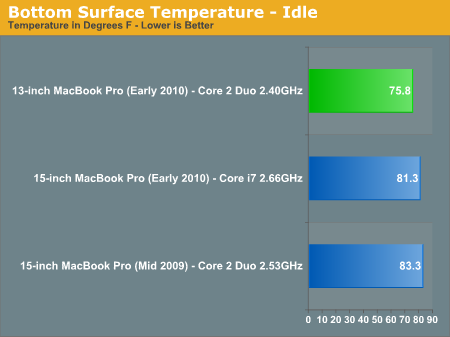
At idle the 13-inch MacBook Pro is about room temperature. The new 15-inch is a few degrees warmer and the 2009 15-inch is actually the warmest. Remember that the Core i7 in the 15-inch has a very low idle power thanks to Intel's power gating.
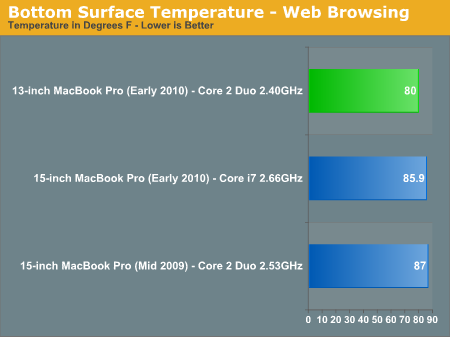
While browsing the web the temperatures climb up considerably. The new 13-inch is still cooler than anything else, while the new 15-inch model's power efficiency let's it run cooler than the previous model.
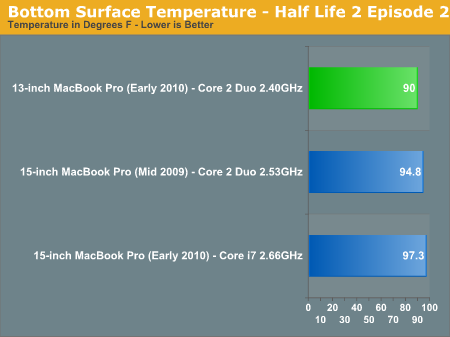
Running Half Life 2 Episode 2 changes things dramatically. Now all three machines are running at or above 90F and the 2010 15-inch MacBook Pro is finally warmer than the previous model. If I measure temperature near the exhaust fan on the notebooks the new 15-inch model peaks at 105F compared to 99F for the previous generation and 92F for the 13-inch.
In all cases the new 13-inch MacBook Pro keeps surface temperatures under control. In most situations the 2010 15-inch MBP is actually cooler than the previous generation, it's only when the dGPU is active or under heavy load that the surface temperature can go well above what the older model would do.
Originally published at https://www.anandtech.com/show/3762/apples-13inch-macbook-pro-early-2010-reviewed-shaking-the-cpugpu-balance (Wayback Machine).