
Apple's 13-inch MacBook Pro (Early 2010) Reviewed: Shaking the CPU/GPU Balance
- Posted in
- Mac
- Apple
- Intel
- MacBook Pro
- NVIDIA
General Performance: A Mild Improvement
We know what the GPU upgrade is good for, but what about the mild CPU bump in the 2010 13-inch MacBook Pro?
General OS usage is a difficult thing to quantify, but one measure of performance has always been the number of bounces an icon in the dock makes before an application loads. I decided to take it to the next level and write a quick script to launch 15 applications in a row, timing how long the entire process takes.
I launched, in order: Mail, Safari, Activity Monitor, iTunes, iCal, DVD Player, iPhoto, Photo Booth, Quicktime Player, Disk Utility, Preview, iMovie, Front Row, Garage Band and Aperture.
The entire process stresses both the disk and CPU, which is why we see a huge improvement when going to an SSD as well as differences between CPU speeds.
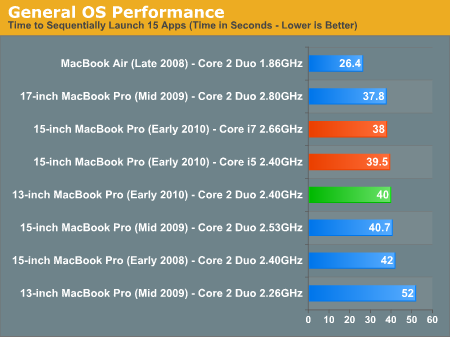
Application launch performance improves tremendously compared to last year's model thanks to the now standard 4GB of memory. The 2GB last year's model came with just wasn't enough. Now if you upgraded your previous gen 13-inch MBP then you'll hardly notice a performance improvement.
Also pay attention to just how well the Late 2008 MacBook Air does in this test. That's thanks to its SSD. Add an SSD to any of these notebooks and you'll see a similarly awesome increase in performance.
Adobe Photoshop CS4 Performance
The Retouch Artists Speed Test we use for our CPU testing under Windows also works under OS X. We're running the exact same benchmark here, basically performing a bunch of image manipulations and filters and timing the entire process.
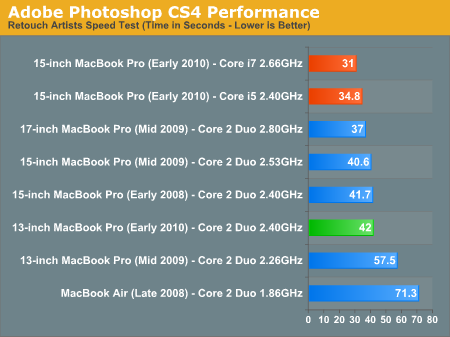
Start doing real work with the 13-inch MacBook Pro and you'll note that it's significantly slower than the new 15-inch models. The Core i5 just rocks. Compared to last year's model the new MBP is much faster, but again that's due to the 4GB vs. 2GB of DDR3 that comes standard with the machine. An upgraded 2009 13-inch MBP would be basically the same speed.
Aperture 2 RAW Import
For my Aperture test I simply timed how long it took to import 203 12MP RAW images into the library.
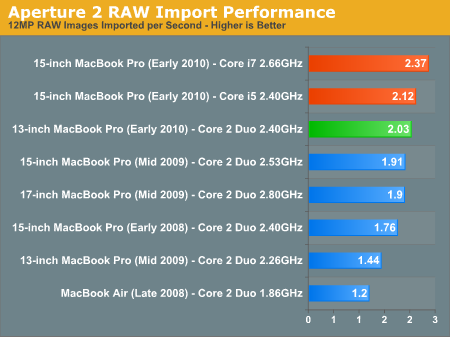
Photographers and digital media creation professionals will want to opt for the 15-inch MacBook Pro, the faster CPU is definitely worth it.
Cinebench R10
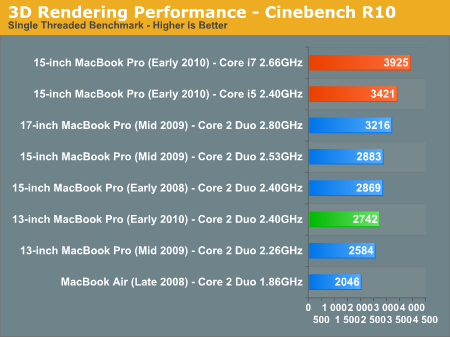
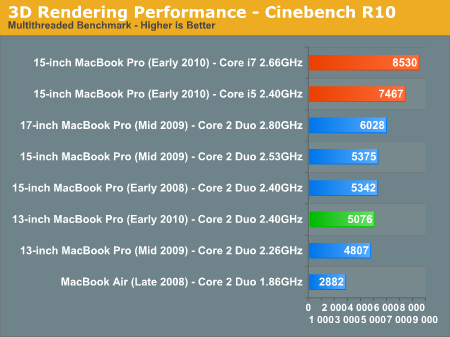
In situations where we're not memory bound, the improvement over the previous generation 13-inch model is small. The performance improvement here is 6%. I'd say in most apps you'd see a 2 - 4% improvement over the 2.26GHz 13-inch from last year.
Quicktime H.264 Video Encoding
Our final benchmark is more consumer focused. Here I'm taking an XviD and converting it to an iPhone-supported H.264 format.
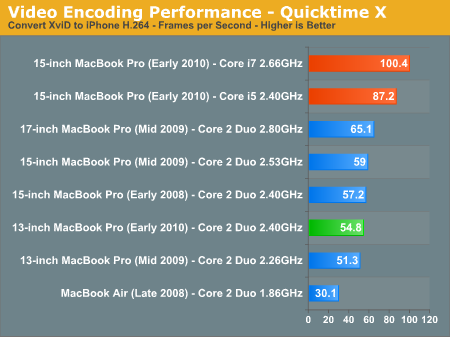
Encoding performance is improved over last year's 2GB/2.26GHz model, but no where near as much as the Core i5/i7 managed with the 15-inch model. If you're doing anything CPU intensive, the new 13-inch MacBook Pro isn't an upgrade.
Originally published at https://www.anandtech.com/show/3762/apples-13inch-macbook-pro-early-2010-reviewed-shaking-the-cpugpu-balance (Wayback Machine).