
System Buyer’s Guide: $1700 Performance Midrange
Monitor, Speakers, and Input Devices
If you don’t already own these components, here are some additional peripherals to fill out your shopping cart.
| System Accessories | ||||
| Hardware | Component | Price |
Estimated Shipping |
Rebate |
| Display | ASUS VW266H Black 25.5" 2ms (GTG) HDMI Widescreen LCD Monitor (1920x1200) | $310 | $12 | ($30) |
| Speakers | Logitech X-540 70 watts 5.1 Speakers | $89 | ||
| Input | Microsoft Comfort Curve Desktop 2000 Black USB Keyboard and Optical Mouse – OEM | $28 | $8 | |
| Operating System | Microsoft Windows 7 Home Premium OEM 1-Pack (for System Builders) | $100 | ||
For an LCD, you could do a lot worse than the 25.5 inches of 2ms, 1920x1200 real estate offered by the ASUS VW266H. ASUS continues to build quality LCDs and includes HDMI connectivity (if not cables) at surprisingly low price points. Currently priced at $310 ($280 after mail-in rebate), the VW266H offers crisp images, good colors, D-Sub, DVI, HDMI, and component connectors, as well as an SPDIF out. It doesn’t include an HDMI cable, but for a monitor of this size at this price it’s difficult to complain.
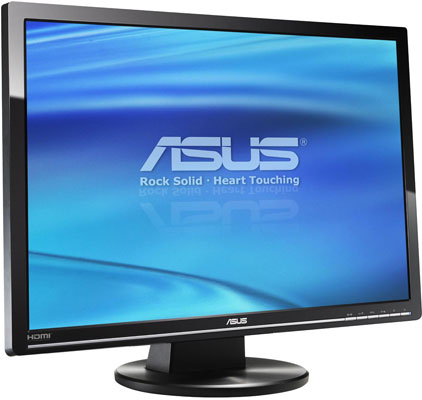
Stepping down to 23” 1080p can save $100 or more and allows you to choose between several 23” 1080p displays. The ASUS VH236H is an attractive option, offering performance and connectivity on par with its larger sibling, and is currently available for $200 ($180 after $20 mail in rebate). Acer’s popular and well-regarded 23” P235Hbmid is another compelling option at the $200 price level, and it even includes an HDMI cable. If you’re really looking to shave off a couple of extra pennies, you can purchase the 21.5” 1080p ASUS VH222H for $170 ($160 after $10 mail in rebate), which is similar to the 23” version in every respect except for size.
All of the above offer great blends of value and performance, along with excellent connectivity. While you can certainly find less expensive 23” or 21.5” monitors, most will not include an HDMI connector, and you will want to be sure to research any bargain monitor whose price seems too good to be true. As the adage suggests, more often than not, “you get what you pay for.” Note that all of the displays are also TN panels, which work well enough for most users but certainly won't surpass quality IPS displays. If you want an IPS display, expect to pay around twice as much as the TN panels for a similar size display.
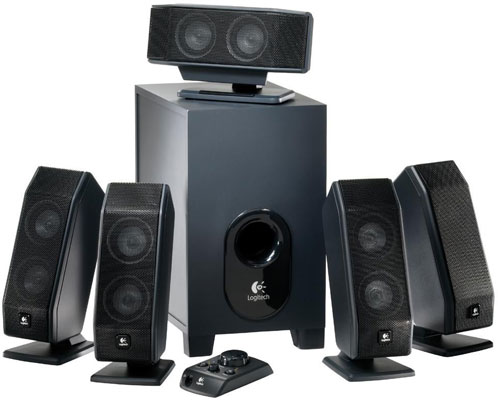
As the “speakers” included with most monitors are jokes no one seems to find particularly funny, it is difficult to recommend using them for anything other than a bargain basement machine. They certainly have no place in the sound system of a performance midrange machine. For a 5.1 system, the 70 Watt Logitech X-540 will definitely get the job done nicely, especially when you consider its $89 price tag. It won’t be mistaken for an audiophile grade rig, but it’s a great fit for gaming surround sound without breaking the bank. Logitech also offers a more robust 505 Watt system, but at $377 the THX-certified Z-5500 is difficult to recommend for a midrange system. As an aside, there is a disappointing lack of quality surround sound systems available in the $100-$350 price range, which makes it difficult to recommend other options.
There are many options in 2.1 systems, however, and it shouldn’t be hard to find something that will sound nice and fit your budget. The 200 Watt, THX Certified Logitech Z-2300 is a popular choice among system builders, and offers a loud (120 watts RMS) subwoofer. At $150, it offers a good mix of performance and price. The Creative Inspire T3130 2.1 speakers are a considerably less expensive option, though at $50 they are of course somewhat less robust (20 Watts total). Just the same, they will be a vast improvement over any speakers that come in the same box as your monitor.
For input devices, the Microsoft Comfort Curve Desktop 2000 fits the bill as the old standby. The keyboard is fine and, if you have no intention of gaming, the mouse will suffice for basic computing tasks. However, someone building this machine—and spending over $300 on a graphics card—probably intends to game with it. If that same someone doesn’t already have a gaming mouse they love, the Logitech MX518 is a popular option and at $43 won’t kill the bankroll. It features eight programmable buttons, custom sensitivity settings, and delivers 1800 dpi resolution. A slightly more upscale option is the Logitech G500, which costs $57, features 10 buttons, a dual-mode scroll wheel, resolution up to 5700 dpi, and the ability to adjust its weight to your preference.
Originally published at https://www.anandtech.com/show/3723/system-buyers-guide-1700-performance-midrange (Wayback Machine).