
The HTC Droid Incredible Review, Clearly Better than the Nexus One
Hallelujah, The Keyboard
In my Nexus One review I complained about the keyboard limiting my ability to type as quickly as I could on the iPhone. Many of you responding by telling me to use a different keyboard. This is Android after all, you can replace your keyboard app if you wish. The Incredible ships with HTC’s attempt at a virtual keyboard and I’m happy to say that it’s like a more cluttered, but more flexible version of the iPhone keyboard.
The autocorrection engine is easily iPhone quality. You get very accurate recommendations while you type. Type in a word that the engine doesn’t know and it gets added to the dictionary. You can also manually add words to the dictionary. The live dictionary listing is present unlike the iPhone which only provides a single suggestion for every word you type. Personally I prefer the Apple method because it keeps the screen from getting too cluttered, while HTC’s approach shows you more of what’s going on in the background.
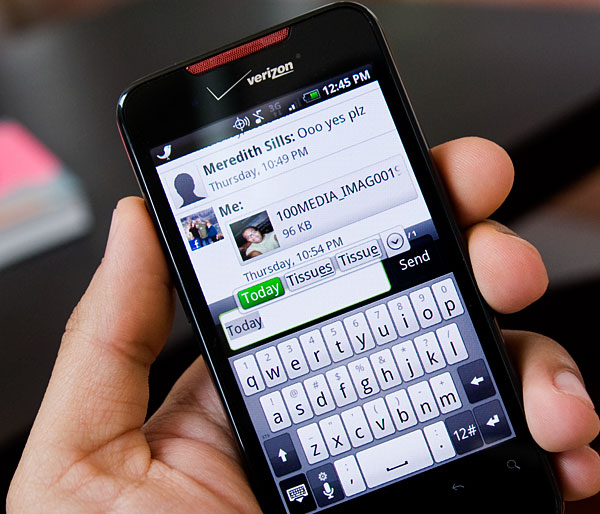
I like that the keyboard tells me when something is added to the dictionary and that it allows me to manually add words to the dictionary. The end result is the same as what you get on the iPhone (Apple does a good job of figuring out what you want added and actually adding it), but HTC is much more transparent about the whole thing.
There's still no multitouch support for the keyboard. While this doesn't impact me on a day to day basis, if you're transitioning from a physical keyboard you will find that the lack of multitouch slows your progress. With a physical keyboard you're often still holding one key down when you go to hit the next one. On the Incredible, that's simply not possible.
If you don’t pay attention to the added visual clutter, you can hardly tell the difference between the iPhone and the HTC keyboards. The keys feel a bit more cramped together but the autocorrection works well enough that this isn’t a huge issue. HTC does do a great job of hiding the option to disable vibrate on keypress. Contrary to popular belief, disabling haptic feedback will not stop the phone from vibrating anytime you press one of the virtual keys. To do this you need to have the keyboard open, hold down the microphone key until the popup switches to a gear and release the key. Then you can disable the vibrate option, which is too distracting for me.
Originally published at https://www.anandtech.com/show/3710/the-htc-droid-incredible-review-clearly-better-than-the-nexus-one (Wayback Machine).