
OCZ's Agility 2 Reviewed: The First SF-1200 with MP Firmware
Random Data Performance
Many of you correctly brought up concerns with our use of Iometer with SandForce drives. SandForce's controller not only looks at how data is being accessed, but also the actual data itself (more info here). The more compressible the data, the lower the write amplification a SandForce drive will realize. While Iometer's random access controls how data is distributed across the drive, the data itself is highly compressible. For example, I took a 522MB output from Iometer and compressed it using Windows 7's built in Zip compression tool. The resulting file was 524KB in size.

This isn't a huge problem because most controllers don't care what you write, just how you write it. Not to mention that the sort of writes you do on a typical desktop system are highly compressable to begin with. But it does pose a problem when testing SandForce's controllers. What we end up showing is best case performance, but what if you're writing a lot of highly random data? What's the worst performance SandForce's controller can offer?
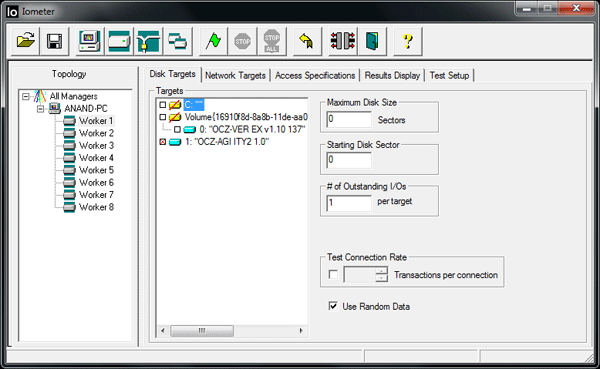
An upcoming version of Iometer will allow you to use 100% random data to test just that. Our own Ryan Smith compiled an early release of this version of Iometer so we could see how much of an impact purely random data has on Iometer performance. When the Use Random Data box is checked, the actual data Iometer generates is completely random. To confirm I tried compressing a 161MB output from Iometer with Use Random Data enabled:

The resulting file was actually slightly bigger. In other words, it could not be compressed. Perfect.
| Iometer Performance Comparison - 4K Aligned, 4KB Random Write Speed | |||||
| Normal Data | Random Data | % of Max Perf | |||
| Corsair Force 100GB (SF-1200 MLC) | 164.6 MB/s | 122.5 MB/s | 74.4% | ||
| OCZ Agility 2 100GB (SF-1200 MLC) | 44.2 MB/s | 46.3 MB/s | 105% | ||
With data that can't be compressed, the SF-1500 (or SF-1200 with 3.0.1 firmware) will drop from 164.6MB/s to 122.5MB/s. That's still faster than any other SSD except for Crucial's RealSSD C300. The Agility 2 and other SF-1200 drives running 3.0.5 shows no performance impact as it's already bound by the performance of its firmware. Since the rest of the Agility 2's performance is identical to the Force drive I'll only include one set of results in the table below:
| Iometer Performance Comparison | |||||
| Corsair Force 100GB (SF-1200 MLC) | Normal Data | Random Data | % of Max Perf | ||
| 4KB Random Read | 52.1 MB/s | 42.8 MB/s | 82.1% | ||
| 2MB Sequential Read | 265.2 MB/s | 212.4 MB/s | 80.1% | ||
| 2MB Sequential Write | 251.7 MB/s | 144.4 MB/s | 57.4% | ||
Read performance is also impacted, just not that much. Performance drops to around 80% of peak, which does put the SandForce drives behind Intel and Crucial in sequential read speed. Random read speed drops to Indilinx levels. Read speed is impacted because if we write fully random data to the drive there's simply more to read back when we need it, making the process slower.
Sequential write speed actually takes the biggest hit of them all. At only 144.4MB/s if you're writing highly random data sequentially you'll find that the SF-1200/SF-1500 performs worse than just about any other SSD controller on the market. Only the X25-M is slower. While the impact to read performance and random write performance isn't terrible, sequential performance does take a significant hit on these SandForce drives.
Originally published at https://www.anandtech.com/show/3667/oczs-agility-2-reviewed-the-first-sf1200-with-mp-firmware (Wayback Machine).