
Dell Inspiron 1564: Mobile i3/i5 for the Masses
- Posted in
- Laptops
Dell Inspiron 15 Overview
Our review unit came to us with the "ice blue" lid, and it's attractive indeed. While glossy plastics adorn the majority of the Inspiron 15, it's not quite the fingerprint-magnet and general eyesore that many of Toshiba's notebooks have been over the past two years.
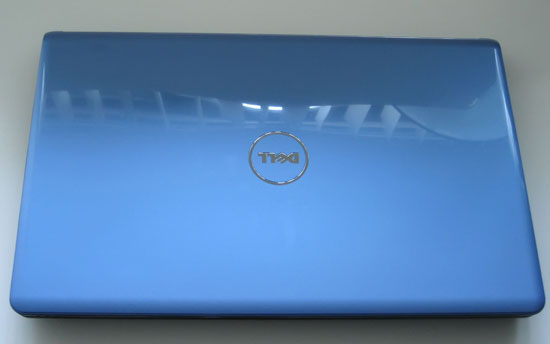


Glossy plastics can be fairly attractive if used in moderation, and for the most part they are here, though even photographing the Inspiron 15 required having a microfiber cloth handy to remove smudges from fingerprints. Glossy plastic is used on the lid as well as the bezel for the screen and trim around the touchpad and keyboard. The bluish-silver coloring on the inside is attractive, with a light-brushed aluminum pattern to it. In the center is the touchpad, which is lightly textured and very comfortable to use.
Dell's designers know moderation, though, and we were happy to see a matte plastic keyboard and frame. Many manufacturers have taken to using glossy plastics even on the keyboards, which is frustrating as the texture isn't as pleasant or comfortable. The matte plastic keyboard takes advantage of the added width required to accommodate a 15.6" 16:9-aspect screen to include a numeric keypad. Overall, the keyboard layout is logical and well thought out, with no real sacrifices made to fit the keypad and dedicated keys for Home, End, Page Up, and Page Down. Dell even includes a dedicated touchpad toggle key between the F12 and Insert keys, but eschewed the Scroll Lock key to do so. The keyboard is comfortable and easy to use, and while flex isn't ideal—the keyboard isn't completely firm—it's nowhere near as bad as many other consumer laptop keyboards are.
While the overall build of the Inspiron 15 is very firm and the use of glossy plastics at least tasteful, Dell's designers seem to have missed the boat in stripping down features to produce a more affordable notebook. As we mentioned before, expandability has taken a massive hit with this model and the cuts Dell made have been cruel ones. The lack of eSATA or FireWire—not even an eSATA/USB combo port—is exacerbated by the missing ExpressCard port. The bottom panel on the unit allows the user to replace the hard drive or memory, but there's just no way to improve connectivity beyond what's there. Likewise, the limited customizability on Dell's website ensures you're stuck with the 15.6" LED-backlit screen's mainstream 1366x768 resolution. Even a matte screen would be a welcome change, especially with the default screen's mediocre viewing angles and poor contrast.
We understand that the Inspiron 15 is meant to be more of a bargain, entry-level laptop, but there's little point in upgrading from the base model Inspiron 1564 with i3-330M (2.13GHz with no Turbo Boost) to the beefier i5-520M. Not only does the added performance go to waste in most cases, but it's also a $270 jump for the CPU upgrade. We suspect Dell shipped us the higher-end model to improve benchmark scores, but frankly it's not worth the cost and we recommend the less expensive Inspiron 15 offerings for general use. If you want a faster CPU, look to the Dell Studio 15 line, which adds the missing eSATA, Firewire, and ExpressCard/34 along with a 1080p LCD and the ability to customize many other areas—or look at HP, Acer, ASUS, Toshiba and others who offer notebooks in the same price range with far more expandability than the Inspiron. Ultimately, the trade-off is going to be how much you want to sacrifice to get a mainstream processor in a fairly slim, lightweight chassis.
Originally published at https://www.anandtech.com/show/2955 (Wayback Machine).