
ASUS UL80Vt and G51J: Going for the Gold
- Posted in
- Laptops
Power Requirements
As a corollary to the battery life tests, we also performed measurements of power requirements using the AC adapters and a Kill-A-Watt device. These numbers are only accurate to the nearest Watt, so a difference of 1W (i.e. from rounding) could obscure up to a 12% actual difference in power requirements. Also note that power requirements change when you switch to DC power, and power supply (power brick) efficiency comes into play when using the AC adapter, so the battery life tests are a better indication of true power requirements.
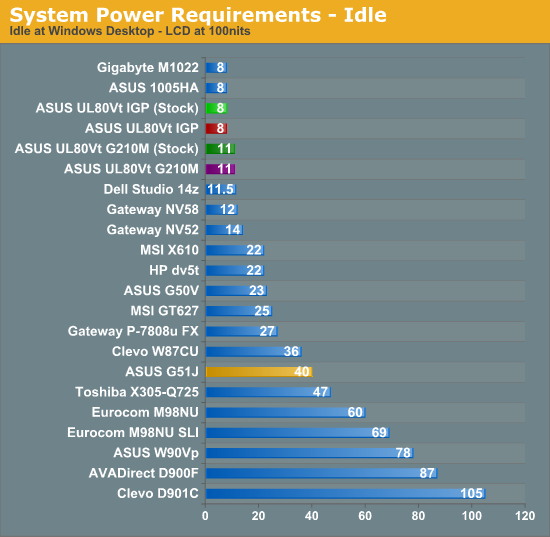
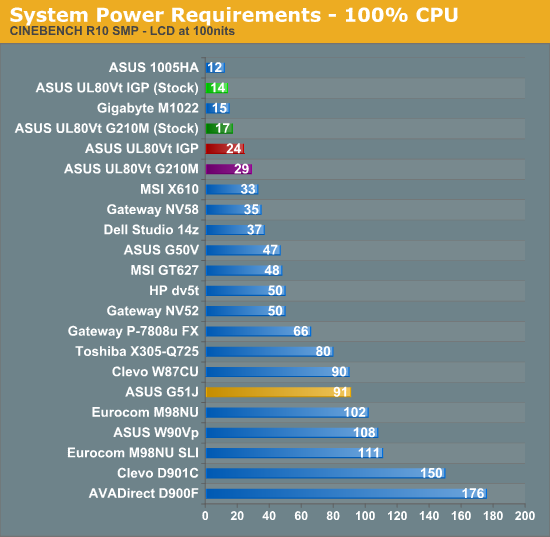
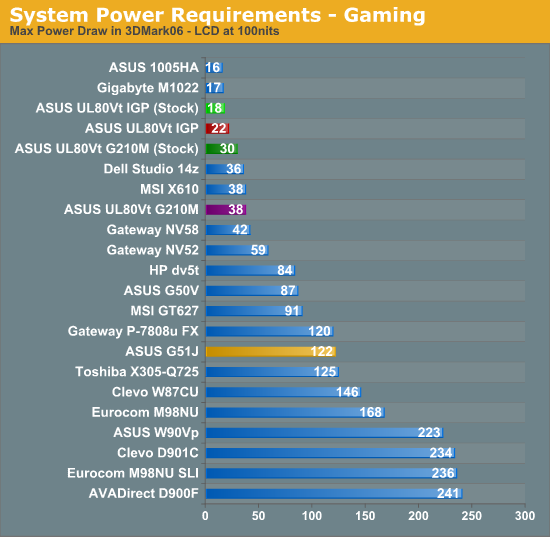
How's that for a nice exponential scale of power requirements? It's sort of fun to see the huge discrepancy in power requirements between desktop replacement notebooks and thin and light laptops. The most interesting aspect of the above graphs for most people will be the various power states of the UL80Vt. It looks like the CPU power requirements from Turbo33 are negligible at idle but can add up to 12W at full load. Meanwhile, the G210M GPU looks like it adds 3W at idle and somewhere around 10W at full load. (We can't be precise since the faster GPU also allows the CPU to work harder, contributing to the overall power draw.)
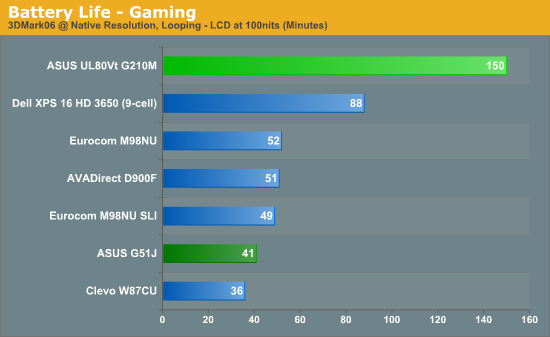
As a point of reference, we also added battery life while "gaming" (looping 3DMark06 at native LCD resolution). The only difficulty is that the laptops provide different GPU performance levels on battery power; for example, all of the Clevo designs force the GPU into a "limp mode" where it runs at significantly lower performance (around the level of the G210M, actually). The two ASUS laptops we're looking at today both allow you to run at full performance while on battery power, so keep that in mind when you look at the last chart.
Originally published at https://www.anandtech.com/show/2886 (Wayback Machine).