
Mobile Buyers' Guide, December 2009
- Posted in
- Guides
Midrange Quad-Core Laptops
For gaming, quad-core CPUs still don't provide enough of a tangible benefit for us to recommend them over dual-core CPUs. On the other hand, anyone interested in video encoding/decoding or other CPU intensive tasks can benefit from a quad-core processor. With the launch of mobile Core i7, the Core 2 Quad CPUs are going the way of the dodo bird right now, so there may be some good deals if you look around. Q9000 systems offer roughly the same performance as i7-720QM systems in highly-threaded workloads, due to their clock speed advantage (2.0GHz vs. 1.6GHz on the i7-720QM), but the i7 CPUs are more flexible thanks to their Turbo modes.
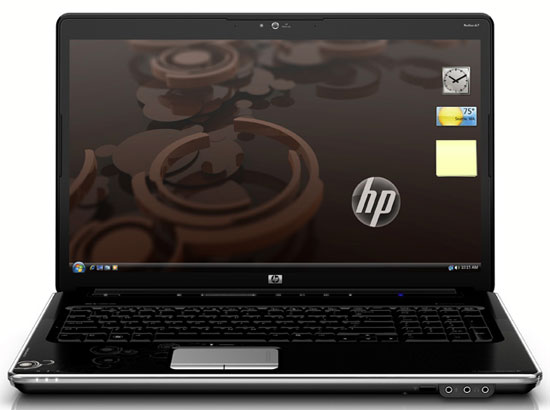
None of the quad-core offerings are thin-and-light laptops; quite the opposite, in fact: most are going to be 17" (give or take) chassis. Looking on the Internet, we could only find a few Q9000 systems that cost under the $1150 limit we've imposed. The least expensive is $1000, listed at Frys.com, but it's "unavailable for Shipping (try in-store pickup)". If you can find one at a local Frys store, the HP dv7-2040us looks like a good deal. If you go straight to the source, the HP Pavilion dv7-2270us appears to be the same product, but with Windows 7 preinstalled and online availability. We just said that quad-core wasn't the best solution for gaming, but the dv7 includes an ATI HD 4650 GPU, which is good enough for most games at medium to high detail on the 1600x900 LCD. There's a $60 instant rebate right now, which drops the price to $1070, so if performance is a higher priority than size and battery life, give it a look.
The only other quad-core Q9000 alternative we could fine right now is the ASUS N61VN-A1, selling for $1100. It's a 16" chassis, but the LCD is only a 1366x768 panel - rather low for such a chassis. It comes with a GeForce GT 240M, which is slightly slower than the HD 4650. Battery life should top out at around 3 hours, according to online reviews.
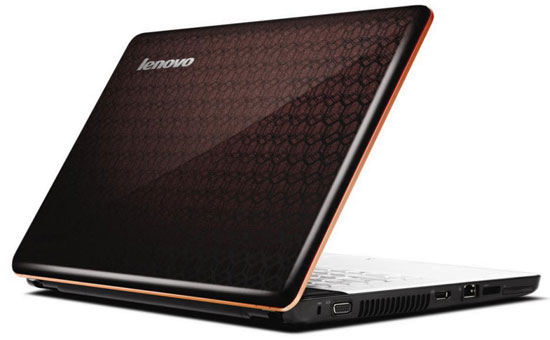
Of course, Q9000 isn't the only option. We did find a few i7-720QM notebooks for under $1150. The first is probably your best bet in terms of price, the HP Pavilion dv6t 15.6" notebook. It comes with GeForce GT 230M graphics and a 1366x768 LCD. Battery life should be about 90-120 minutes depending on what you're doing (or twice that with the 12-cell battery upgrade), and $1000 is the cheapest price we could find for a Core i7 notebook. Lenovo has a competing notebook with similar specs, the IdeaPad Y550, priced at $1100. It bumps the GPU up to the GT 240M (only a small clock speed bump relative to the GT 230M) and comes with a 500GB HDD and 802.11n - about the same price as the HP dv6t if you add those items.
Any Good LCDs?
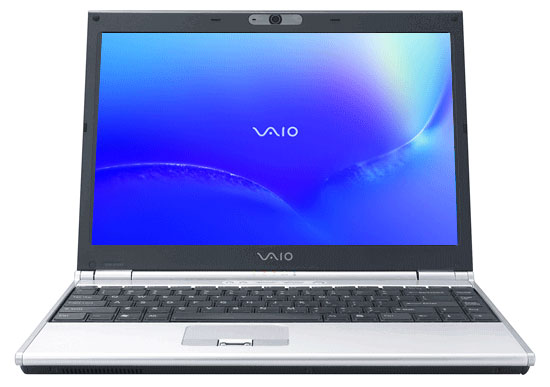
We went through our local Walmart, Best Buy, Costco, Target, and Office Max stores to look at the LCDs and build quality. There were enough options that we ultimately decided to forget about build quality (it's a bit too nebulous to assess in a few minutes) and focus on the LCDs. Over fifty laptops were examined, and we found one - yes, ONE! - laptop where the LCD was clearly better than a 300:1 contrast ratio. We were able to test any of the laptops to determine the exact contrast ratio or color accuracy, and there's always the chance that you'll get the same model laptop with a different LCD, but the sole LCD standout in the retail laptop comparison is the Sony VAIO VGN-SR520G/B. We'd guess the LCD we saw was at least a 750:1 contrast ratio, and the blacks were much darker than any of the surrounding laptops.
Not sure what the difference is or how to tell of a laptop you're considering has a high contrast ratio? Just walk over to the desktop LCDs and open up a sample image - the sample images on a standard Windows 7 installation will clearly show the difference. Desktop LCDs will still have better color accuracy and viewing angles (with a few exceptions), but contrast ratios below 500:1 should be immediately visible to the naked eye.
As far as the Sony VAIO VGN is concerned, the other specs are reasonable. You get a P8400 CPU, GMA 4500MHD graphics, 4GB DDR2, 500GB HDD, DVDRW, 802.11n, and a 13.3" 1280x800 LCD. We've also heard some complaints about the 16:9 aspect ratio LCDs, so some of you will undoubtedly be happy with this 16:10 display. Battery life is listed at 5.5 to 7.0 hours (closer to 5.5 for Internet surfing would be our guess), and the VAIO tips the scales at just 4.3 pounds. If you're looking for an alternative to the ASUS UL80Vt and you want a better LCD, this is the only laptop we could find that's worth consideration. What you end up doing is paying about $100 for a better LCD, which is a reasonable expense in our opinion.
Originally published at https://www.anandtech.com/show/2883 (Wayback Machine).