
Biostar TPower i55 – Super Middle Weight Contender
- Posted in
- Motherboards
Networking
The Windows 2000 Driver Development Kit (DDK) includes a useful LAN testing utility called NTttcp. We used the NTttcp tool to test Ethernet throughput and the CPU utilization of the various Ethernet Controllers used on the Intel motherboards. We set up one machine as the server; in this test, an Intel system with an Intel CSA Gigabit LAN connection. Intel CSA has a reputation for providing fast throughput and is a logical choice for our Gigabit LAN server.
On the server side, we used the following Command Line as suggested by the VIA whitepaper on LAN testing:
Ntttcpr -m 4,0,‹server IP› -a 4 -l 256000 -n 30000
On the client side (the motherboard under test), we used the following Command Line:
Ntttcps -m 4,0,‹client IP› -a 4 -l 256000 -n 30000
At the conclusion of the test, we captured the throughput and CPU utilization figures from the client screen.
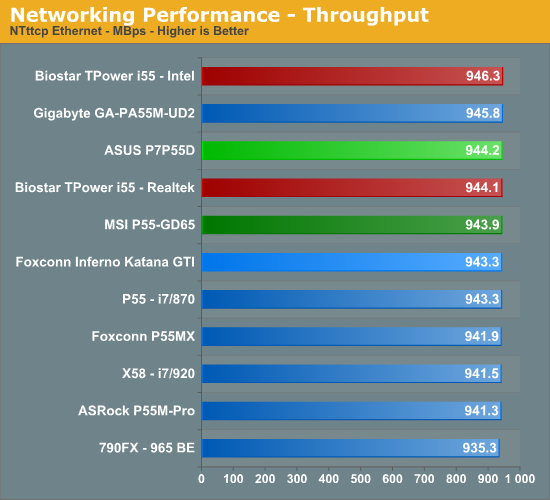
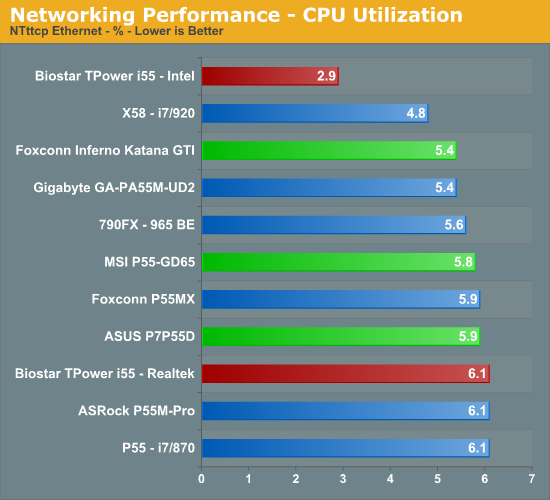
Our network throughput test indicates how well a particular controller design from Realtek, Marvell, or Intel performs instead of being indicative of true chipset performance. This also holds true for the CPU utilization results, though this test can also be influenced to certain degree by the BIOS code and chipset interconnect design.
The CPU utilization and throughput numbers favor the Intel controller on the Biostar board, followed closely by the Realtek chipsets on the other boards. In practice, few if any users will notice a difference, even if they have the requisite gigabit hub, as storage performance frequently bottlenecks the actual transfer rates. However, we applaud Biostar for using the Intel controller as it truly is the best controller available on any motherboard today.
For our second series of networking tests we utilize a Promise SmartStor NS4600 NAS unit equipped with two WD Caviar Black 640GB drives in RAID 1 operation. We are using two benchmarks from Intel’s popular NASPT 1.70 testing tool. The Promise NAS unit is connected to each test platform via a NetGear Gigabit Ethernet switch. We left all settings at their defaults on both the motherboard and Promise NAS unit. Our goal was to maximize the performance of the NAS unit to verify our network throughput capabilities on each motherboard.
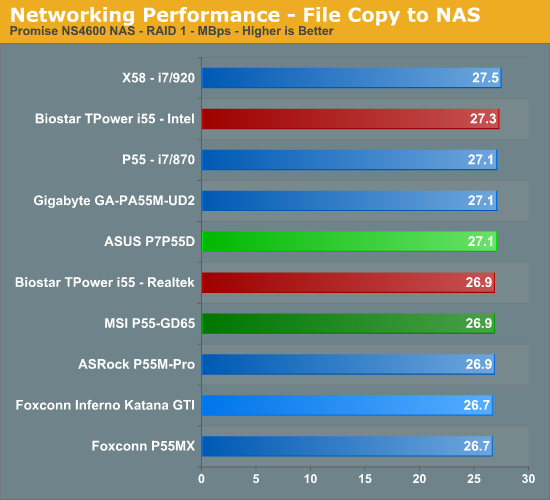
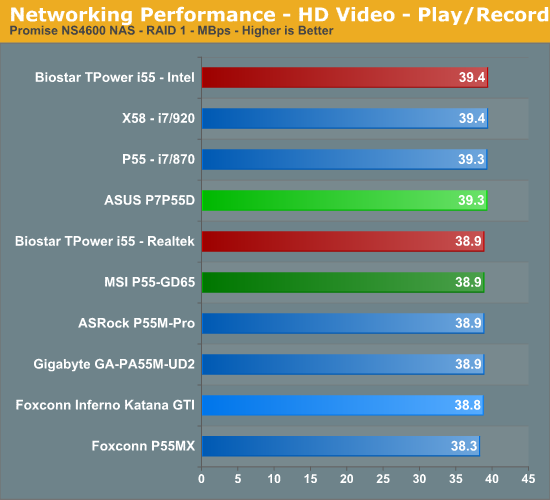
Our P55 test subjects perform almost identically in our actual usage tests with the Realtek chipsets, but the Biostar board has a slight advantage when using the Intel controller.
USB / FireWire Performance
Our USB transfer speed tests are conducted with an USB 2.0/FireWire based Lacie external hard drive unit featuring a 1TB 7200rpm Samsung drive. In the SSD to External test, we transfer a 3.82GB folder containing 2735 files of various sizes from our Kingston 80GB SSD to the Lacie drive. In the next two file tests, we use the same 3.82GB folder to transfer from our WD VRaptor 300GB hard drive to the external Lacie drive utilizing the USB 2.0 and IEEE 1394a interface.
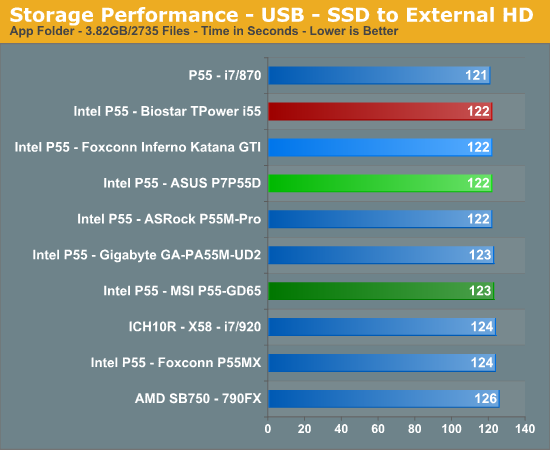
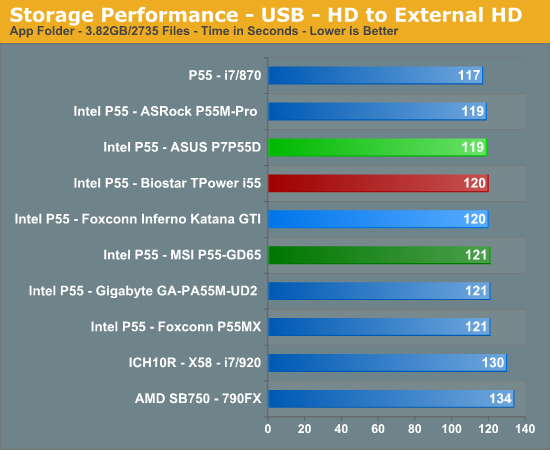
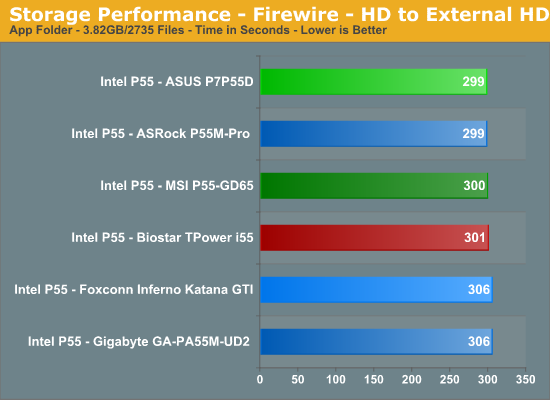
The Biostar board performs in the middle of the pack in our USB tests. The LSI Firewire controller on the Biostar board has a slightly higher write speed than the TI controllers on the Gigabyte/Foxconn boards, but is a little slower than the VIA controllers on the ASUS/MSI boards.
Storage Performance
In our storage test, we utilize the same 3.82GB test folder and transfer it from our WD VRaptor drive to our Kingston 80GB SSD.
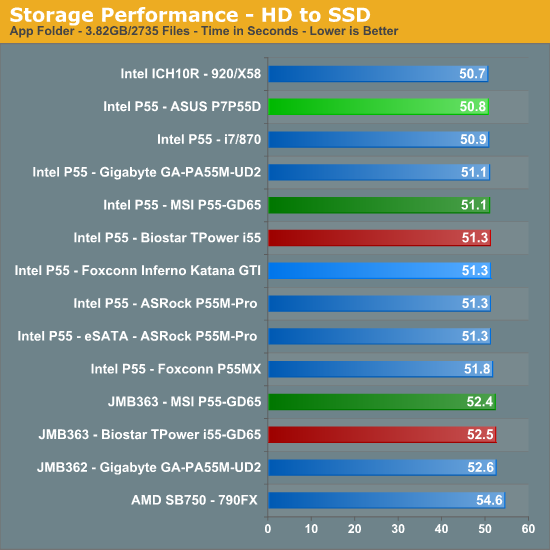
Once again, our P55 motherboards perform almost identically. The P55 chipset on the Biostar board has a 3% advantage over the JMicron controller on the same board. However, any measurable differences were not recognized in actual usage.
Originally published at https://www.anandtech.com/show/2880 (Wayback Machine).