
Windows 7 Performance Guide
- Posted in
- Systems
Networking
For our networking tests we utilize a Promise SmartStor NS4600 NAS unit equipped with two WD Caviar Black 640GB drives in RAID 1 operation. We are using our standard large folder and perform a copy from the NAS and then back to the NAS. The Promise NAS unit is connected to each test platform via a NetGear Gigabit Ethernet switch. We left all settings at their defaults on both the motherboard and Promise NAS unit. Our goal was to maximize the performance of the NAS unit to verify our network throughput capabilities in each operating system.
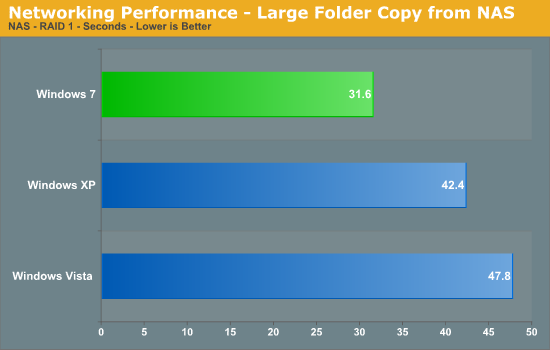
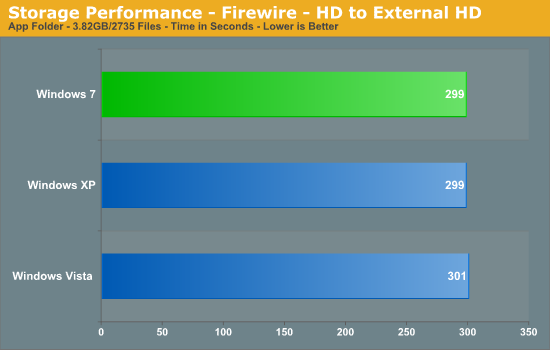
In our download test, Win7 is blazing fast with a 25% advantage over XP and 34% over Vista, making this result particularly notable since network file copy performance has always been a bit of a laggard on Vista. The results are very close in our upload test with Win7 and Vista basically tied and 16% ahead of XP.
USB / FireWire Performance
Our USB transfer speed tests are conducted with an USB 2.0/FireWire based Lacie external hard drive unit featuring a 1TB 7200rpm Samsung F1 drive. In the SSD to External test, we transfer a 3.82GB folder containing 2735 files of various sizes from our Kingston 80GB SSD to the Lacie drive. In the next two file tests, we use the same 3.82GB folder to transfer from our WD VRaptor 300GB hard drive to the external Lacie drive utilizing the USB 2.0 and IEEE 1394a interface.
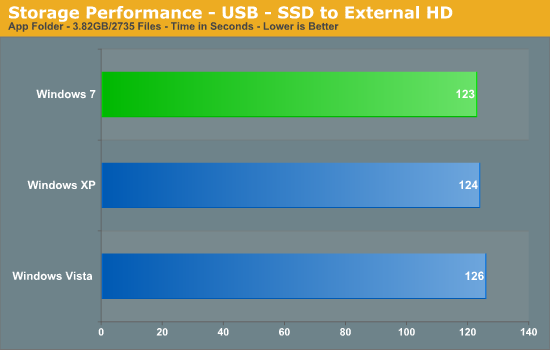
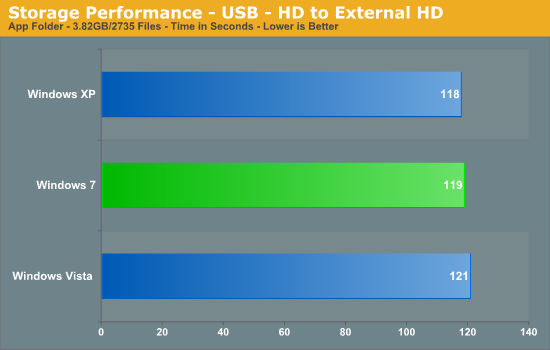
Win7 and XP perform similarly in our USB 2.0 and IEEE 1394a tests with both finishing ahead of Vista.
Originally published at https://www.anandtech.com/show/2864 (Wayback Machine).