
ASUS UL80Vt First Look: Mobility Redefined
- Posted in
- Laptops
ASUS UL80Vt Benchmarked - General Performance
This is a first look and we have not yet had a chance to run all of our performance tests. Battery life testing in particular is going to take a long time -- which is a good thing, outside of the testing aspect. We have only had the UL80Vt for two days now, but we have been duly impressed with its features, design, and performance. It may not be the best-looking laptop on the planet, it may not have every feature under the sun, and it certainly isn't the fastest laptop. However, it does everything a typical laptop user could need, it does it at an affordable price point, and it truly manages to redefine what we can expect in terms of mobility from Windows laptops. Here are a few preliminary benchmarks we've run.
We conducted tests using the "moderate battery saving" and "maximum performance" profiles in ASUS' Power4Gear software. Turbo mode (overclocking) was enabled in all testing so far; honestly, we don't see much point in disabling it (which requires a reboot), but we'll test battery life without Turbo mode for the full review; that may add another 5-10% battery life, although the laptop already lasts a full day so it's not a critical concern. The SU7300 CPU has two P-states, 800MHz and 1300MHz; the overclocked FSB results in the SU7300 running at 1066MHz or 1733MHz (using a 4X or 6.5X multiplier). CPU-Z does not report clock speeds correctly (it always showed an 8X multiplier for some reason), but ASUS provided an updated version of Intel's Thermal Analysis Tool that reports the correct speed.
After a few initial tests, we discovered that the only way to get the CPU to run at the 6.5X multiplier is to select "Maximum Performance" in the Power4Gear software, with the maximum CPU speed set to at least 62%; otherwise the CPU will always run at the 4X multiplier. Since we already had a bunch of results for 1066MHz, we decided to report those -- it will make for an interesting comparison with the Intel Atom at least. The 1733MHz results will be in bright green and the 1066MHz results are in dark green in the following charts. We'll start with general performance results using PCMark as well as a few CPU intensive tasks like video encoding and 3D rendering.
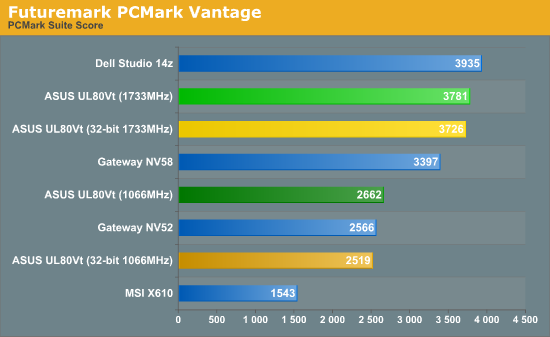
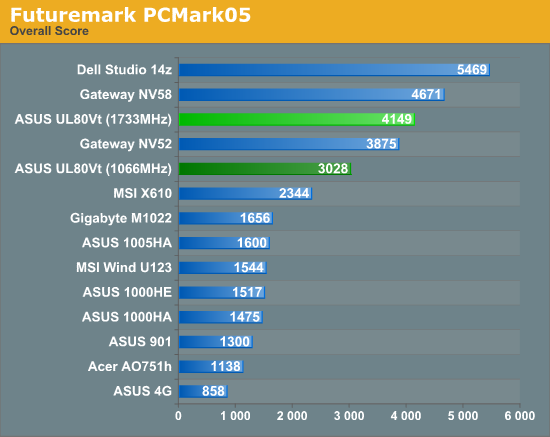
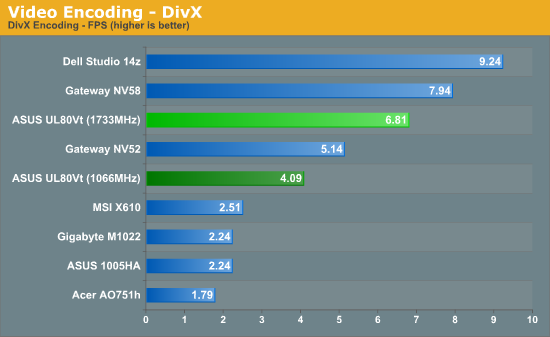
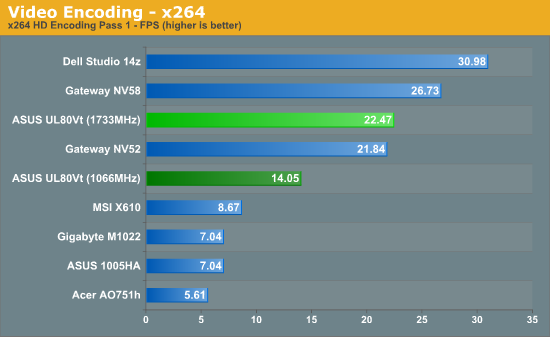
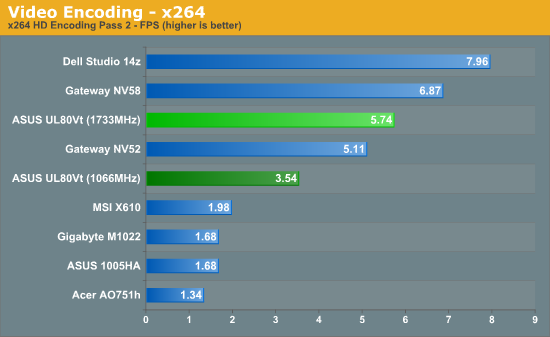
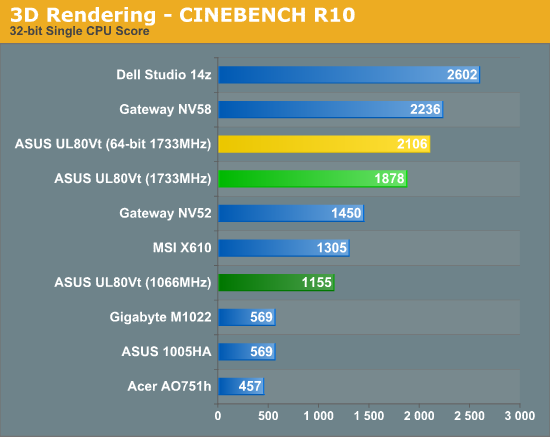
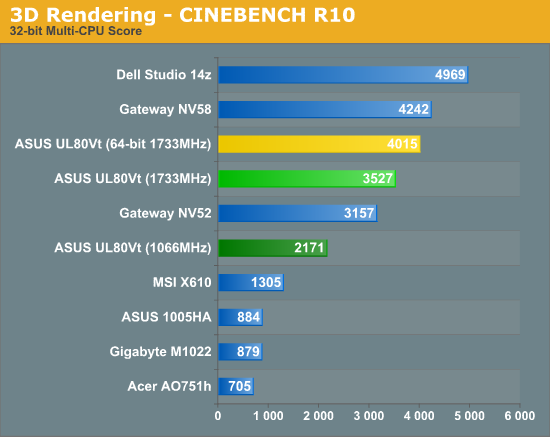
The general performance delivered by the UL80Vt is certainly impressive. It's not the fastest laptop on the market by any means, but application performance is better than the majority of AMD-based laptops currently available. The overclocked SU7300 outperforms the Athlon QL-64 (2.1GHz) by 7% in PCMark05, 47% in PCMark Vantage, 12% in the second x264 encoding pass (the first pass is relatively simple by comparison, depending more on the hard drive and platform than on the CPU), 32% in DivX encoding, and 12% in CINEBENCH R10. The latest 45nm AMD parts like the Turion II Ultra M640 will regain the lead, certainly, but we still have to account for power draw. We'll get to that in a moment, but suffice it to say that it's going to be difficult to beat the overclocked SU7300.
Comparing the UL80Vt to netbooks shows just how slow the Intel Atom is. Even at 1066MHz, the UL80Vt is typically at least twice as fast as the ASUS 1005HA, and at 1733MHz it's 150-250% faster. Sure, it also costs twice as much, but we would make a strong argument that netbooks are only "fast enough" if your demands are low. The bigger selling point for netbooks is their small size and weight, and 14" laptops costing close to $800 certainly encroach on that territory. Netbooks work far better as a second (or third…) PC than as your primary system, while something like the UL80Vt can fill all roles reasonably well. If the general application performance makes netbooks look bad, wait until we look at graphics performance.
Originally published at https://www.anandtech.com/show/2863 (Wayback Machine).