
Dell Studio 14z: Thin and Light Done Right
- Posted in
- Laptops
Battery Life without Killing Graphics
We run many scenarios for our battery life tests. Since most the 14z doesn't include an internal optical drive, we will focus on DivX HD, x264 HD, Internet, and idle battery life. The GeForce 9400M definitely helps in video playback with complex H.264 codecs. We measured CPU utilization for both 720p and 1080p x264 videos and Windows Media Player Home Cinema; the maximum CPU usage for 1080p was only 12%, and average CPU use was just over 5% for both 720p and 1080p. Interestingly enough, 720p DivX decoding actually required slightly more CPU time (8.5%).
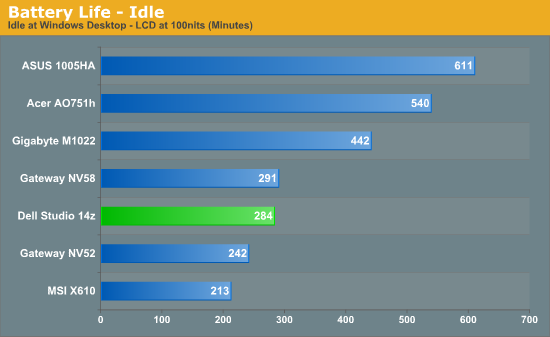
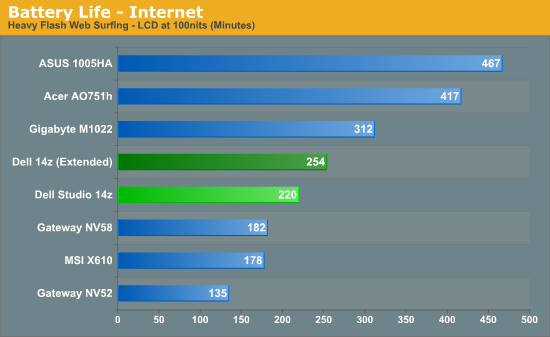
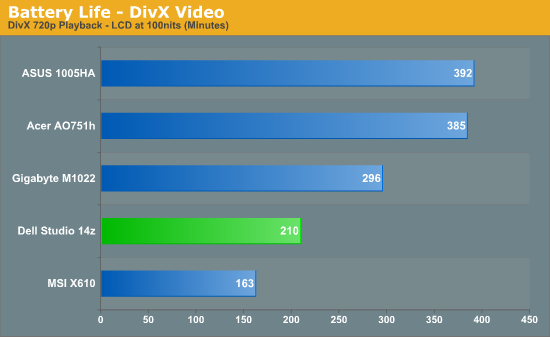
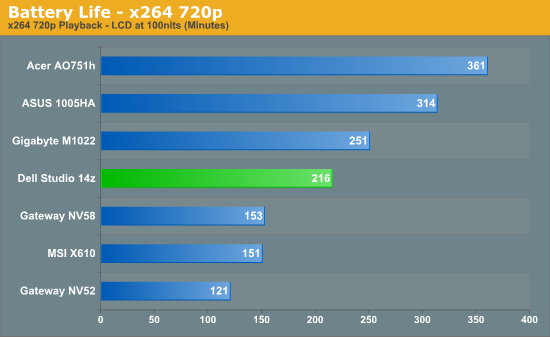
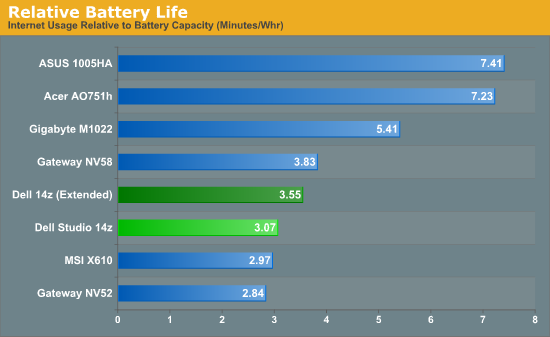
Compared to other laptops, the Studio 14z delivers reasonable battery life. However, we are using the larger 8-cell battery (71.6Wh/74Wh), and even in our idle test we didn't come anywhere near the 6.5 hours of battery life Dell lists on their website using the default power settings. In order to get to 6.5 hours, you need to enable the "Dell Extended Battery Life" option, which switches to the "Power Saver" profile, disables the Glass UI, and makes a few other tweaks.
It looks like the Studio 14z should offer comparable battery life to the standard MacBook, at least with the 8-cell battery, but that means the MacBook is making better use of its 60Wh battery. The MacBook Pro remains out of reach of similarly equipped Windows laptops (for now). The Studio 14z does extremely well in the Internet and x264 decoding tests, where it beats the Gateway NV58 by over 20% and 40% respectively. The Gateway NV58 has a smaller battery, however, and in relative battery life the NV58 still outperforms the 14z in Internet tests.
Incidentally, battery life while gaming remains acceptable: we were able to run 3DMark06 in a loop for just over three hours (188 minutes), with essentially the same performance as we achieved on AC power. Even with the smaller 56Wh battery, users should still be able to get over two hours of gaming, just shy of three hours of Internet surfing (depending on web site complexity), or about 2.5 hours of HD video playback. That's not as good as the standard MacBook (3.1 hours of video playback and web surfing on a 45Wh battery), but it's no longer a complete blowout.
Power Requirements
As a corollary to the battery life tests, we also performed measurements of power requirements using the AC adapters and a Kill-A-Watt device. These numbers are only accurate to the nearest Watt, so a difference of 1W (i.e. from rounding) could obscure up to a 12% actual difference in power requirements. Also note that power requirements change when you switch to DC power, and power supply (power brick) efficiency comes into play when using the AC adapter, so the battery life tests are a better indication of true power requirements.
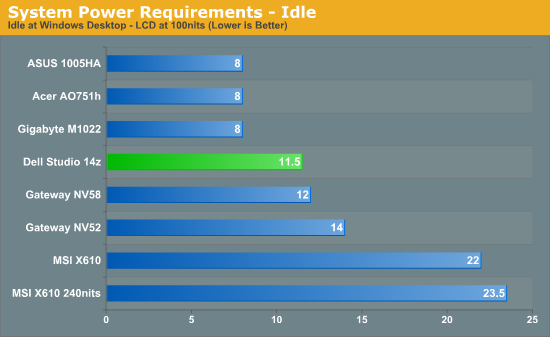
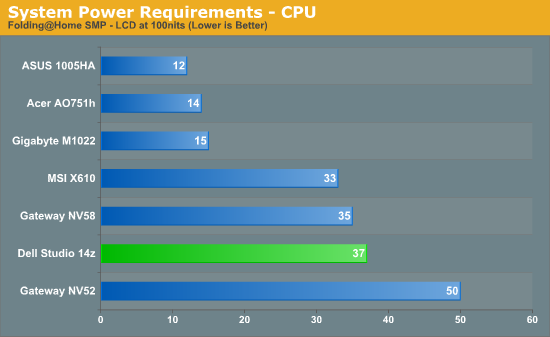
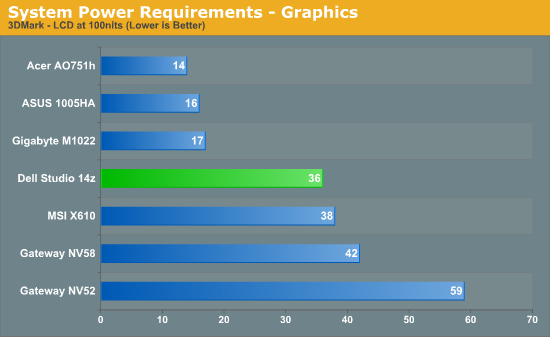
The Studio 14z has impressive idle power requirements, coming in just below the NV58. When we put a load on the CPU, however, the lower clock speed on the T6500 in the NV58 puts it back in the lead. Worth noting is that the T6500 has a TDP of 35W compared to 25W for the P8600, but all indications are that it actually doesn't use as much power. TDP isn't a true measurement of power requirements!? Say it isn't so…. Perhaps more interesting is that in our simulated gaming test (3DMark at native LCD resolution), the Studio 14z ends up using less power than any of the other laptops. It's still a far cry away from the netbooks, but it's nice that users can get what appears to be the best current IGP solution without compromising on power requirements.
Originally published at https://www.anandtech.com/show/2862/dell-studio-14z-thin-and-light-done-right (Wayback Machine).