
MSI P55-GD65 - Mid-Range P55 for the Masses
- Posted in
- Motherboards
Our board of interest today is the MSI P55-GD65. You can purchase this board for around $160 at various e-tailors.
MSI P55-GD65 Feature Set
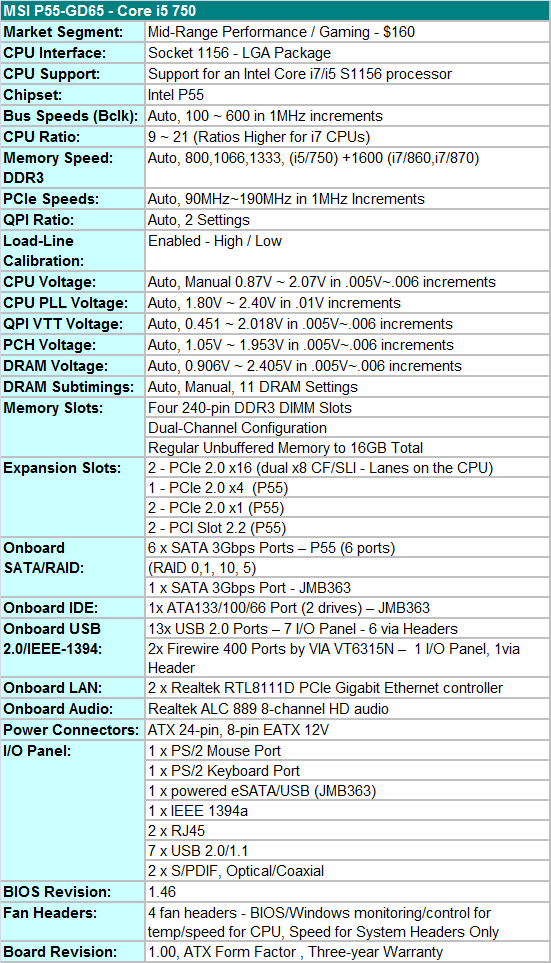
MSI includes a full featured set of components like the Realtek ALC 889 HD audio codec, dual Realtek RTL8111D Gigabit LAN controllers, Via VT6315N 1394a chipset, powered JMB363 eSATA/USB port on the I/O panel, and full support for the Core i7/i5 S1156 processor series.
MSI includes an extensive accessories bundle. You get the standard rear I/O panel cover along with 1 x IDE cable, 1 x Floppy cable, 4 x SATA cables, 1 x SATA power cables, SLI and CF bridges, a USB bracket, an informative manual, quick installation guide,OC Genie guide, Winki Guide, and two software CDs.
Of note in the software package is Winki. This is a Linux-based operating system similar to ASUS’ ExpressGate. Unlike ExpressGate, you boot Winki off the DVD or off a USB thumb drive once it is setup. Winki includes Open Office, Photo Viewer, Instant Messaging, Web and Skype functionality without booting into your primary OS .
BIOS
The BIOS layout is very good and offers a significant amount of settings for overclocking. MSI’s Cell Menu is where all the action takes place with a wide variety of adjustments including the CPU Core, PLL, VTT, PCH, VDimm and VRef voltages. Each of the settings is very granular and offers just about any range that a user could want or need. Clock and PCIe skews are not available but generally are not needed in this range.
One extremely nice function that MSI includes is that frequency and timing changes are directly visible in the BIOS when values are being changed. Overclocking profiles can be saved, loaded and individually named in one of the available eight slots. MSI's M-Flash (in-BIOS updating) worked very well with our board not having a problem with the BIOS being flashed 30 times in our testing. One item missing from the board is some type of BIOS backup or redundancy system that we find on the ASUS and Gigabyte boards in this price range.
MSI's BIOS-level fan speed control options are an improvement over other P55 boards, but not perfect. Users can select a target CPU fan speed between 40 and 70°C while setting a minimum fan speed between zero and 87.5% in 12.5% increments. The two system fan headers are only capable of speed changes with settings at 50, 75, or 100%. Unfortunately, they cannot be controlled by system temperature changes.
Originally published at https://www.anandtech.com/show/2853 (Wayback Machine).