
The SSD Relapse: Understanding and Choosing the Best SSD
- Posted in
- Storage
The Wiper Tool
The only Microsoft OS with TRIM support is Windows 7. Windows XP and Vista users are out of luck when it comes to TRIM, even if your drive supports it, the OS will never send it the command. Luckily there’s a workaround, one first popularized by Indilinx - not Intel. Kudos to the Indilinx guys.
It’s called the Indilinx Wiper Tool.
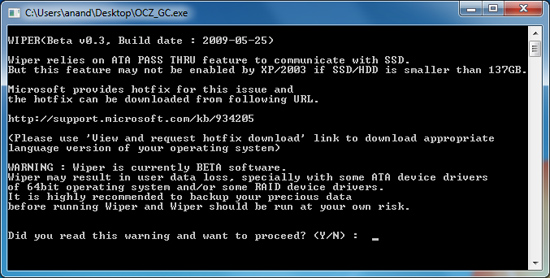
The tool asks the OS for all available LBAs (free space as far as the OS is concerned), then feeds the list to the SSD and tells the drive to TRIM those LBAs - prioritizing them for cleaning. It shouldn’t touch valid data, the key word being shouldn’t. Once cleaned, with no existing data in those blocks, performance goes back to its new state.
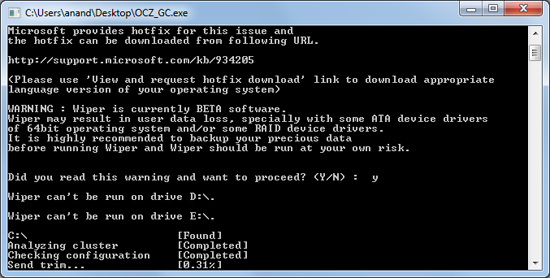
It’s a very simple solution actually. TRIM works because the OS knows when a file is deleted and it uses the TRIM command to inform the SSD of the deletion. Don’t have OS level TRIM support? Well, just run a tool that asks the OS what locations aren’t in use any longer. You get the same result, it just takes one extra step: running the wiper tool.
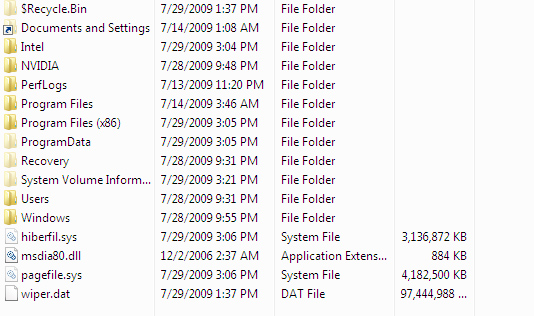
See wiper.dat? It's eating up all available LBAs then telling the controller to TRIM those blocks. Clever.
I tested the Wiper Tool to make sure it worked as promised and indeed it did, I actually showed you the results at the beginning of this story. One pass of the tool and the drive went from used to new performance:
| PCMark Vantage HDD Score | New | "Used" | After TRIM/Idle GC | % of New Perf |
| OCZ Vertex Turbo (Indilinx MLC) | 26157 | 25035 | 26038 | 99.5% |
You’ll need to get the tool from your drive vendor and it currently works under both 32-bit and 64-bit Windows OSes (XP through 7). I found that it works best in IDE mode; with your controller set to RAID or AHCI I’ve seen issues where the manual trim process can easily take more than several hours. When running properly it takes a couple of minutes to trim an entire drive.
You don’t need to run the tool that often (Indilinx drives don’t drop significantly in real world performance anyway) and once we get official TRIM support, Windows 7 users won’t need to do anything at all. But until then it does provide a nice way to keep your drive fresh.
Originally published at https://www.anandtech.com/show/2829 (Wayback Machine).