
Optimizing for Virtualization, Part 2
- Posted in
- IT Computing
"Magic" memory
If you are already running ESX, you may be aware of the fact that it is still to this day the only hypervisor-based solution that allows for memory overcommitment. To get this to work, VMware has implemented three ways of reclaiming memory from a running VM: Page sharing, ballooning and swapping. To allow ESX to get the best out of these implementations, a final consideration when virtualizing would be to put VM’s with similar workloads and operating systems together on the same physical machine. Now, when running only a small amount of VM’s next to each other, this might not be a viable option, or seem to improve the situation much, but in heavy-duty environments, grouping similar VM’s together allows the hypervisor to free up a large amount of memory by sharing identical pages across the different systems. ESX scans through all pages at runtime to group the static parts of memory that each VM shares, allowing for example 5 idling Windows systems to take up little more RAM than a single one. This effect is made clear in the image below, in which VMware demonstrated the amount of memory saved across 4 VM’s, thanks to aggressive “page-sharing”, as VMware calls its technology.
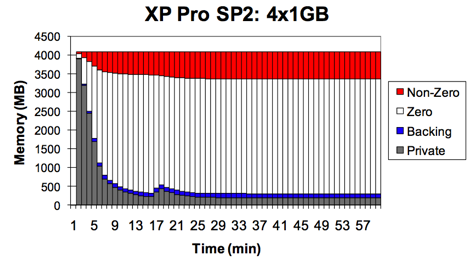
Page-sharing is just one of 3 technologies ESX uses to reclaim memory from its VM’s, the other two being ballooning and swapping. You can check the effect page-sharing has on your VM’s in esxtop’s memory screen.

The SHRD counter denotes the amount of memory in the VM that is shared with other VM’s, this includes zero’d out pages.
The ZERO counter denotes the amount of memory that has been zero’d out. These pages also count as shared ones, as every single “zero’d” page refers to the same zero’d physical segment.
SHRDSVD is the estimated amount of memory that is saved for that VM thanks to the page-sharing mechanism.
Also interesting are the MCTL-columns, that deal with the VM’s ballooning driver. MCTLSZ is the amount of memory that has been reclaimed through the use of the balloon-driver installed with VMware Tools. This “balloon” is actually no more than a process claiming the free memory on a VM, to artificially increase pressure on the VM’s OS. This way, the OS is forced to run as memory-efficiently as possible, allowing for as much memory as possible to be reclaimed for other VM’s, should the need arise.
Originally published at https://www.anandtech.com/show/2795 (Wayback Machine).