
Desperately Seeking Quality LCDs
- Posted in
- Displays
Brightness and Contrast Ratio
For the brightness, contrast, and color accuracy tests, we depend on a hardware colorimeter and software to help calibrate the displays. We use a Monaco Optix XR (DTP-94) colorimeter and Monaco Optix XR Pro software, and we also test with ColorEyes Display Pro. Results in nearly every case have been better with Monaco Optix XR Pro, so for this article we're skipping the ColorEyes Display Pro results. We didn't perform a complete evaluation of the FP241VW, so we're missing maximum/minimum brightness results, but in general the display performs similarly to other LCDs.
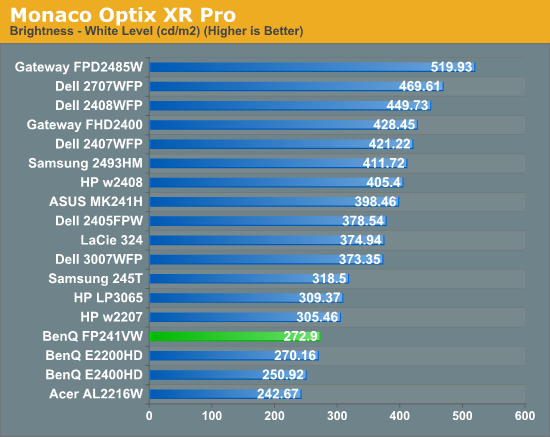
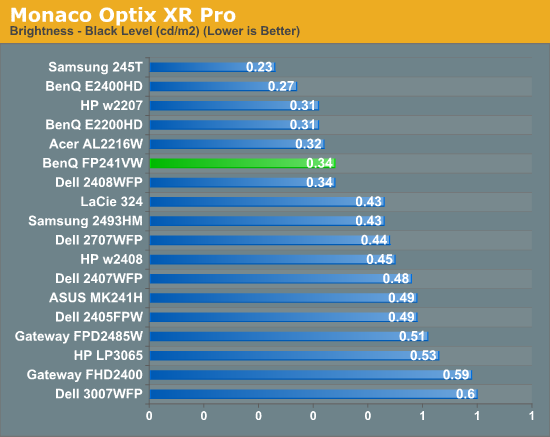
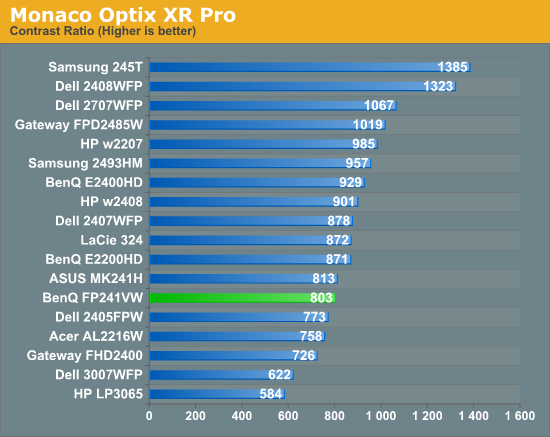
Don't pay too much attention to the white/black graphs, as they are merely reference points for how the displays perform at certain settings. Like many other LCDs, the FP241VW has a "normal" brightness level of ~270 nits, which is more than sufficient and is actually brighter than what most users prefer to use in an office environment. You can reach the advertised 500 nits brightness if you adjust contrast and color levels as well. More important than brightness levels is the contrast ratio at the various settings. We measured a contrast ratio of 800:1 with the FP241VW, which is a decent result placing it in the lower mid section of our charts. While higher scores are better, in reality anything above 500 is sufficient for most users (i.e. the HP LP3065 that we like is at the bottom of the chart). Also, we wouldn't worry about any advertised dynamic contrast ratio numbers - at least not if you want consistent colors.
Color Gamut
Below is a comparison of color gamut for the LCDs we've tested. We use Gamutvision, a utility developed by Imatest LLC, to calculate color gamut. We compare the color profiles of the LCDs to the Adobe RGB 1998 color profile and report the results as a percentage - higher being better.
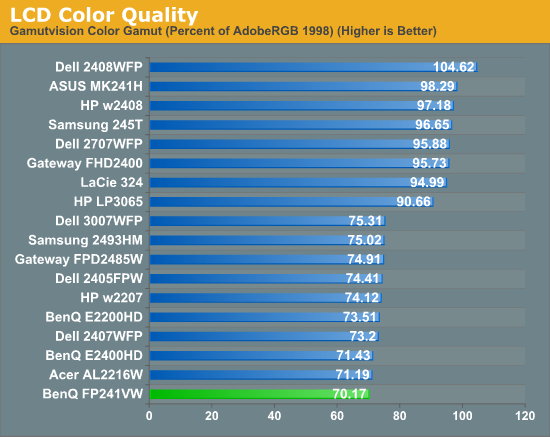
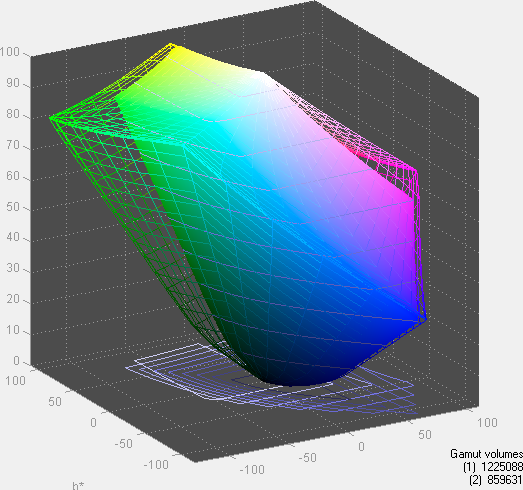
So far, color gamut has generally fallen into one of two categories: either +/-95% or +/-75%. Color gamut is determined almost exclusively by the backlighting, and the BenQ FP241VW falls short of other high-end LCDs in this area. In fact, it's at the bottom of the chart (though the difference between 70% and 75% isn't something you're likely to notice, so the bottom grouping essentially is a tie). For the original price, we would expect better, and if AU Optronics updates this particular panel we would definitely like to see a better backlight. Ideally, what we would like to see from more manufacturers is the use of LED backlighting - you can get extremely high color gamuts using RGB LEDs, and power requirements are also lower than traditional CCFL backlights. It's important to keep things in perspective, however: 70% may seem very low, but if you are using the standard sRGB profile (Windows' default) these LCDs look fine. It's only in applications like Adobe Photoshop with its expanded color space that you might notice a difference between the display color gamuts.
Originally published at https://www.anandtech.com/show/2787 (Wayback Machine).