
Optimizing for Virtualization
- Posted in
- IT Computing
CPU Considerations
Although Binary Translation is a very mature and solid technology, no matter how well it performs there is a certain amount of overhead involved. Over the past few years, Hardware-Assist has slowly come around to take its place, while the evolution to 64-bit systems chugs along quietly. The choice therefore would seem rather clear-cut: using newer CPUs should get you better results. Improvements are constantly being made to AMD's and Intel's latest and greatest to better accommodate virtualized environments, fundamentally changing the way ESX operates the hardware. Keeping up with the performance jumps throughout these architectural restructurings can get rather complicated.
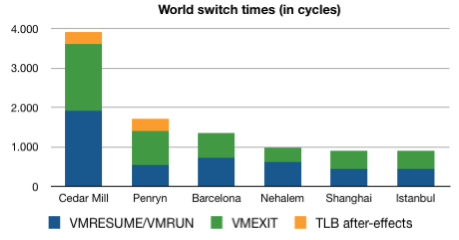
The above graph is a rough attempt at sketching the improvements on world switch times, one of the biggest factors in hardware virtualization performance. It is based on the duration of the VMRESUME (Intel VT-x)/VMRUN (AMD-SVM) and the VMEXIT execution times. A world switch happens when the CPU is for example forced to switch to hypervisor mode ("Ring -1", if you remember Johan's article) to prevent a VM from influencing other VMs. This requires running some instructions that vary according to the machine's hardware. The graph denotes how many cycles are essentially lost performing this operation. The added value of Hardware-Assisted Paging (RVI for AMD, EPT for Intel) is immediately visible here, as are the vast improvements to hardware virtualization performance throughout the years.
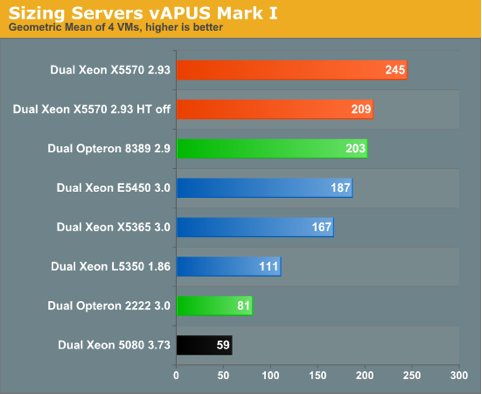
Even keeping these improvements in mind, does it make sense to jump on the latest generation CPUs whenever a new one emerges? In this case, it is simply easiest to let the numbers speak for themselves. Johan's recent articles pitting CPUs against each other in real world test scenarios might be of help here, but we want to stress the importance of using multiple data points before coming to a conclusion. The numbers in vApus Mark I project that the differences between CPU choices for heavyweight VMs are not quite as large as one might suspect. Using a Clovertown for a little while longer will not necessarily cripple one's virtualization performance at this point, and though the extra features provide a notable performance increase, they will not immediately justify the cost of a complete server overhaul
A less obvious recommendation, but one not limited to merely the uses of virtualization, is the use of Large Pages to increase the amount of memory covered by the TLB and make it more efficient by reducing the number of misses. We've noticed a performance increase of roughly 5% when large pages are used in combination with Hardware-Assisted Paging.
The drawback here is somewhat the same as when using a large block size in your file system: the bigger the smallest part that can be addressed, the bigger the waste when less than a full page is needed. As virtualization generally tends to put the bulk of the memory to use, this is only a tiny consideration, however.
A second problem, however, is that Large Pages need to be enabled on both the application and the OS level and so you actually need to adapt your own software to it. In SQL Server Enterprise Edition, Large Pages are used automatically provided it is enabled on the OS-level and the amount of RAM present is higher than 8GB, but other software packages might implement it differently. We can tell you how to implement it on the OS-level, though.
Linux: Add the following lines to /etc/sysctl.conf:
vm/nr_hugepages=2048
vm/hugetlb_shm_group=55
Windows: Enable it for the required users in your Local Policies:
Start > Administrative Tools > Local Security Policy > Local Policies > User Rights Assignment > Lock pages in memory
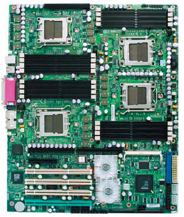
Thirdly, with the increasing use of NUMA-architectures, there is another important consideration to keep in mind: using it as efficiently as possible by reducing remote memory access to a minimum. Luckily, ESX can take advantage of NUMA just fine with its scheduling capabilities, but as an administrator it's important to optimize the VM layout to fit the NUMA nodes. This can be achieved by preventing a single VM from requiring more memory or cores than is available in a single node. Working this way puts the hardware to use much more efficiently and effectively reduces the amount of time wasted by remote access of memory belonging to other NUMA nodes.
Naturally, this is easier said than done. Luckily, ESXtop provides us with the necessary counters to make sure a VM stays where it is supposed to be. We can make sure of this by using "ESXtop -a" to have ESXtop automatically display every single counter. By pressing "M" we can display the Memory screen, and by pressing F we can filter the display down to show only the counters we are interested in.
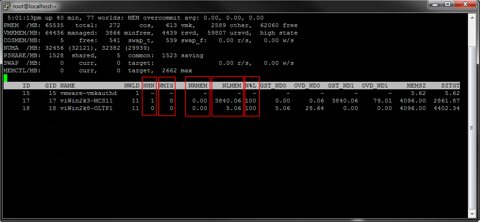
The counters that are most important with regards to NUMA are highlighted in the picture above.
NHN: This is the NUMA home node, the node on which the VM originally started.
NMIG: The amount of node migrations since startup. This should preferably stay at 0. If the VM is found migrating nodes frequently, some tuning of the VM layout may be needed.
NRMEM: This is the amount of memory that the VM is using from a remote NUMA node. Once again, this should be as low as possible, since accessing remote memory in a NUMA system is a very costly procedure.
NLMEM: This is the actual local memory in use by the VM.
N%L: This counter displays the percentage of the VM's memory that is running locally. Ideally, this should be at 100% at all times.
Originally published at https://www.anandtech.com/show/2786 (Wayback Machine).