
Optimizing for Virtualization
- Posted in
- IT Computing
A Quick Overview of ESX
To start, we need to brush up on what a hypervisor actually looks like, and clarify its different components. The term "hypervisor" is at this point nicely marketed to encompass basically everything that allows us to run multiple virtual machines on a single physical platform. Of course, that's pretty vague on what exactly a hypervisor denotes. Johan wrote an excellent article about the inner workings of the hypervisor last year, but we'll quickly go over the basics to keep things clear.
Kernels and Monitors
In VMware's ESX, the hypervisor is made up of two completely separate technologies that are both essential in keeping the platform running: the VMkernel and the Monitor. The Monitor provides the virtual interface to the virtual machines, displaying itself as a standard set of hardware components for the virtualized OS. This layer is responsible for the actual translation of the VM's calls for hardware (be it through the use of hardware virtualization, binary translation, or paravirtualization), and sends them through to the actual kernel, namely VMware's own kernel.
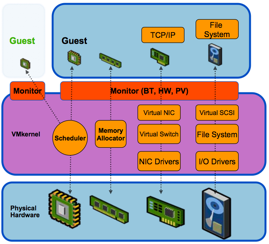
This monitor is the same across VMware's bare-metal (ESX) and hosted solutions (think VMware Workstation and Server). The difference in ESX is in its VMkernel, the kernel that acts as the miniature OS that supports all the others. This is the part that interacts with the actual hardware through various device drivers and takes care of things like memory management and resource scheduling.
This short explanation should make it a bit more clear what kind of workloads these two components need to handle. Limitations of the VMkernel are mostly rooted in its robustness and the amount of raw throughput it can handle efficiently through its scheduling mechanics: e.g. more or less the same limitations any OS would suffer in some way. On the other hand, limitations of the Monitor are mostly a matter of using the correct configuration for your workload, and depend largely on the features of the hardware you allow the Monitor to work with.
Originally published at https://www.anandtech.com/show/2786 (Wayback Machine).