
MSI X58M - Mighty Mouse
- Posted in
- Motherboards
MSI X58M - Feature Set
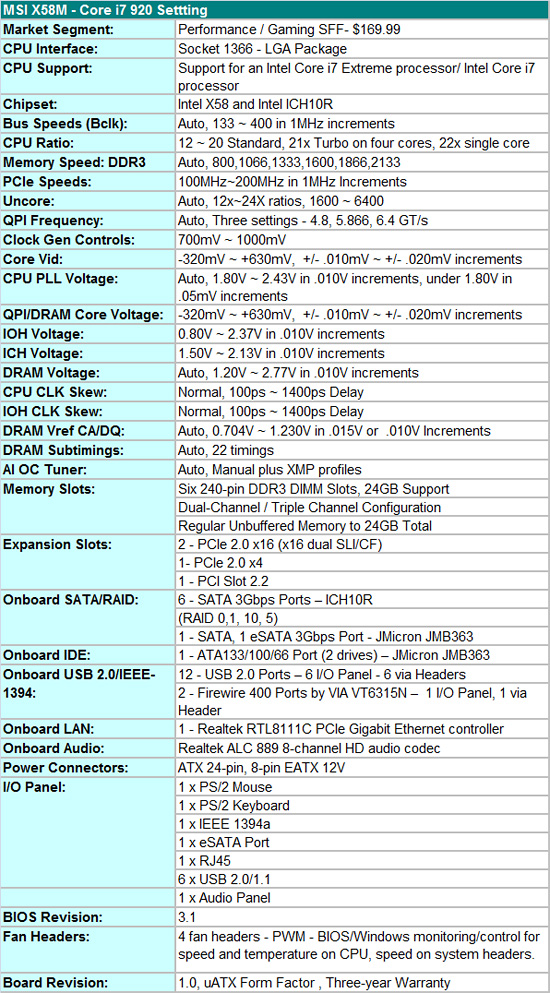
MSI includes the standard array of components like the Realtek ALC889 HD audio codec, Realtek RTL8111C, VIA VT6315N IEEE 1394a chipset, JMB363 chipset for eSATA, IDE, and SATA, Intel ICH10R for SATA and RAID, along with full support for the Core i7 processor series. With the latest 3 series BIOS, the board fully supports both CrossFire and SLI operation.
MSI also includes an accessories bundle. You get the standard rear I/O panel cover along with 1 x IDE cable, 1 x SATA cable, 1 x USB expansion bracket, and an external Molex power cable. MSI provides a well-written and informative manual and software CD.
BIOS
MSI has a well optioned BIOS that belies the fact this is an "entry level" X58 motherboard. The BIOS is set up for the general enthusiast and includes all the settings one needs to get the most out of this motherboard. Two strengths of the BIOS are the abundant voltage settings and memory timing options. For those who do not wish to tinker that much, MSI provides several auto overclocking options that can take the guesswork out of most of the BIOS settings. We found that these settings will get you about 90% of the way there when overclocking.
We did have a couple of slight disappointments with the BIOS. In the voltage setting options, MSI does not disclose the base voltages that the board defaults to at startup, instead offering a possible range in the text field descriptions. Speaking of the text fields, MSI did a good job on explaining several of the settings and voltage ranges, but inexplicably left out these descriptions in other areas. Our other complaint has to do with the limited control over the CPU and System fan headers. The CPU fan header can be set to control fan speed based on temperatures and the system number one fan header offers three speed adjustments, but the two chassis headers offer nothing in the way of control.
There's a bit more good news and bad news on the BIOS front. There are six Overclocking profiles and M-Flash actually works. We flashed our BIOS twenty five times without an incident, though we still feel safer flashing from a DOS boot disk. MSI also provides their GreenPower technology on this board that allows the BIOS to dynamically control the number of power phases in operation based on load if the CPU Phase control option is enabled. The bad news is that while S3 resume and wake on USB work perfectly, but only up to around 150 Bclk speeds. They system would not resume properly with the Bclk set higher than ~150 in our testing. MSI is working diligently to fix this problem. Other than that, we were very impressed with the BIOS.
Software
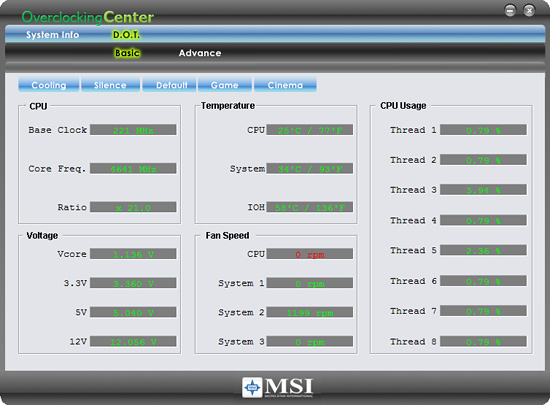
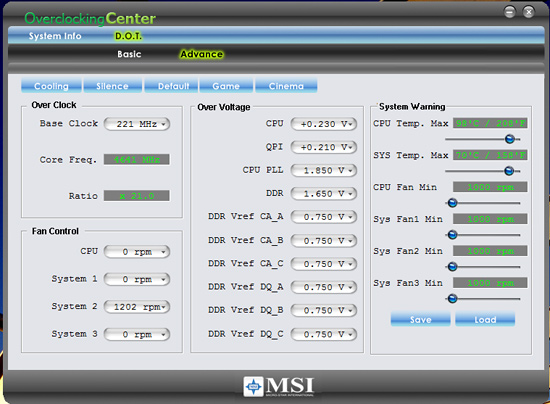
MSI’s Overclocking Center application provides monitoring, system information, and basic overclocking capabilities. This application has a come a long way in the past few months but is still a step or two behind Gigabyte’s EasyTune6 and EVGA’s ELeet applications; still, it provides a reasonable number of options and controls. This application is useful for extracting a decent amount of performance improvement out of the system after booting into Windows via the four basic voltage setting changes (really about all you need for i7 in most cases) and Bclk changes up to 265MHz. One benefit of such an approach is that you can reduce or increase performance - along with power requirements and the stress on a system - without rebooting. MSI also provides some presets for various system setups and the ability to save profiles. We did find that the application would not properly identify several four-pin CPU fans.
DPC Latency
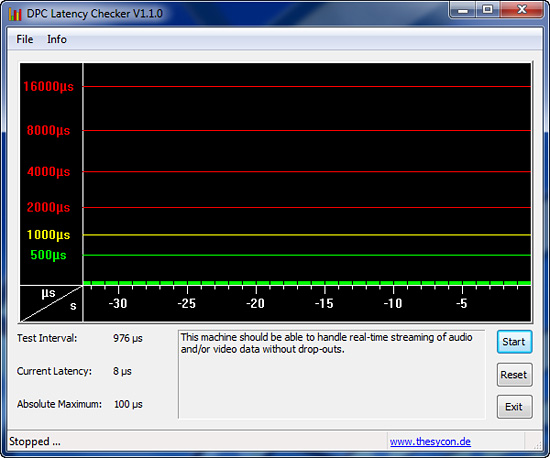
We receive a lot of requests for DPC latency results on each board we test. The MSI X58M passed with flying colors using our stock settings at 21x133, but with 12GB of memory at DDR3-1600 at 8-8-8-24 1T timings.
Originally published at https://www.anandtech.com/show/2771 (Wayback Machine).