
Gateway P-7808u: to Quad or Not to Quad?
- Posted in
- Laptops
Gaming Performance
We've chosen to focus on "reasonable" settings for the games below. That means we run Assassin's Creed and Company of Heroes in DX9 mode at maximum detail setting - DX10 reduces performance by quite a bit in AC and by a much larger amount in CoH. We run Crysis at Medium settings (for reference, High detail drops performance almost in half: 20.7 FPS for the P-7808u at 1680x1050). The remaining games are at maximum detail settings, but without any anti-aliasing.
Again, we chose to focus on 1680x1050 as a baseline performance comparison, and we will do so with other laptops going forward. If necessary, we will use an external LCD to run at that resolution - which we did with the P-7808u. Besides 1680x1050, we will also include results at the native LCD resolution, and one other resolution. In this case, we include results at 1440x900, 1680x1050, and 1920x1080. Ideally, you would want to run any laptop at the native LCD resolution, but depending on the game and your hardware that may not be practical. The following charts are color-coded for ease of reference: green is for 1680x1050, red for the native resolution of 1440x900, and gold for results at 1080p. For Mirror's Edge, we also provide results with PhysX enabled, shown in black/purple.
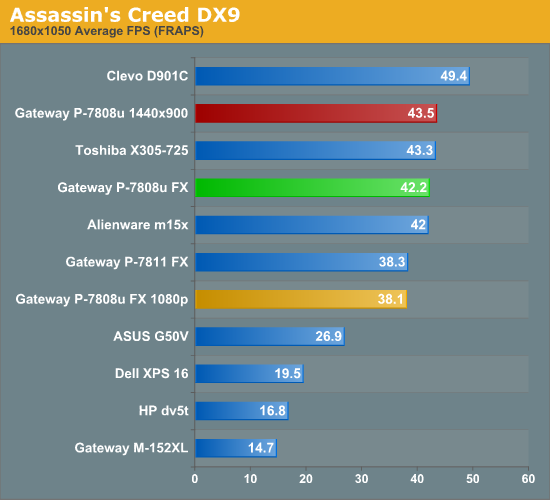
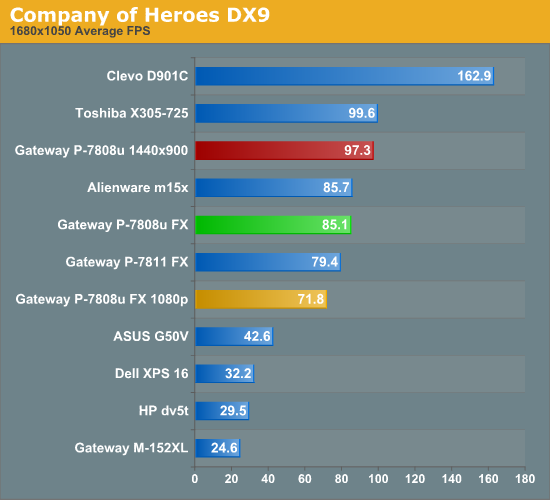
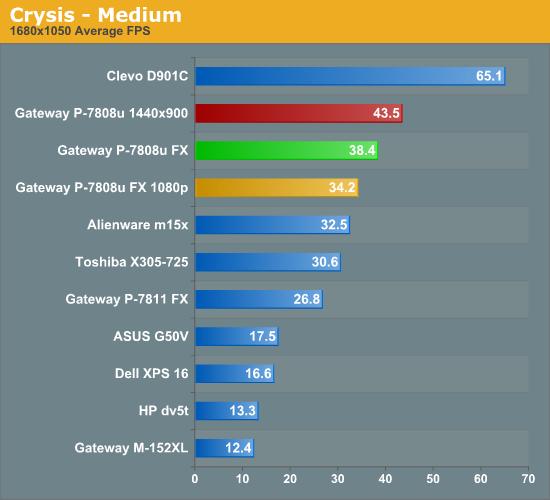
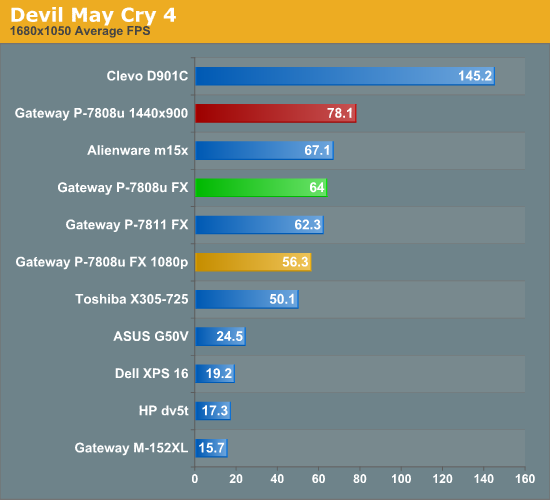
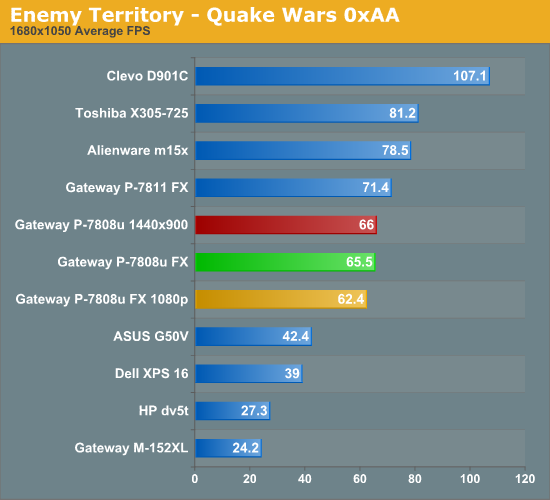
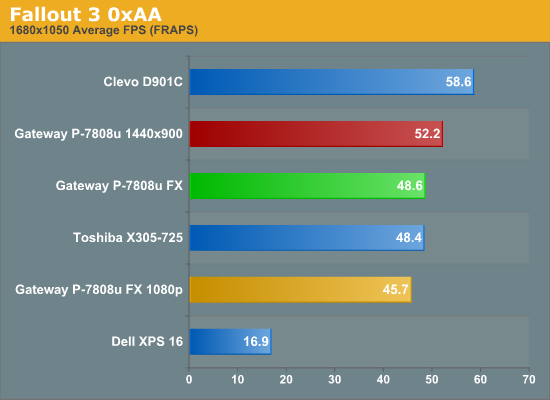
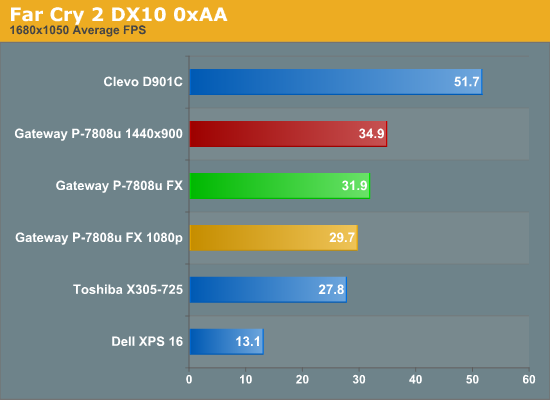
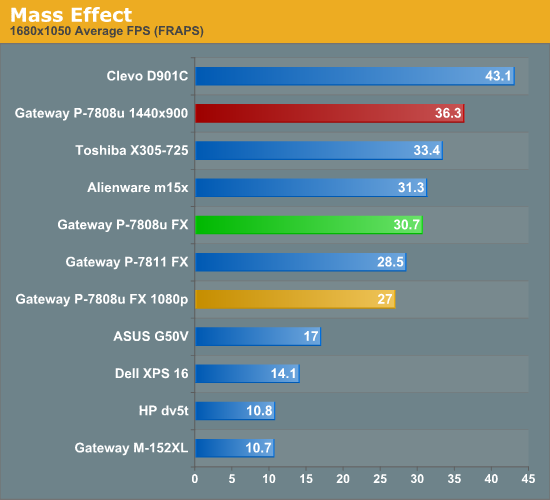
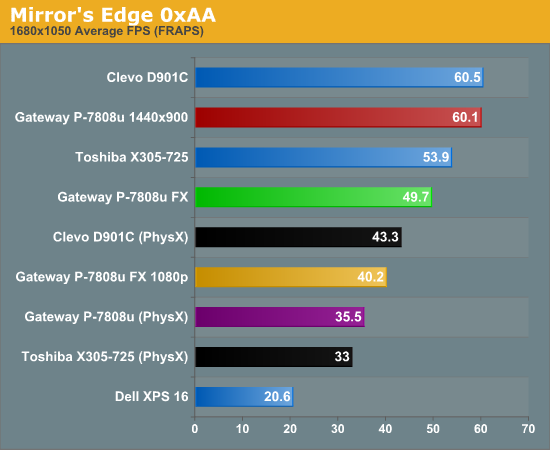
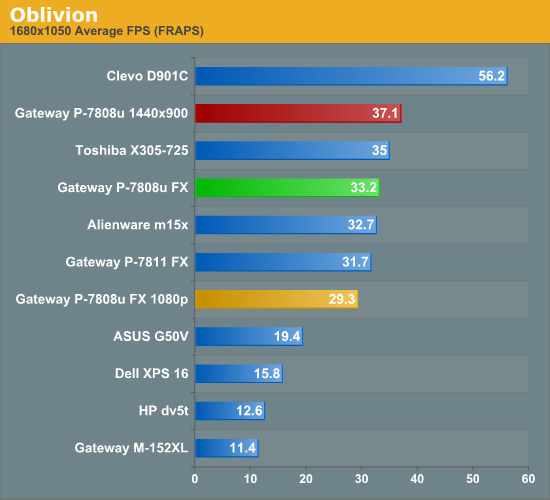
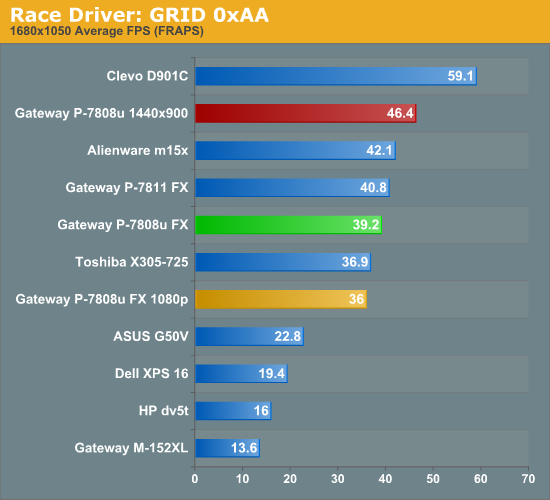
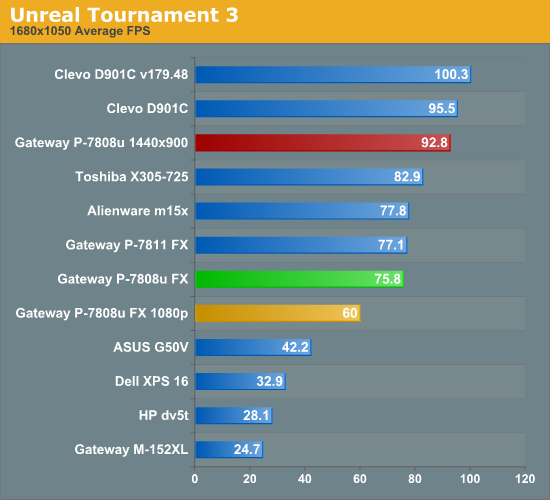
Overall performance in games is very good for a single GPU solution, with only the Toshiba X305-Q725 and the Clevo D901C consistently beating the P-7808u. However, updated drivers have clearly influenced performance in many of the titles; otherwise we would expect the Alienware m15x (8800M GTX) to consistently surpass the P-7808u. There are also a few instances where the older P-7811 is faster than the P-7808u, which we can safely chalk up to the faster 2.26GHz clock speed of the P8400 being more beneficial than the extra cores on the 2.0GHz Q9000. Beyond that, it's a bit difficult to determine how those two laptops actually compare, because of the difference in drivers. Because of the driver changes, we will most likely remove many of the old results in our next laptop review.
In our "equivalent settings" comparison, the P-7808u prices right where you would expect given its use of the GeForce 9800M GT. The 1GB of memory may help in a few games, but very few titles will benefit when running at the native LCD resolution. Focusing just on the results at 1440x900, the P-7808u shows the benefits of running a lower resolution LCD. All of the titles we tested provide very acceptable frame rates at the native LCD resolution, with the only exceptions being Crysis and Far Cry 2. The scores of 43.5 FPS and 34.9 FPS, respectively, are lower than some users would like, but both games remain playable. Those are two of the most demanding titles currently on the market, and they always seem capable of utilizing every ounce of GPU power you can throw at them. We would recommend dropping the detail levels in Far Cry 2 from "Very High" down to "High" or even "Medium" - just as we recommend with Crysis.
Originally published at https://www.anandtech.com/show/2748 (Wayback Machine).