
The SSD Anthology: Understanding SSDs and New Drives from OCZ
- Posted in
- Storage
SSD Aging: Read Speed is Largely Unaffected
Given the nature of the SSD performance-over-time “problem” you’d expect to only pay the performance penalty when writing files, not reading. And for once, I don’t have any weird exceptions to talk about - this is generally the case.
The table below shows sequential read performance for 2MB blocks on new vs. “used” SSDs. I even included data for a couple of the hard drives in the "Used" column; for those numbers I'm simply measuring transfer rates from the slowest parts of the platter:
| 2MB Sequential Read Speed | New | "Used" |
| Intel X25-E | 240.1 MB/s | |
| Intel X25-M | 264.1 MB/s | 230.2 MB/s |
| JMicron JMF602B MLC | 134.7 MB/s | 134.7 MB/s |
| JMicron JMF602Bx2 MLC | 164.1 MB/s | 164.1 MB/s |
| OCZ Summit | 248.6 MB/s | 208.6 MB/s |
| OCZ Vertex | 257.8 MB/s | 250.1 MB/s |
| Samsung SLC | 101.4 MB/s | |
| Seagate Momentus 5400.6 | 77.9 MB/s | - |
| Western Digital Caviar SE16 | 104.6 MB/s | 54.3 MB/s |
| Western Digital VelociRaptor | 118.0 MB/s | 79.2 MB/s |
The best SSDs still transfer data at over 2x the rate of the VelociRaptor.
Read latency is also extremely good on these worn SSDs:
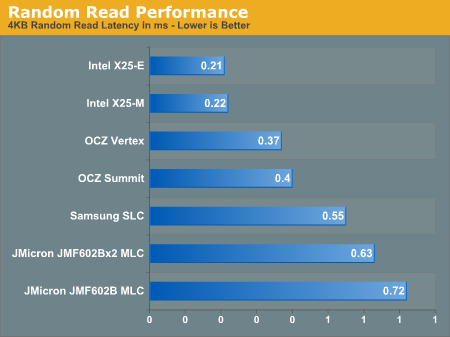
I left the conventional hard drives out of the chart simply because they completely screw up the scale. The VelociRaptor has a latency of 7.2ms in this iometer test with a queue depth of 3 IOs; that's an order of magnitude slower than the slowest SSD here.
Since you only pay the overhead penalty when you go to write to a previously-written block, the performance degradation only really occurs when you’re writing - not when you’re reading.
Now your OS is always writing to your drive, and that’s why we see a performance impact even if you’re just launching applications and opening files and such, but the penalty is much less tangible when it comes to read performance.
Originally published at https://www.anandtech.com/show/2738 (Wayback Machine).