
Toshiba X305-Q725: Quad-Core Gaming Notebook
- Posted in
- Laptops
Upgradeability and Internals
Taking apart the X305 to look at the internal components follows the familiar process. First, you need to remove the keyboard, which is done by popping out the strip just above the function keys. At that point you can remove four screws, and then there are another 20 or so screws on the bottom. Yes, that is a lot of screws, but when you have such a large chassis it's good to have everything held firmly together. You'll also need to remove the hard drives and optical drive to get at a few of the screws. Once this is all done, the top of the chassis comes off with relative ease, so if you are trying to open your laptop and it doesn't seem to be cooperating, there's a good chance you missed a screw or two.
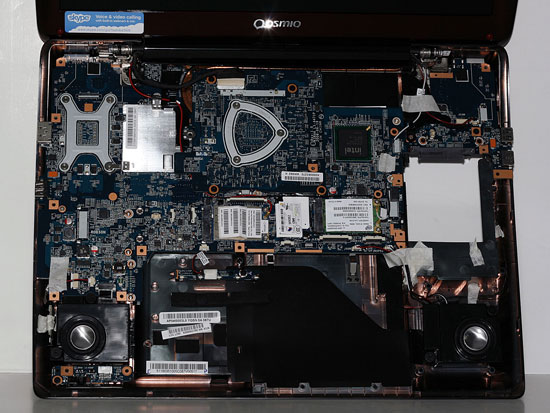


Short of replacing the CPU, or perhaps upgrading one of the mini-PCI cards, there's very little reason to do anything more than remove the two bottom access panels. As you can see from the above images, we stopped the disassembly process short of removing the motherboard. It shouldn't be too difficult to do that, but putting all of the wires back in place afterwards can be a bit like putting together a jigsaw puzzle. The X305-Q725 system comes fully populated, so the only way to upgrade the memory or hard drives is to remove what's already there.
At the top of the motherboard, you can see the GPU module, and there's room to the right for an oversized card. Most likely, the SLI variants have an extra large GPU module. We do wish it were easier to get at the CPU, however, as that's one upgrade some users might be inclined to make in the future.
Originally published at https://www.anandtech.com/show/2735 (Wayback Machine).