
NVIDIA's Ion Platform: Performance Preview
- Posted in
- GPUs
Blu-ray Playback: The Big Feature
Intel’s US15 chipset (codenamed Poulsbo) supports full hardware MPEG-2, VC-1 and H.264 decode acceleration. It’s necessary because Atom is too slow to decode high bitrate video encoded in these formats. Without this hardware decode acceleration, Atom wouldn’t be able to playback Blu-ray or HD video.
Most desktops, notebooks and netbooks based on Atom don’t use the US15 chipset; they use 945G and 945G lacks this hardware decode acceleration support.
NVIDIA’s GeForce 9400M addresses the problem using its PureVideo HD engine, providing support for full hardware decode acceleration of all three of the aforementioned codecs. In other words, you should be able to watch Blu-ray movies on an Ion based PC.
On a Core 2 Duo machine, CPU utilization will be in the single digits (double digits for a single core) while playing a Blu-ray movie on a GeForce 9400 motherboard. Despite the hardware accelerated video decode, the initial handling of the data to be decoded is still done on the CPU. Not to mention that getting the encrypted data off of the disc and decrypting it also happens on the CPU. As important as the GPU is in this situation, you still need a fast CPU to watch a Blu-ray movie. But a fast CPU, the Atom processor is not.
Would the 9400M be enough to let you watch a real Blu-ray movie on an Atom based machine?
NVIDIA included a clip from The Dark Knight Blu-ray on the Ion system’s hard drive for us to test CPU utilization. No thanks. As much as we trust NVIDIA to have selected the most balanced content representative of all Blu-ray movies, and included it on the hard drive it shipped with the Ion reference platform, we thought we’d stick with our own content.

Blu-ray Casino Royale on an Ion
We took our Casino Royale Blu-ray disc and ran it through AnyDVD HD. We ripped the disc and copied the resulting ~46GB ISO to the Ion’s hard drive. We didn’t have an external Blu-ray drive so this was the best method of being able to watch a Blu-ray on the machine.
As expected, hardware acceleration worked. Casino Royale was encoded in H.264 and the Ion platform decoded it flawlessly. CPU utilization was high averaging between 40 - 50% on a single-core Atom machine with Hyper-Threading enabled:
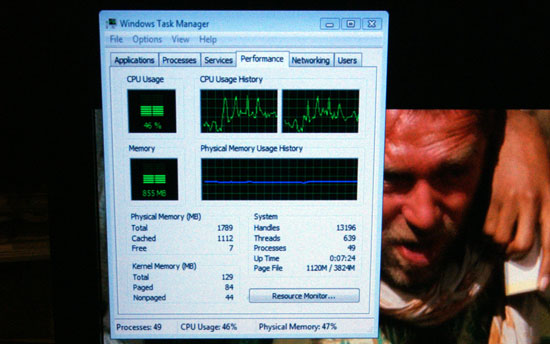
There were some scenes where the CPU utilization peaked to over 90%. While we didn’t see any dropped frames, keep in mind that we’ve already decrypted the disc; the CPU is actually doing less here than if we were playing a Blu-ray disc directly from a drive. I suspect that playing back encrypted content it is possible for the Ion platform to drop frames if CPU utilization jumps out of its comfortable 40 - 50% average.
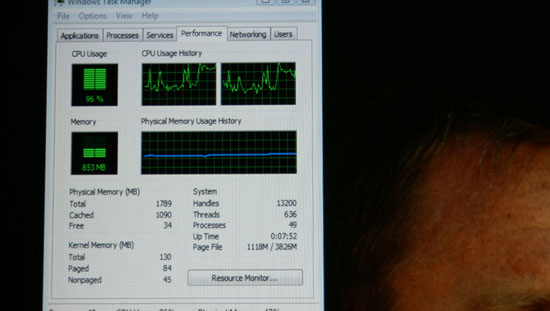
It’s worth mentioning that the Ion machine rarely jumped up that high in CPU utilization, but it definitely did at a few points while playing Casino Royale. A standard Atom platform with the 945G chipset couldn’t even attempt to play a Blu-ray movie. While there may be some cause for concern that Atom, even paired with the 9400M, won’t always be enough to watch Blu-ray movies on it’s too early to tell. At worst I wouldn’t expect to drop more than a few frames every now and then based on how often I saw the CPU spike above 90% utilization.
I tried enabling both cores on the Atom processor (NVIDIA shipped the Ion reference with a dual-core Atom 330, but with one core disabled) to see if that could alleviate the CPU utilization concerns. Unfortunately I seemed to have run into an NVIDIA or Cyberlink software issue because I couldn’t get smooth Blu-ray playback on Ion with both cores enabled on the Atom 330.
Originally published at https://www.anandtech.com/show/2718 (Wayback Machine).