
Gigabyte GA-EP45-UD3P - P45 at its Finest
- Posted in
- Motherboards
SATA Performance
PCMark Vantage is the latest benchmark available from Futuremark, and it is only for use with Windows Vista. Similar to the venerable PCMark05 in its makeup, Vantage modernizes the criteria and test methodology to reflect what users may encounter when running the new Windows OS and current applications. The total HDD benchmark is roughly 87% reads and 13% writes in nature. We run each test five times per drive, producing a median score that we use for comparison in our charts. We enable AHCI settings for each board and download the latest driver set from the manufacturer.
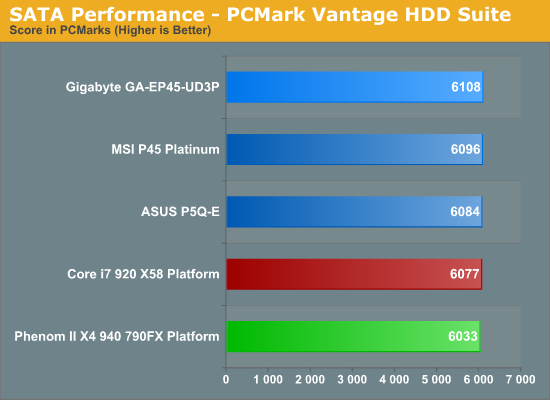
All of the P45 boards utilize the ICH10R for primary storage duties, so there is little difference between the results. ASUS normally finishes first in our storage tests but GIGABYTE was able to pull slightly ahead with the GA-EP45-UD3P.
USB / FireWire Performance
Our USB transfer speed tests are conducted with an OCZ Rally 2 Turbo 4GB Flash Drive and USB 2.0/FireWire based Maxtor OneTouch II external hard drive. In the small file test, we transfer a 602MB folder containing 444 files of various sizes from our hard drive to the USB Flash drive. In the large file test, we transfer a 1.90GB file folder containing 17 different files from our hard drive to the external drive utilizing the USB 2.0 and IEEE 1394a interface.
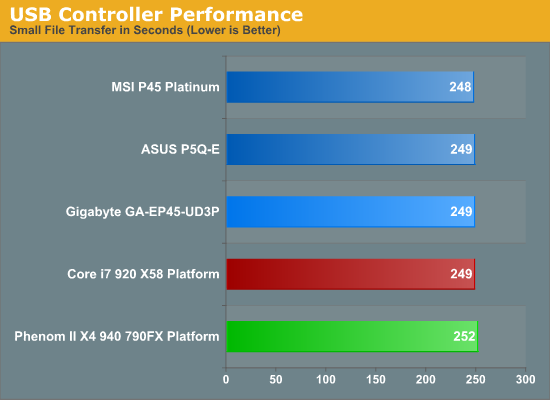
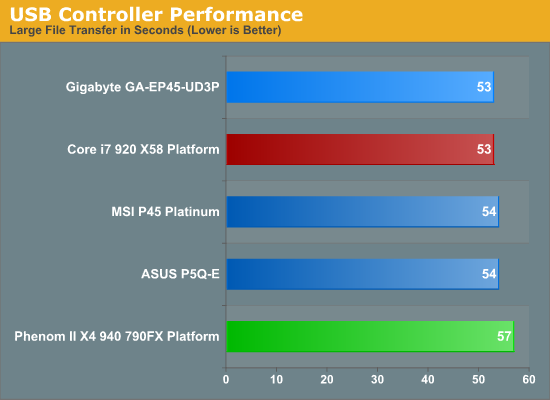
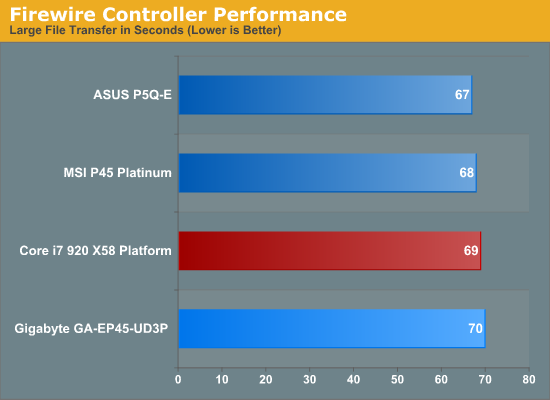
USB performance is a wash since all of the P45 boards use the same ICH10R chipset that provides the USB capabilities. While our synthetic HD Tune tests indicate parity between the boards, the actual transfer of files in the small file test indicates a slight advantage to MSI's implementation. Our large file USB test basically results in a tie as we are comparing the same chipset and the external hard drive becomes the limiting factor. The VIA and LSI FireWire solutions on the MSI and ASUS boards hold a small advantage over the Texas Instruments chipset on the GIGABYTE board.
Networking
The Windows 2000 Driver Development Kit (DDK) includes a useful LAN testing utility called NTttcp. We used the NTttcp tool to test Ethernet throughput and the CPU utilization of the various Ethernet Controllers used on the Intel motherboards. We set up one machine as the server; in this test, an Intel system with an Intel CSA Gigabit LAN connection. Intel CSA has a reputation for providing fast throughput and is a logical choice for our Gigabit LAN server.
On the server side, we used the following Command Line as suggested by the VIA whitepaper on LAN testing:
Ntttcpr -m 4,0,‹server IP› -a 4 -l 256000 -n 30000
On the client side (the motherboard under test), we used the following Command Line:
Ntttcps -m 4,0,‹client IP› -a 4 -l 256000 -n 30000
At the conclusion of the test, we captured the throughput and CPU utilization figures from the client screen.
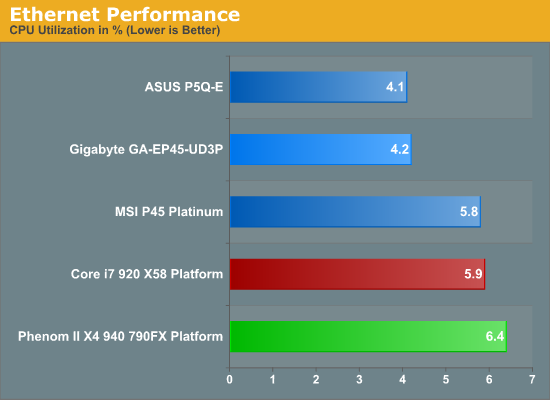
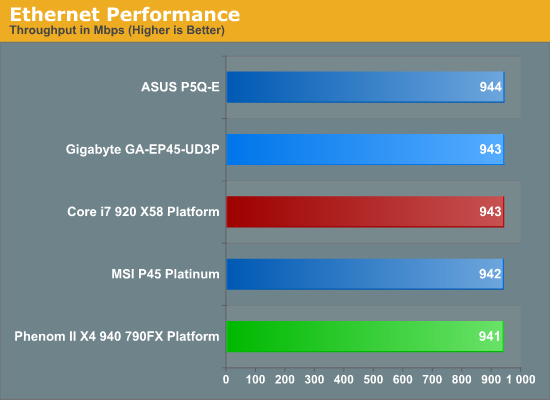
Our network throughput test indicates how well a particular controller design from Realtek, Marvell, or Intel performs instead of being indicative of true chipset performance. This also holds true for the CPU utilization results, though this test can also be influenced to certain degree by the BIOS code and chipset interconnect design.
The CPU utilization and throughput numbers favor the Marvell controller on the ASUS board, followed closely by the Realtek chipsets on the MSI and GIGABYTE boards. In practice, few if any users will notice a difference, even if they have the requisite gigabit hub, as storage performance frequently bottlenecks the actual transfer rates.
Originally published at https://www.anandtech.com/show/2717 (Wayback Machine).