
CrossFireX and the Phenom II X4 940 – Competitive or Not?
- Posted in
- Motherboards
Test Setup
Fortunately for us, during motherboard testing we test SLI or CrossFireX solutions extensively. However, we do not test the graphics cards in the same manner as we do in a GPU review. During motherboard testing, we focus on ensuring compatibility, identifying any layout problems, and checking performance deltas between motherboard chipsets. Instead of running absolute GPU intensive settings, we seek a balance between playable settings, quality, and platform performance. This means reasonable resolutions and 2xAA/8xAF settings to keep the GPU from being a limiting factor where possible. We think these quality settings are fine for most users, especially in FPS games where the differences between 2xAA, 4xAA, or 8xAA are minimized due to the speed of the game.
We run our benchmarks at two of the most popular resolutions for new systems, which happen to be 1680x1050 and 1920x1200. We mention this now as our overview of CrossFireX performance will not have 2560x1600 at 4xAA/16xAF results or tri-card setups. The population of 30” monitors is rather small and except for Crysis, tri-card performance is generally worse than dual card performance with our midrange setups. Consider this review a snapshot of CrossFireX performance with one particular GPU selection as we will not be looking at other ATI cards except the HD4870 1GB.
As such, our test systems today are platform oriented based on similar components and overall pricing schemes between the Intel Core 2 Quad and AMD Phenom II platforms. We selected a “budget” Core i7 setup that is capable of both SLI and CrossFire to ensure platform consistency when we look at SLI performance shortly.
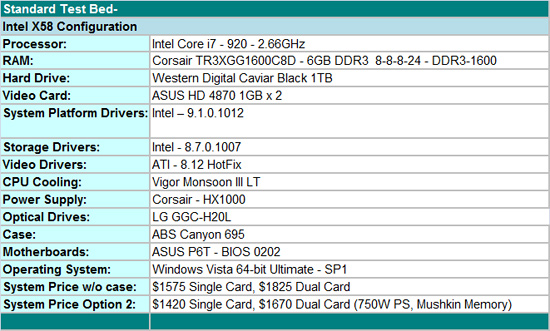
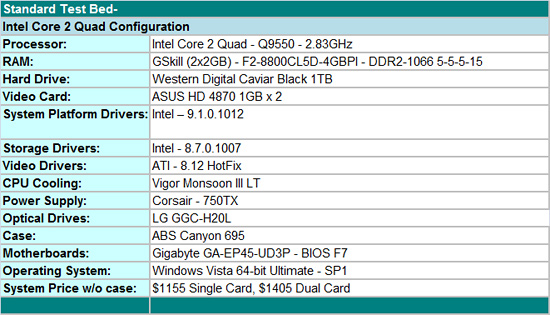
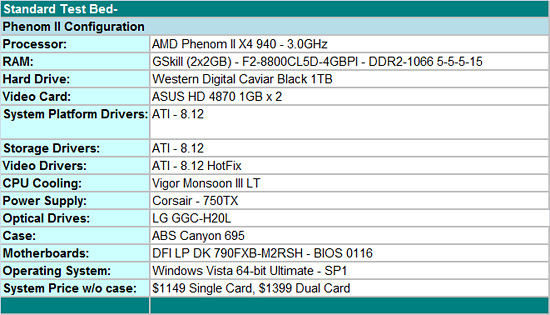
Our Phenom II and Intel Core 2 Quad platforms are within $6 of each other. We fully realize the pricing of the Phenom II X4 940 competes with the Intel Core 2 Quad Q9400, not Q9550, but we are looking at platform costs here. Of course, we could debate the various component choices for several pages and yes, the platform costs could shrink on either side. We did not use rebates in our pricing and all costs were gathered from Newegg on 1/29/09. We think our selections offer the best blend of price, performance, compatibility, and quality right now.
Our decision to go with a 790FX/SB750 combination on the AMD side is strictly based upon performance. The 790FX is about 3%~5% faster on average than comparable 790GX products. AMD continues to recommend the 790GX/SB750 as the platform of choice for the AM2+ and upcoming AM3 products. We disagree from a performance viewpoint; the 790FX/SB750 combination is simply the best choice in our opinion. Of course you will typically pay about $35~$40 or greater for the 790FX boards, but if you intend on running CrossFireX, we think it is worth the additional cost.
On the Intel side, we decided to go with the P45 chipset as it offers a very balanced blend of performance and value. The Gigabyte GA-EP45-UD3P is a superb CrossFire capable motherboard that also happens to be one of the best overclocking S775 products around. The P45 offers dual PCI Express x8 operation in CrossFire mode compared to dual x16 on the 790FX, X48, and X58 boards. However, we did not notice any performance differences between dual x8 and dual x16 operation when comparing the P45 to the X48 in offline testing utilizing our resolutions and quality settings.
The i7 setup can be cost reduced and we did offer a cost improved option by switching out the power supply and memory for equal alternatives. If you are only interested in CrossFire capability on the i7, the motherboard cost can be reduced another $45 and if memory overclocking over DDR3-1800 is not important, then memory costs (DDR3-1600 6GB HP kits) can be reduced another $40 on average. This would bring the i7 platform cost down to $1335 for a single video card configuration without too much of a problem.
Our standard power consumption results with the i7 boards utilized the Corsair HX-1000 power supply and our P45/790FX boards used the Corsair 750W power supply. We are qualifying the Corsair 750TX (and other under 1000W units) on the i7 platform currently. However, we did complete our benchmark runs today on the i7 with the Corsair 750TX. We will provide additional power consumption and temperature results based on these changes shortly.
We selected the ASUS EAH4870 DK/HTDI/1GD5 video card. It is a non-reference design that offers improved thermals and acoustics over the standard HD4870 1GB cards on our board choices. We think if a user is going to run CrossFireX on one of these platforms, then the best possible performance choice is the HD4870 1GB. Depending upon pricing on the HD 4870 1GB cards, a 4870X2 might be a better choice for most users.
The WD Caviar Black 1TB is our hard drive of choice for storage purposes. LG’s Blu-ray playback capable drive fills in for optical duties. We purchased two of G.Skill's impressive DDR2-1100 4GB kits that operate at speeds up to DDR2-1240 on our boards with about 2.1V of VDimm. We used 4GB in our Phenom II and Core 2 Quad systems with memory set at DDR2-1066 with 5-5-5-15 timings at 1.8V. Our DDR3-1600 6GB kit is from Corsair and was dialed in at DDR3-1600 with 8-8-8-24 1T timings at 1.60V. Vigor provided their Monsoon III LT CPU cooler that offers mounting kits for the 1366, 775, and AM2+ processors. ABS provided their Canyon 695 case and it has proved to be exemplary during testing.
Our game selections are a few of the recent top selling titles. Certain titles that are capped at 30FPS like Command and Conquer Red Alert 3 or do not benefit from CrossFireX (Flight Simulator X) were not included. We tested Grand Theft Auto IV with the latest 1.02 patch but still have a couple of unanswered anomalies on the i7 platform. Those results are not available today.
We are also including results with our processors overclocked for CrossFire only. Overclock results with a single card configuration provided little benefit in most cases. Simply overclocking the video cards resulted in better performance numbers than overclocking the processors with this configuration. That is a story for another time. The Phenom II 940 is running at 3.95GHz (17.5x226, DDR2-1205, 5-5-5-18, NB Speed 2486Mhz ), Core 2 Quad Q9550 at 4.25GHz (8.5x500, DDR2-1000, 5-4-4-12), and the Core i7 920 at 4GHz (20x200, DDR3-1600, 8-8-8-24). These were the maximum stable overclocks on air-cooling that we could sustain in a 24/7 setup with Vista Ultimate 64 SP1.
Originally published at https://www.anandtech.com/show/2715 (Wayback Machine).