
The All-in-One Battle: Dell's XPS One 24 vs. Apple's iMac
- Posted in
- Systems
At the Mercy of Microsoft
The biggest limitation to these all in one designs is that if you're an OEM other than Apple or basically if you're shipping a Windows system, you're bound by the abilities of the OS. Apple is in a unique position as it controls the hardware and software stack to tightly integrate the two, resulting in features that just work.
Over the past year Dell has taken notice of its need to be more of a software and hardware developer and recently introduced its first major addition to Vista, it's called the Dell Dock.

The Dell Dock, it sits at the top of your screen
Sitting at the top of your screen, the Dell dock is reminiscent of Apple's Dock in Mac OS X but with a more limited purpose.
The Dell Dock is actually surprisingly good, it's a great way of condensing the handful of frequently used applications into an easy to access launch bar. It keeps your desktop clean and since most users only need a handful of applications, it significantly reduces trips to the Start Menu which has honestly outlived much of its usefulness over the years.
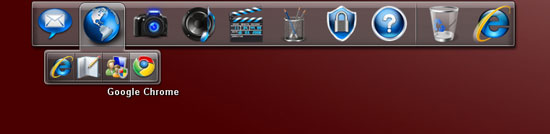
It's customizable, just drag new shortcuts onto it
The XPS One ships with IE7 as the default web browser, which just felt wrong. The first thing I found myself doing is looking for either Firefox or Chrome, I settled on the latter and simply drug the desktop icon to the Internet menu in the Dock. The Dock added Google Chrome to the Internet category, then asked me if I wanted to remove the Chrome icon from the desktop - how sweet.
Where the Dell Dock falls short is in its inability to truly replace the taskbar. Switching between applications still requires an ALT+TAB, Vista's Flip3D or a visit to the taskbar. Dell's Dock addresses the issue of launching applications, but finding and moving between apps remains issues that Windows needs to address. It looks like Microsoft plans on doing this with Windows 7, but at a year away from launch Dell needs to find something to do in the interim.
The Vista hindrance continues to limit Dell even if we look at the simple things. Both Windows Vista and Mac OS X support a hybrid sleep mode where the contents of memory are written to disk as well as kept active in main memory. So long as you have power, your machine will wake up from sleep nearly instantaneously as all data is still valid in main memory. Lose power and the contents of memory are safe on your disk and simply restored as soon as you get power back.
The suspend to RAM nature of this hybrid sleep means that waking up from sleep should be instant, which it is on both Vista and OS X. For whatever reason however, Vista takes longer to give you full control of your system once more. The table below shows how long it takes from sleep to when I can begin using my mouse on both the Dell XPS One 24 (or any other Vista machine for that matter) vs. Apple's 24" iMac:
| Apple iMac (OS X) | Apple iMac (Vista) | Dell XPS One 24 (Vista) | |
| Time to fully wakeup from Sleep | 7 seconds | 10 seconds | 12 seconds |
The Dell XPS One 24 took around 12 seconds to give me an active mouse after being woken up from sleep, the 24" iMac actually woke up in 3.8 seconds but needed 7 seconds total to restore the active network connection. OS X appears to get you back to your desktop sooner and definitely back to work quicker than Vista. I ran the same test on the iMac running Vista just to make sure that hardware differences weren't the cause, and it took the iMac approximately 10 seconds to give me a working mouse cursor after being pulled out of sleep.
For some reason Vista seems to take longer to wake up your input devices from sleep than OS X, it's not a huge deal but again, something that's out of Dell's hands to do anything about.
Remember the issues I mentioned earlier about the brightness and volume display not working with Pidgin in the foreground? Once again I suspect that these are OS/software interaction issues.
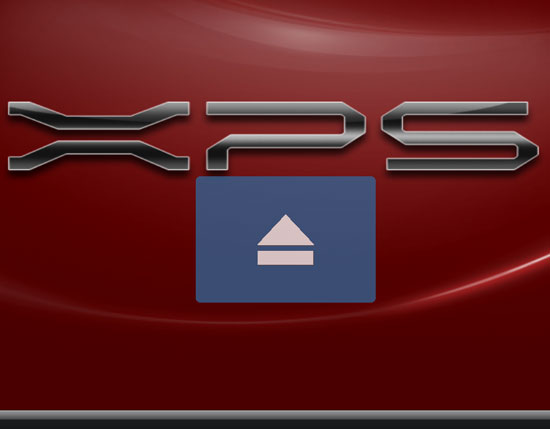
Very Apple-esque, nice work Dell

Not too different, eh?
None of the problems here are tremendous, but they do illustrate key frustrations that OEMs like Dell are facing these days. As time goes on, these OEMs must be equal parts software and hardware developers in order to truly complete their platforms. We're seeing a bit of that today, but more is necessary.
Originally published at https://www.anandtech.com/show/2656 (Wayback Machine).