
An Introduction to Virtualization
- Posted in
- IT Computing
Desktop Virtualization - What It Is, and What It Isn't
Now that the two main forms of virtualization offering complete systems have been explained, it might be interesting to talk about desktop virtualization. We have noticed a lot of confusion surrounding this term, and wanted to clarify this technology for those who are affected by it.
A common misconception amongst people unfamiliar with desktop virtualization is that it's actually another range of changes in a standard system, which somehow allows users to make use of a "virtual desktop" on their otherwise perfectly normal system. Confusion tends to arise when thinking about what exactly needs virtualizing about something as basic as a desktop, and what purposes it would serve, so let's get this misunderstanding out of the way from the start: desktop virtualization is not as simple as isolating your desktop from the rest of your computer system. In fact, the term "desktop virtualization" is a bit confusing altogether when put next to hypervisors and containers.
Instead, we can think of it as a way to "consolidate desktops" onto a centrally managed system, much in the spirit of terminal services, in an attempt to reduce workstation sprawl on a company network. Desktop virtualization, or VDI as it is commonly referred to, is in fact a combination of technologies that make it possible for people to log in on their private virtual machines (be they hypervisor- or container-based) from some other place on the network. This prevents company data from spreading outside of the IT administrator's influence, and makes the act of troubleshooting a specific problem a lot more convenient than having to run around half the building to find the culprit.
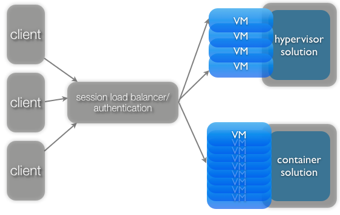
Generally, the system employs a protocol much like Microsoft's Remote Desktop to be able to work freely on their virtual machine, without ever having to interact with the actual hardware directly. Security and authentication systems may be in place, ensuring the right people get assigned to the right virtual machines, and taking care of possible break-ins. The actual system used to log in remotely might be anything, ranging from a thin PC to its bloated cousin, the regular workstation.
Companies that are currently working hard on improving their desktop virtualization solutions are VMware and Citrix.
Originally published at https://www.anandtech.com/show/2653 (Wayback Machine).