
Apple's Redesigned MacBook and MacBook Pro: Thoroughly Reviewed
- Posted in
- Mac
The New MacBook Pro
The new MacBook Pro looks larger than the older one thanks to its increased size in width and depth. The thickness of the system went down thanks to the mini DisplayPort output, cooler chipset and thinner aluminum chassis, which makes it feel better in your hands. Build quality is much improved from the previous generation, and just like the new MacBook, this thing feels like you're getting what you paid for.
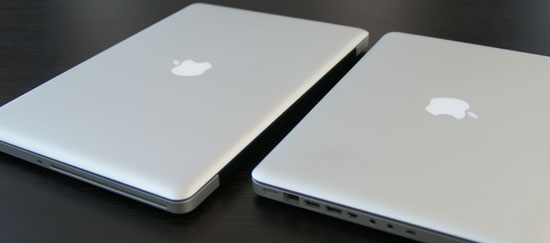
The MacBook Pro (left) vs. the MacBook (right)
| New MacBook Pro 15" | 2008 Penryn MacBook Pro 15" | 2007 Merom MacBook Pro 15" | |
| Dimensions | H: 0.95" W: 14.35" D: 9.82" |
H: 1.0" W: 14.1" D: 9.6" |
H: 1.0" W: 14.1" D: 9.6" |
| Weight | 5.5 lbs | 5.4 lbs | 5.4 lbs |
| Screen Size/Resolution | 15.4" / 1440 x 900 (LED backlit) | 15.4" / 1440 x 900 (LED backlit) |
15.4" / 1440 x 900 (LED backlit) |
| CPU | Intel Core 2 Duo 2.4GHz, 2.53GHz or 2.80GHz (45nm Penryn, 1066MHz FSB) | Intel Core 2 Duo 2.4GHz - 2.6GHz (45nm Penryn, 800MHz FSB) | Intel Core 2 Duo 2.2GHz - 2.6GHz (65nm Merom, 800MHz FSB) |
| GPU | NVIDIA GeForce 9400M (mGPU) + GeForce 9600M GT dGPU (256MB or 512MB GDDR3) | NVIDIA GeForce 8600M GT (256MB - 512MB) | NVIDIA GeForce 8600M GT (128MB - 256MB) |
| Memory | 2GB - 4GB DDR3 1066 | 2GB - 4GB DDR2-667 | 2GB - 4GB DDR2-667 |
| HDD |
250GB - 320GB 2.5" 5400RPM SATA |
200 - 250GB 2.5" 5400RPM SATA 200GB 7200RPM SATA |
120 - 250GB 2.5" 5400RPM SATA 200GB 7200RPM SATA |
| Optical Drive | Integrated SuperDrive | Integrated SuperDrive | Integrated SuperDrive |
| Networking | 802.11a/b/g/n 10/100/1000 Ethernet |
802.11a/b/g/n 10/100/1000 Ethernet |
802.11a/b/g/n 10/100/1000 Ethernet |
| Built in iSight | Yes | Yes | Yes |
| Inputs | 2 x USB 2.0 1 x FireWire 800 1 x ExpressCard/34 1 x Audio in 1 x Integrated mic |
2 x USB 2.0 1 x FireWire 400 1 x FireWire 800 1 x ExpressCard/34 1 x Audio in 1 x Integrated mic |
2 x USB 2.0 1 x FireWire 400 1 x FireWire 800 1 x ExpressCard/34 1 x Audio in 1 x Integrated mic |
| Outputs | 1 x Audio 1 x Mini DisplayPort |
1 x Audio 1 x dual-link DVI |
1 x Audio 1 x dual-link DVI |
| Battery | 50WHr | 60WHr | 60WHr |
| Price | $1999 | $1999 | $1999 |
With the MacBook Pro you get something that looks like a larger MacBook. Thanks to the 15.4" screen there's enough keyboard real estate to provide two external speakers responsible for a better sound than what you get from the base MacBook. Then there's the backlit keyboard, which you don't get with the MacBook. There's an ExpressCard/34 slot and a faster Core 2 CPU by default (2.4GHz vs. 2.0GHz in the MacBook). And finally you get the GeForce 9600M dGPU in addition to the GeForce 9400M, driving a higher quality, higher resolution 15.4" panel.
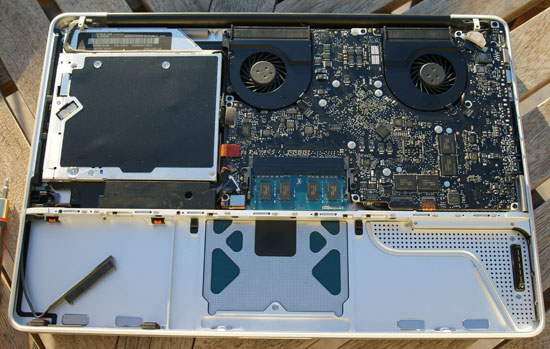
The MacBook Pro motherboard, note the two fans - one for the CPU and one for the GeForce 9600M
The differences between the MacBook and MacBook Pro actually haven't changed all that much; you get more ports, faster hardware and a better display. The difference here is that the $1299 MacBook is closer to the Pro than the old one ever was. I'd say the biggest reasons to move to the MacBook Pro are if you need the additional screen real estate, ExpressCard port or the GeForce 9600M. The majority of users will probably be well served by the new MacBook.

The MacBook Pro (left) vs. the MacBook (right)

Originally published at https://www.anandtech.com/show/2645 (Wayback Machine).