
Intel Xeon 7460: Six Cores to Bulldoze Opteron
- Posted in
- IT Computing
24 Cores in Action
So how do you test 24 cores? This is not at all a trivial question! Many applications are not capable of using more than eight threads, and quite a few are limited to 16 cores. Just look at what happens if you try to render with Cinema4D on this 24-headed monster: (Click on the image for a clearer view.)
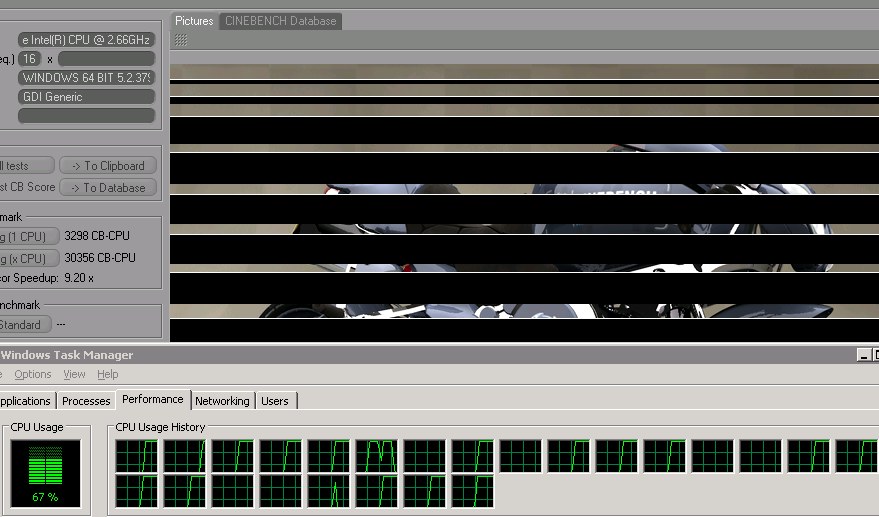 |
Cinebench fails to use all 24 cores
Yes, only 2/3 of the available processing power is effectively used. If you look closely, you'll see that only 16 cores are working at 100%.
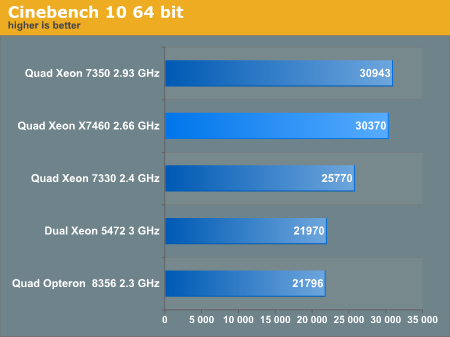
Cinebench is more than happy with the 3MB L2 cache, so adding a 16MB L3 has no effect whatsoever. The result is that only the improved Penryn core can improve the performance of the X7460. The sixteen 45nm Penryn cores at 2.66GHz are able to keep up with the sixteen 65nm Merom cores at 2.93GHz, but of course that is not good enough to warrant an upgrade. 3ds Max 2008 was no different, and in fact it was even worse:
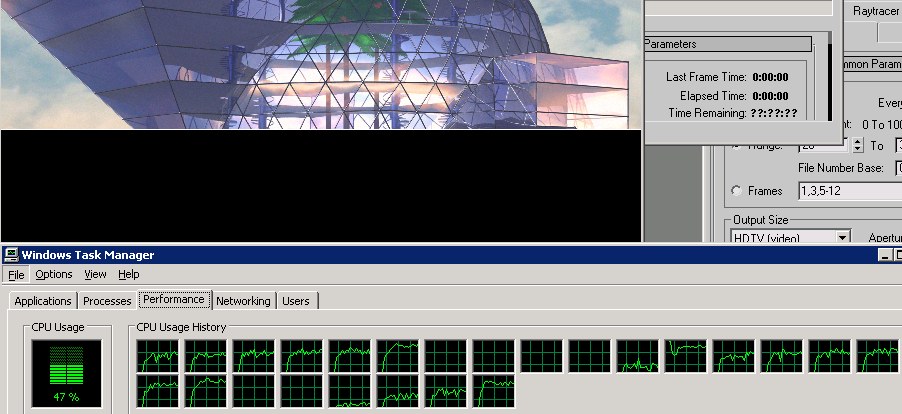 |
3dsMax 2008 seems to be limited to 16 cores too
As we had done a lot of benchmarking with 3ds Max 2008, we wanted to see the new Xeon 7460 could do. The scanline renderer is the fastest for our ray-traced images, but it was not able to fully use 16 cores. Like Cinebench, it completely "forgot" to use the eight extra cores that our Xeon 7460 server offers. The results are very low, around 62 frames per hour, while a quad Xeon X7350 can do 88. As we have no explanation for this weird behavior, we didn't graph the results. We will have to take some time to investigate this further.
Even if we could get the rendering engines to work on 24 cores or more, it is clear that there are better ways to get good rendering performance. In most cases, it is much more efficient to simply buy less expensive servers and use Backburner to render several different images on separate servers simultaneously.
Originally published at https://www.anandtech.com/show/2625 (Wayback Machine).