
ASUS Eee Box Preview & Intel's Atom Benchmarked
- Posted in
- Systems
Performance
The Eee Box we previewed shipped with 1GB of DDR2-667 and despite the limited memory size, performance was actually surprisingly good under Windows XP. Windows popped up quickly and the OS itself was snappy; the Eee Box’s Atom processor was more than fast enough for single tasking in the OS. If you’re looking for a PC to surf the web, check email, listen to music and watch standard definition videos then the Eee Box running Windows XP is more than sufficient, it’s actually fast. Start multitasking a lot and you’ll want the 2GB upgrade, but again, 1GB is totally fine if you keep your application launching under control.
Unfortunately the same can’t be said for under Vista; while performance between XP and Vista is actually pretty similar within applications, it’s the speed of the UI that really varies between the two OSes. Without Aero, Windows Vista still feels slower than XP despite posting very similar application performance scores. While the Eee Box feels like a fast machine under XP, it feels underpowered when running Windows Vista. Upgrading the memory to 2GB doesn’t have any impact on the feel under Vista either unfortunately.
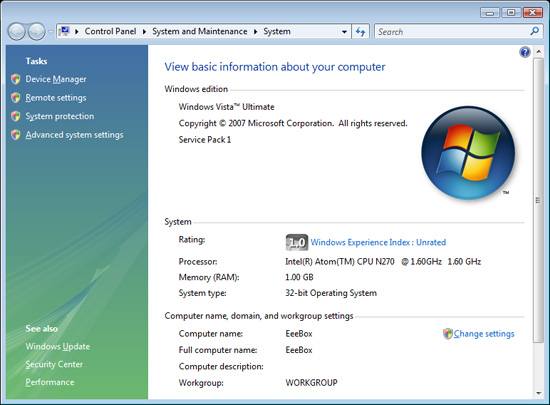
The Eee Box has no problems running Vista, however we’d strongly recommend against it. The experience is just so much better under XP that we’d suggest keeping Vista on your more powerful machines and leave XP or Linux on the Eee Box.
Power Consumption
Measuring power consumption of the Eee Box is unbelievably simple thanks to a very small difference between idle and load power.
| Phantom Power | Idle Power | Load Power | |
| ASUS Eee Box | 1.2W | 14.5W | 19W |
| Intel Celeron 420 Desktop | 1.2W | 58W | 70W |
The Eee Box consumes 1.2W of power at the outlet when completely turned off, which is pretty high given how low its idle and load power levels are. When sitting idle at the Windows desktop the Eee Box pulls around 14.5W and under load it will peak at 19W.
The Atom processor in the Eee Box is actively cooled using a fan and a very small heatsink connected to the CPU and chipset via heatpipes. While the Atom processor can run without a heatsink, we suspect that the combination of the chipset and the tight operating quarters forced ASUS to use active cooling in the Eee Box. In order to keep costs down however the size of the thermal solution was limited and ASUS ended up relying on a fan to keep the CPU and chipset cool rather than a large heatsink.
Unfortunately during testing the Eee Box was no where near silent, while we could manually reduce fan speed to make the system quiet the BIOS refused to do so by default. ASUS mentioned that there may be issues with the thermal sensor in our unit and the final production systems may be quieter.
Our sample is an early prototype and we expect a final unit by July, but for now ASUS isn’t really capitalizing on the low power consumption of the Atom processor. The Eee Box should be silent and it just isn’t right now.
Originally published at https://www.anandtech.com/show/2537 (Wayback Machine).