
NVIDIA 780a: Integrated Graphics and SLI in One
- Posted in
- CPUs
Low Power SLI: HybridPower
It's not just the CPU guys that are taking power consumption seriously these days, NVIDIA is too. With the nForce 780a, NVIDIA finally introduces a technology it has been talking about for several months: HybridPower.
With all of NVIDIA's 2008 chipsets featuring integrated graphics, HybridPower enables a discrete graphics card to shut off when not in use, relying on the motherboard's integrated graphics (mGPU) to handle display output.
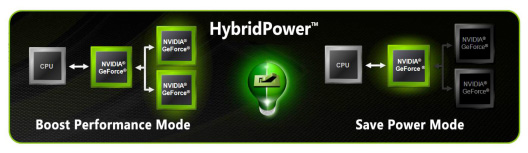
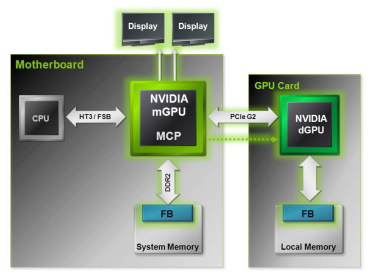
The technology works like this: the discrete GPU (dGPU) is plugged into a standard PCIe slot, however the display is connected to the mGPU. With HybridPower running in Power Savings mode, the mGPU handles all rendering and display output, while the dGPU remains turned off completely (not idling, but completely turned off, even the fan stops spinning). In Performance Boost mode, the dGPU is turned on and it handles all 3D rendering and display operations but its frame buffer is copied to system memory before being displayed by the mGPU. The dGPU renders all frames but the mGPU actually displays them. Since the dGPU's frame buffer needs to be copied to system memory and is actually displayed by the mGPU there is a small performance hit for enabling HybridPower, thankfully it is negligible.
BIOS and driver support for HybridPower is nothing short of outstanding, the install process is virtually seamless. Generally when dealing with integrated graphics and switching between a mGPU and dGPU you'll need a couple reboots and maybe a reconfigure of the BIOS before you can get display output. With the nForce 780a we simply plugged in a supported NVIDIA GPU and everything else worked itself out.
One problem we countered was related to behavior of the platform with its unsigned graphics driver. The issue is this: the nForce 780a's IGP uses the same graphics driver as the GeForce 9800 GX2 we attempted to install, however that graphics driver won't automatically be installed due to the fact that it is unsigned. It requires a re-run of the NVIDIA installation utility if the user adds a graphics card after the fact in order to get it to install properly. We are assuming that final drivers will be signed and this won't be a problem once the product is available for retail sale, but for now it can be confusing since no errors are thrown and you need to look at device manager before you realize that the GX2 driver wasn't properly installed.
The real problems with HybridPower arise when attempting to switch between using the mGPU and dGPU. The public and reviewers alike were both led to believe (by both AMD and NVIDIA) that the platform/driver would intelligently switch between the mGPU and dGPU - this isn't the
real world functionality of the platform.
Switching between the HybridPower modes must be done manually; while NVIDIA would like for the transition to be automated and seamless, this is the first incarnation of the technology and support for application-sensing technology just isn't there yet.
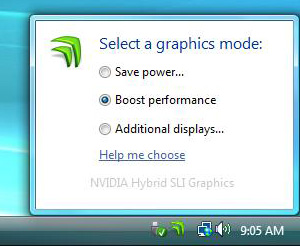
Luckily, NVIDIA developed a very simple tool that sits in your systray, allowing you to switch between HybridPower modes. Simply right-click the tool, select the appropriate operating mode and the driver enables or disables the appropriate GPU.
There are some limitations; first and foremost, only the GeForce 9800 GTX and GeForce 9800 GX2 are supported by HybridPower. On the chipset side, the nForce 720a, 730a, 750a, 780a and all of the GeForce 8x00 series motherboards support HybridPower. For most users, you'll need a new motherboard and a new GPU to take advantage of HybridPower.
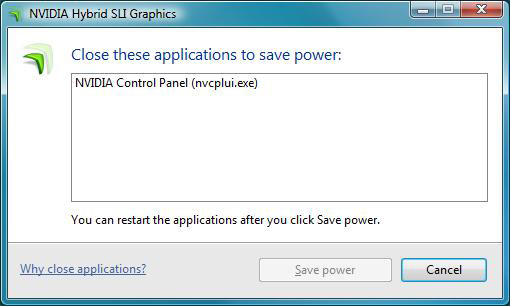
Certain 3D applications won't let you change state while they are running, so you may have to quit applications like 3dsmax before you are able to switch power modes. NVIDIA's utility reminds you of this:
When switching HybridPower modes, the state of one GPU gets moved to the other, meaning that the process isn't instantaneous. The more windows you have open and the more GPUs you have in the system, the slower the process will be. On a single GeForce 9800 GTX it took between 4 and 7 seconds to switch modes, which honestly wasn't too bad.
When we outfitted the system with a GeForce 9800 GX2, featuring two GPUs, the process took up to 13 seconds. The amount of time it takes to switch modes depends entirely on the number of windows open, with 40 windows open the GeForce 9800 GTX took a maximum of around 6 seconds to switch modes, compared to 13 seconds for a GeForce 9800 GX2 thanks to its two GPUs. The transition time would be even higher on a 3 or 4 GPU system.
The type of windows open doesn't seem to have an impact on the transition time between HybridPower modes, simply the number of windows (and their associated memory footprint). The problem is that a dual-purpose machine (one used for work and gaming) can easily have a large number of windows open, and waiting more than 10 seconds for anything to complete easily makes a system feel slow/sluggish.
The power savings were absolutely worth it, see for yourselves:
| Save Power Mode (dGPU Disabled) | Boost Performance Mode (dGPU Enabled) | |
| Total System Power Consumption (Idle) | 115W | 165W |
Since the mGPU is just as capable of decoding HD video as the dGPU in this case, it is possible to build an actual gaming HTPC out of something like the nForce 780a. You no longer have to sacrifice performance in order to keep power consumption down, you can have a multi-GPU setup but still watch movies thanks to HybridPower.
30" LCD Owners Need not Apply
The ASUS M3N-HT Deluxe only offers an analog VGA output as well as a digital, single-link HDMI output. The problem with this configuration is that while it is possible to convert HDMI to DVI, there is no way of outputting a dual-link DVI signal. In other words, the resolutions needed by 30" displays won't be reachable via the mGPU.
If this assumption is correct and there is no way to output a dual-link DVI signal from the mGPU (the reviewer's guide indicates only a single-channel integrated TMDS), then it almost entirely negates the point of HybridPower and 3-way SLI on this motherboard. Anyone investing a serious amount of money into graphics cards may also have reason to invest in a 30" display, which as it stands will be unsupported by this platform unless the display is driven directly off of the graphics cards themselves, in which case HybridPower won't work.
This is absolutely unacceptable and would prevent us from recommending the 780a as anything more than just another SLI motherboard. HybridPower is quite possibly the best feature for a high-end SLI user and if it won't work with 30" displays then its usefulness is severely degraded.
Unfortunately there's no other workaround here, NVIDIA simply chose wrong with its lack of support for dual-link DVI and we won't see this problem fixed until a new revision of the mGPU makes its way into later chipsets.
Originally published at https://www.anandtech.com/show/2521 (Wayback Machine).