
NVIDIA 780a: Integrated Graphics and SLI in One
- Posted in
- CPUs
One Chipset Fits All
NVIDIA is targeting the 780a as their top chipset for the AMD enthusiast and has gone to great lengths to ensure this is a better alternative than the AMD 790FX. NVIDIA designed this chipset to provide a total platform solution that includes a robust integrated graphics engine or the option to run NVIDIA’s SLI, Quad SLI, or 3-way SLI configuration.
780a Specifics
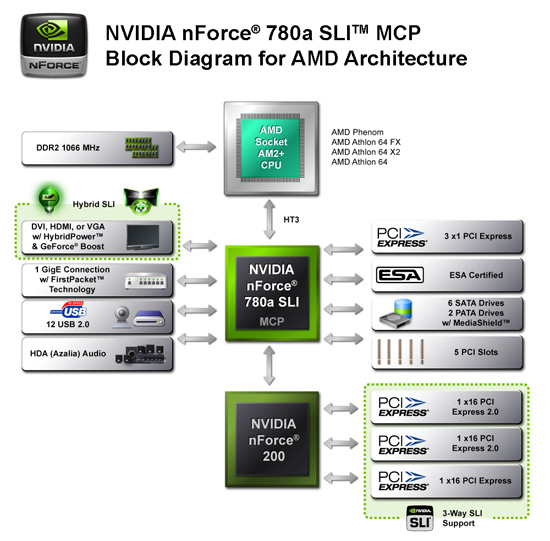
The NVIDIA 780a SLI chipset is built on TSMC's 65nm process technology. NVIDIA is keeping the exact transistor count private along with several other details concerning the internal layout. That said, the 780a SLI product family includes the 780a SLI MCP and the often utilized nForce 200 chipset that provides an extra 32 lanes of PCI Express 2.0. NVIDIA separates these 32 lanes to provide a single x16 link and dual x8 links for three- way SLI.
The 780a SLI MCP provides 19 lanes in total, 16 are dedicated to the nForce 200 link and the other three are available for x1 slots. NVIDIA 780a SLI MCP sports an intergrated GigE MAC interface, 12 USB 2.0 ports, HDA audio interface, five PCI slots, and support for six SATA drives and two PATA peripherals. RAID 0,1, 0+1, and 5 are fully supported along with native AHCI support now.
NVIDIA uses a highly optimized unified memory architecture (UMA) design, and all graphics memory is shared with system memory with the ability to access up to 512MB of system memory. The core clock speed operates at 500MHz, but unlike the 780G we have not discovered any BIOS options offering the ability to overclock the core. We did try NVIDIA’s performance tool to overclock the core and shaders, but our test sample would lockup at any setting.
Hybrid SLI support is fully implemented on the 780a with the release of the 174.15 driver set this week. Hybrid SLI supports current 8400GS and 8500GT based cards. In early testing, we have seen increases of up to 30% in games with a 8400GS card. The additional card completely changes the game play dynamics of this chipset and allows several recent games to play at 1024x768 or 1280x1024 medium quality settings and still keep the frame rates in the 30FPS to 50FPS range. However, smooth game play at those settings is not possible in Crysis unless you drop the quality setting to low.
NVIDIA integrates their PureVideo HD capabilities into the 780a. PureVideo HD offers hardware acceleration for decoding VC-1, H.264 (AVC), WMV, and MPEG-2 sources up to 1080p resolutions. Advanced de-interlacing is available when using a Phenom processor. We generally found CPU utilization rates and output quality to be near or equal to that of the 9600GT.
On the audio side, the HDMI interface offers support for 8-channel LPCM, provided you install the necessary NVIDIA driver set. Our driver support disks had this driver installation tucked away from the normal chipset installation, so be sure to load it if you want multi-channel LPCM. This feature matches Intel’s G35 chipset and is a far better alternative to the AMD 780G that sports 2-channel LPCM for the HTPC audience.
Rounding out the video capabilities of the 780a is analog output, DVI/HDMI interfaces, and a internal TMDS. The 780a features dual independent displays that allow resolution, refresh rates, and display data to be completely independent on the two display paths. NVIDIA provides HDCP support with on-chip key storage for the DVI or HDMI interfaces but is regulated to a single interface during playback operations. The biggest drawback we found was the 300MHz RAMDAC that only supports resolutions up to 1920x1440 at 75Hz. The DVI support is limited to a single-link TDMS rated at 162MHz pixel clock, which translates to a 1900x1200-resolution limit.
HyperTransport 3.0 capability (5.2GT/s+ interface) is included and is important in getting the most out of the 780a graphics core. With a Phenom onboard, the 780a will perform post-processing on high-definition content and it makes a difference in image quality and fluidity during 1080p playback.
Originally published at https://www.anandtech.com/show/2521 (Wayback Machine).