
24" LCD Roundup
- Posted in
- Displays
Color Accuracy
Imaging professionals definitely like to have accurate colors, and the best way of assuring that your display shows the proper colors is to use a colorimeter and calibration software. However, not everyone has access to such tools and many users are unwilling to spend over $200, so we test before and after calibration. (Put more accurately, we calibrate the monitors and then tweak the created profile back to an uncalibrated state so that we can evaluate the performance of the display in its default state.) For calibration, we target a white level of 250 nits -- anything more than that is too bright in our opinion. We also do a second calibration targeting a white level of 100 nits, which would be useful when working on material that will end up in print form. Before we get the results, here are the display settings we used on the test LCDs. We let the LCDs stabilized for at least one hour before performing measurements.
| LCD Brightness and Contrast Settings | ||
| Standard Calibrated (~250 nits) | Calibrated for Print (~100 nits) | |
| ASUS MK241H | 45 Brightness, 80 Contrast 100-100-100 RGB |
50 Brightness, 80 Contrast 54-51-73 RGB |
| Dell 2408WFP | 50 Brightness, 50 Contrast 80-80-80 RGB |
48 Brightness, 50 Contrast 55-55-55 RGB |
| Gateway FHD2400 | 70 Brightness, 70 Contrast 76-77-92 RGB |
50 Brightness, 50 Contrast 57-57-70 RGB |
| LaCie 324 | 35 Brightness, 0 Contrast 128-128-128 RGB 2.2 Gamma, 6500K |
7 Brightness, 0 Contrast 128-128-128 RGB 2.2 Gamma, 6500K |
| Samsung 2493HM | 60 Brightness, 75 Contrast 100-100-100 RGB |
28 Brightness, 75 Contrast 46-37-65 RGB |
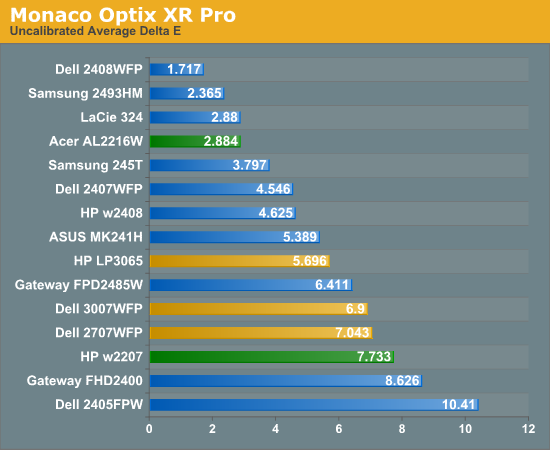
Starting with the uncalibrated results, it's pretty easy to see why we feel calibration tools are necessary for most users. This is not to say that you can't be happy with inaccurate colors -- your eyes will compensate, and some people prefer warmer (redder) or cooler (bluer) tones. However, if you're doing work with images or video as an example, it is important that what you see on your display matches as much as possible what others will see on their displays. Of the tested LCDs, only four are able to achieve an average Delta E of less than 3.0 without calibration -- three of which happen are part of this roundup. That's encouraging, as it indicates LCD manufacturers may be spending a bit of extra time to ensure that at least one of the settings will provide neutral, accurate colors. The real shocker however is the Dell 2408WFP. Its uncalibrated Delta E reaches an exceptional 1.7 -- a score that's better than several of the LCDs after calibration!
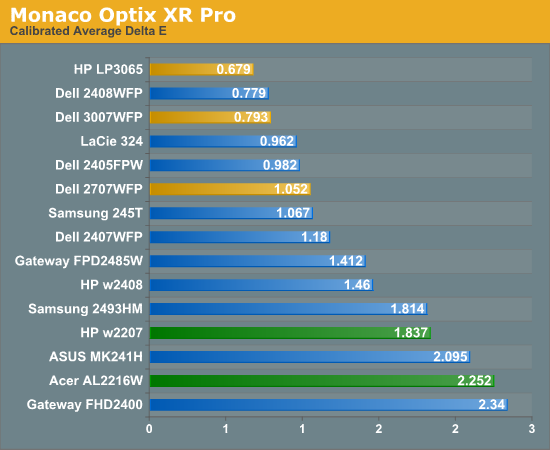
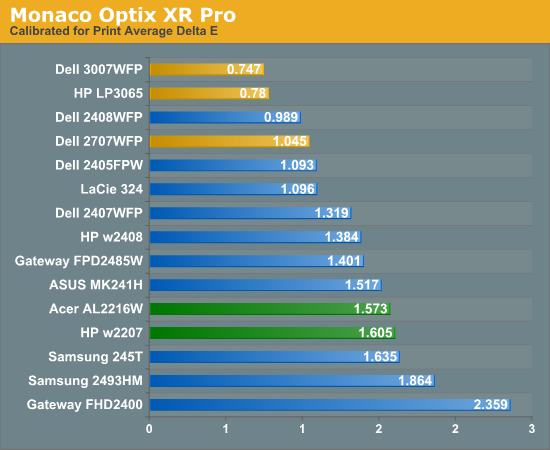
With calibration, all the scores improve substantially, but anyone serious about color accuracy is probably going to want an average Delta E of around 1.0 or less after calibration. Of the tested monitors, the 24" Dell displays (all three models that we've tested), the LaCie 324, and the two 30" LCDs all manage to accomplish this, along with the Dell 2707WFP and Samsung 245T. Switching to appropriate "printing" settings puts the three largest LCDs at the top of the charts, along with the Dell 2408WFP (and the old 2405FPW) and LaCie 324.
Most of the LCDs in this roundup place in the middle or upper portion of the above graphs, with one exception. The Gateway FHD2400 comes in last or in second to last in all three tests. We actually really like the Gateway display for many of its features, but in terms of color accuracy it is definitely lacking. We spent a substantial amount of time trying to tweak the settings in order to achieve better results, all to no avail. There's more to LCDs than color accuracy, of course, and the price and appearance might be enough to help you overlook the relatively poor performance here.
Originally published at https://www.anandtech.com/show/2518 (Wayback Machine).