
AVADirect M570RU: SLI, Drivers, and 8800M GTX Performance
- Posted in
- Laptops
Battery Life, Power Use, and Noise
For battery life testing, we ran our standard three in-house tests. The first consists of surfing the internet until the battery runs down. We set Internet Explorer to load three web pages (including AnandTech.com), pause for 60 seconds, exit, and then reload those pages. The second test simply plays a DVD until the battery runs dead. For the third test, we loop the four gaming tests in 3DMark06. In all cases, we set the power profile to "Balanced" and set the display brightness at maximum brightness. The CPU and GPU on M570RU consume the lion's share of the power, so turning down the backlight for the LCD won't help much. Still, you might be able to increase battery life by another 5~10 minutes at lower settings.
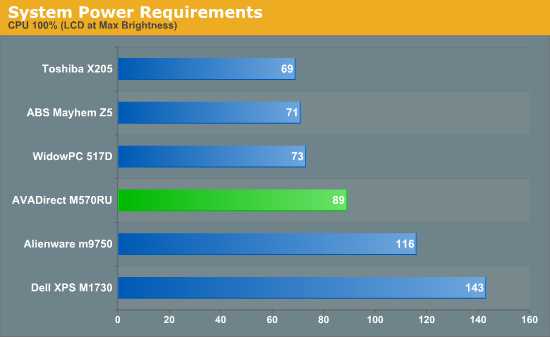
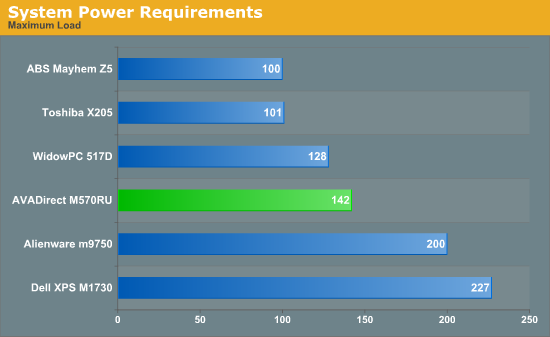
Related to battery life are the power requirements. We measure with the system plugged in, so some of the power saving features are not active. However, the numbers below do give you an idea of how much relative power various tasks require.
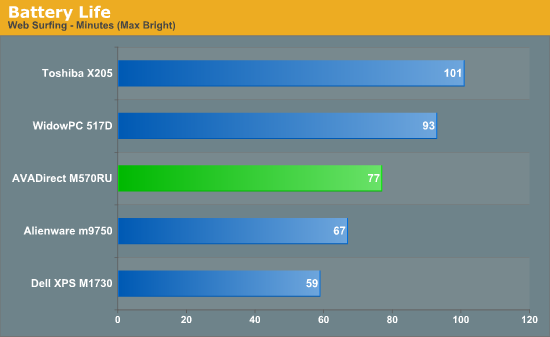
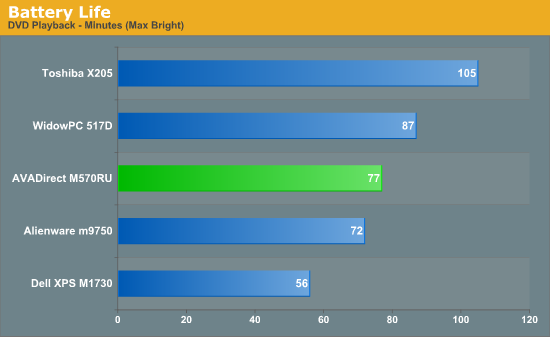
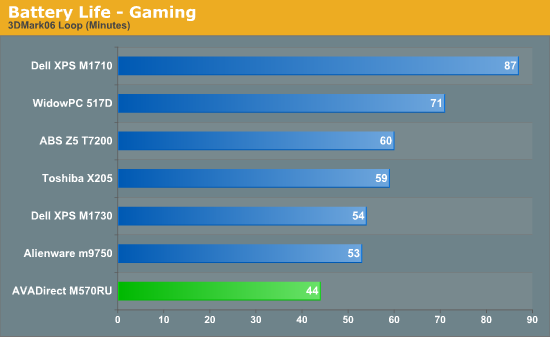
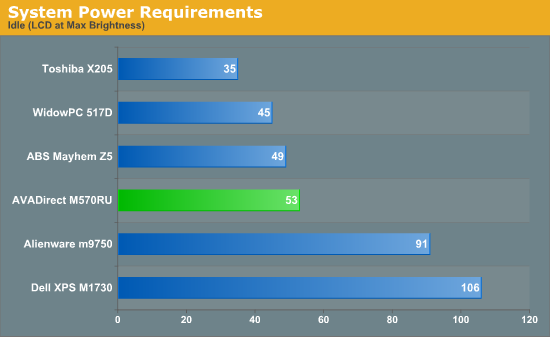
The AVADirect system comes with a 65 Whr battery, in comparison to 95 Whr batteries on several of the other 17" systems. Performance is typically better than the Dell XPS M1730, but that's not really saying much. The faster processor also clearly hinders performance relative to the WidowPC 517D2. One of the more interesting results is the gaming battery life; performance is much lower than the WidowPC -- far more than the faster CPU could possibly account for. Looking at the performance, it appears that the AVADirect system is not reducing GPU clock speed as much on battery power as the WidowPC system did. This suggests some updates to the BIOS that came with Penryn support may be present.
Regardless of what you do, it's clear that you're not going to get a lot of battery life out of a system like this -- at least not without some new technology like Hybrid SLI. Like most gaming notebooks, battery life and true mobility are sacrificed in pursuit of performance. As long as you're okay with the decision, there's nothing inherently wrong with this gaming notebook.
One last item we would like to comment on is the noise levels of this notebook. While we certainly don't expect a gaming notebook to be silent, particularly when running some intense game, it just so happens that we have several gaming notebooks in our possession right now. Frankly, the Clevo notebook is substantially louder than the other two notebooks, even at idle. The system appears to be struggling to keep CPU temperatures down, as it rarely dropped below 41 dB at a distance of 2 feet. By comparison, the Dell XPS M1730 is practically silent when idle (31 dB). Once a heavy load is placed on the CPU, noise levels rise even higher to 45 dB, and during gaming sessions noise output can reach up to 47 dB. The M1730 only got that loud after overclocking the CPU, which isn't really a fair comparison. Of course, the M1730 is a larger chassis, which makes it a bit easier to cool. Regardless, we're quite shocked that a single GPU notebook would end up being quieter than an SLI notebook.
Originally published at https://www.anandtech.com/show/2479 (Wayback Machine).