
AMD 780G: Preview of the Best Current IGP Solution
- Posted in
- CPUs
Testing Notes
Our image quality tests today consists of still screenshots from several movies in our collection, actually the primary criteria were movies that offered decent bitrates and were screen capture friendly under DRM infested Vista. While we tried to capture the exact moment within a frame to compare the 780G to the G35/GF8200, this was not always possible. However, we did our best to capture the screenshots on the same frame but at times; the capture process grabbed the beginning of the frame or the trailing end.
In the end, we feel like the process is close enough to give you an indication to any differences between the images. Obviously, we cannot show the reference image but will comment as to which screen shot best represented the reference image on our home theater system. We find measuring video output quality in this manner a subjective process to some degree, as at times we liked an image that did not match the reference screenshot better than the one that did. Considering that fact, we decided to bring eight people in to give us their opinions during playback sequences and then still-shot reviews.
We utilized PowerDVD 7.3 (build 3610 utilized, 3730 in testing) for playback with all settings on auto, except we enabled hardware acceleration within the application. We measured CPU utilization and bitrate results with the Vista Task Manager and PowerDVD Info applications respectively. We took readings every five minutes and averaged the results at the end of the movie. Movies were played back in full screen mode at their native resolutions with the desktop set to 1920x1200. We will show discrete card results in our next article. However, the HD 3450 provided results that were just a few percent better than the HD 3200 with the released 8.3 driver set.
Audio settings selected were Dolby Digital 5.1, DTS 5.1, or two-channel LPCM where applicable. Unlike the 780G, the G35 and GeForce 8200 fully supports multi-channel LPCM output and we will comment on results with either LPCM 5.1 or Dolby TrueHD decoded streams (via PowerDVD) where applicable.
We calibrated both systems on our Gateway XHD3000 monitor to ensure the color palettes were set equally. Fine tuning the control panel settings for each of the test setups can and will improve the picture quality but we will leave that up to the user to decide their preferences. We played back the movie sequences on the Gateway monitor for initial viewing and judging. We proceeded to output the same movie sequences on our calibrated Samsung 61" (HL-T6187S) DLP set utilizing the same control panel and PowerDVD settings to view the images in an HT setting.
We then utilized our test setups to pass through the image and audio via HDMI to our Pioneer Elite VSX-94THX A/V receiver. Using the receiver as a "repeater", we output the native signal (our preferred method to PWDVD) to our HT setup (7.1 audio/Samsung 61” DLP) for our test subjects. We will list their preferences in our comments section. We will also warn you in advance that the original images are generally 2MB to 3MB in size if you decide to download them.
MPEG 2 Video Quality - SWORDFISH
We are utilizing the movie SWORDFISH from Warner Brothers, what else can we say, we still like seeing Halle Berry in the lounge chair. This movie offers bitrate levels that averaged 5.4 Mb/s to 8.1 Mb/s on average. In our particular test scene, John Travolta is drinking a cup of coffee in a close up shot that highlights skin tones along with reflections off the cup and background objects.
 780G – Click to Enlarge |
 G35 – Click to Enlarge
|
 GeForce 8200 – Click to Enlarge |
The differences in the images are minor but the G35 appears to have slightly deeper colors along with a slight edge in sharpness while the GeForce 8200 offers additional contrast and a better background image, but being darker overall. However, the 780G image was faithful to the reference image during playback tests. Our test audience placed 4 votes for the 780G, 2 for the G35, and 2 for the GeForce 8200.
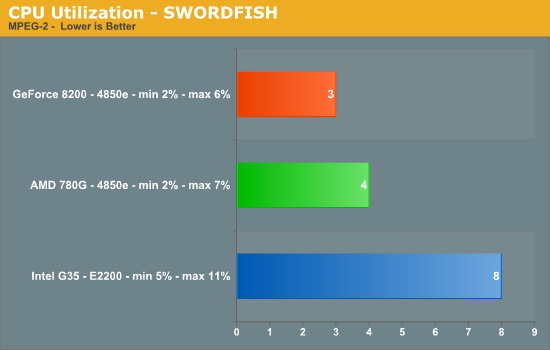
CPU utilization during playback favors the 780G and GeForce 8200 on average by 4%. This was surprising to us as the G35 does not offer full hardware decode capabilities for MPEG-2 playback. However, we never had a problem with playback in this title and others such as Cars and Spiderman 3.
VC1 Video Quality - SWORDFISH
SWORDFISH is not a very demanding movie in 1080P playback but the image screenshots should give a good indication to the improvement when going from MPEG-2 to VC1. This movie offers bitrate levels that averaged 15.7 Mb/s to 25.2 Mb/s on average. Once again, we utilize the coffee shop test scene.
 780G – Click to Enlarge |
 G35 – Click to Enlarge |
 GeForce 8200 – Click to Enlarge |
The differences in the images are once again minor but this time the 780G appears to have better skin tones while sharpness and overall color palette seems to favor the G35. We thought the GeForce 8200 image was slightly on the flat side when comparing facial details but had the best background details. The 780G image was more faithful to the reference image during playback tests. The 780G garnered 3 votes, 3 to the G35, and 2 for the GeForce 8200.
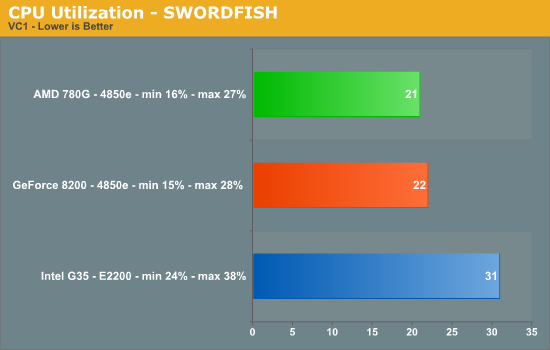
CPU utilization during playback favors the GeForce 8200 and 780G by a several percent even though the G35 offers hardware accelerated decoding of the VC1 format. There were not any judder or stuttering problems on any of the platforms during playback.
Originally published at https://www.anandtech.com/show/2475 (Wayback Machine).