
CrossFireX Arrives: First Look at 3 and 4 GPUs in 2 Card Setups
- Posted in
- GPUs
World in Conflict Performance
Version: 1.005
Settings: Medium quality plus Heat Haze, Debris Physics, and DX10
We tested this game using the built-in benchmark feature of the game. In our experience, this does a good job of testing the different graphical scenarios that can be encountered in the game.
World in Conflict, from the data, really looks like we had Vsync enabled, the system was severely CPU limited, or the framerate cap was on. However, this was not the case. These data points had minimum and maximum framerates extending from ~30 to ~160 fps, and there appears to be another factor in the resulting data looking so flat between resolutions.
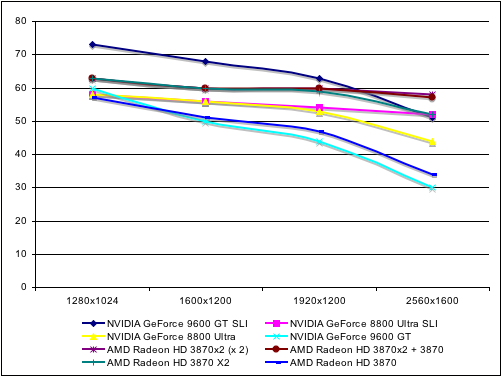
The 9600 GT SLI was able to break past this barrier and post average framerates higher than 60fps. The only major difference is that that we had to use a different driver just for the 9600. Given what we experienced in our recent Dell XPS M1730 article, the 170 series drivers help significantly in World in Conflict and Crysis; unfortunately, no official beta or other driver with 8800 Ultra support is available. We are investigating further and waiting for driver updates from NVIDIA.
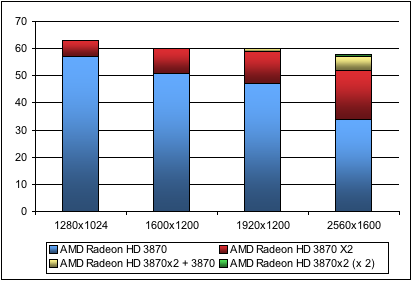
It seems clear that if there is some limit on performance scaling here with our test platform. We expect future driver updates to significantly help both SLI and CrossFireX.
Pushing resolution higher is the way to get more value out of multi-GPU here. Increasing settings may help, and we will go back and look at higher settings with these configurations in the future. Running at Very High is still not a viable option, but there is room for customization to end up with a workable stress test for current high-end systems.
| World in Conflict Performance | ||||
| 1280x1024 | 1600x1200 | 1920x1200 | 2560x1600 | |
| NVIDIA GeForce 9600 GT SLI | 73 | 68 | 63 | 51 |
| NVIDIA GeForce 8800 Ultra SLI | 58 | 56 | 54 | 52 |
| NVIDIA GeForce 8800 Ultra | 58 | 56 | 53 | 44 |
| NVIDIA GeForce 9600 GT | 60 | 50 | 44 | 30 |
| AMD Radeon HD 3870X2 (x 2) | 63 | 60 | 60 | 58 |
| AMD Radeon HD 3870X2 + 3870 | 63 | 60 | 60 | 57 |
| AMD Radeon HD 3870X2 | 63 | 60 | 59 | 52 |
| AMD Radeon HD 3870 | 57 | 51 | 47 | 34 |
With all the data compressed under 60fps, it is hard to get a clear understanding of what's going on. In the interest of reporting what we actually saw, the above chart shows our results.
Originally published at https://www.anandtech.com/show/2473 (Wayback Machine).