
A Closer Look at ESA
- Posted in
- Cases/Cooling/PSUs
Control Panel
As detailed in the ESA launch article, ESA is not a new control bus. It is built around the UBS HID specification. This means ESA sits on top of the existing USB specification to support new monitoring and control features. Other software is already sitting on top of USB, so ESA is fortunately not breaking any new ground in how it works. The standards already exist and the ESA specification has recently been approved by the USB-if HID subcommittee.
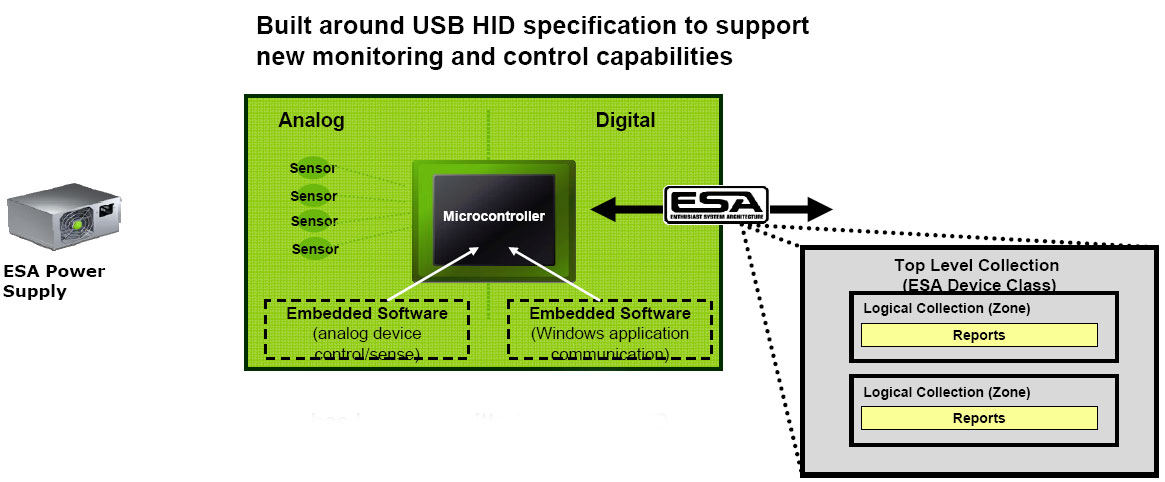 |
ESA is both a hardware and software interface. Components that report ESA data and allow control must be ESA compliant. The software that reports and controls ESA components can be written for an OS, implemented in BIOS, or designed to operate before an OS - or any combinations of all three approaches. For those familiar with USB HID it is OS independent, operating before the OS loads, and thus ESA can eventually be OS independent.
Software ties ESA together, and while ESA is technically OS independent, our ESA test system supports ESA in software that is running in Windows Vista Ultimate or another Windows OS. NVIDIA System Monitor provides data on how the system is performing in temperature, FSB, voltages, fan speeds, overclocking, and whatever variable manufacturers choose to implement . NVIDIA Control Panel is where the end user can adjust these variables.
 |
ESA compliant power supplies, cases, water coolers, and many other component classes are controlled by NVIDIA Control Panel. On an ESA system, the available ESA components can be selected under "Performance", "Device Settings". In this example you can see the CPU has been adjusted to an FSB of 411 and voltage raised to 1.55V, resulting in an overclock of the 3.0GHz CPU to 3.7GHz.
To be perfectly frank the control aspects of ESA are not quite ready for prime time as it is not possible to dial-in the settings shown here without creating a blue screen and system crash. We had to first set the BIOS somewhere in the neighborhood of where we wanted to go and then do final tweaking with NVIDIA Performance in Control Panel.
Using Control Panel only, we were not able to overclock beyond an FSB of 366 without crashing the system. To be fair, NVIDIA made it very clear that the current test system was put together to demonstrate the monitoring capabilities of ESA with no real finalizing of performance tweaking in ESA. We were able to validate to our satisfaction that the current ESA interface does not appear to hamper the system's overclocking abilities as a whole - it was just not possible to exert full control of overclocking adjustments with the current ESA interface.
In recent conversations, NVIDIA has been emphatic that the released 780 and 790 ESA versions will provide the same overclocking capabilities with ESA that can be achieved in the BIOS. We certainly agree with that position and believe achieving this goal is critical to the success of ESA. As soon as these new ESA-updated components are available, AnandTech will be doing an article on overclocking and performance tweaking with ESA, and then we'll see if they can actually reach this objective.
Originally published at https://www.anandtech.com/show/2447 (Wayback Machine).