
Samsung 245T: LCD Prime
- Posted in
- Displays
Uncalibrated
Results
Brightness and Contrast Ratio
For the brightness, contrast, and color accuracy tests, we depend on the hardware colorimeter and software to help calibrate the displays. As previously stated, we use a Monaco Optix XR (DTP-94) colorimeter and Monaco Optix XR Pro software. The software and hardware help users to get color that is more accurate from their displays. Before we get to the calibrated results, we took a quick look at the range of brightness and contrast at stock settings while changing just the brightness level.
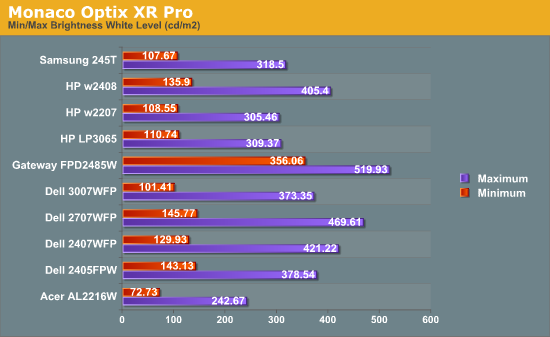
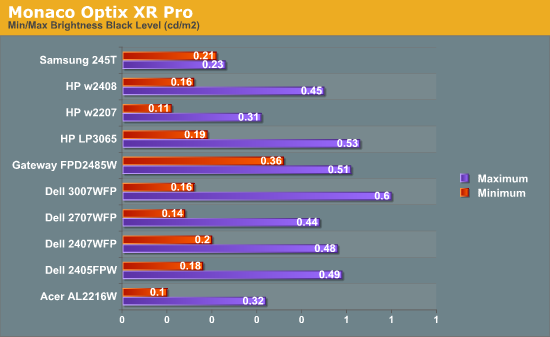
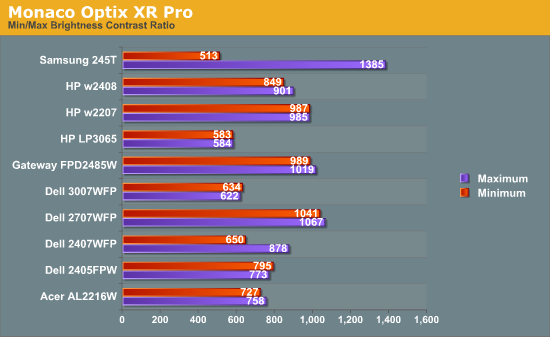
Without adjusting any of the default settings other than brightness, the maximum brightness level of the Samsung 245T reaches almost 320 nits -- as usual, more than most people need. At minimum brightness, we measure just over 100 nits. Further tuning of the color levels allows us to reach slightly lower/higher brightness levels, but the default range is sufficient. At maximum brightness, we measure a contrast ratio of nearly 1400:1 -- even without the dynamic contrast setting enabled. Reducing the brightness also reduces the contrast ratio, and it's interesting to note that black levels are reasonably stable at around 0.22 nits.
What happens when we enable Dynamic CR? Maximum brightness jumps to 350 nits while the black level went up slightly to 0.24 nits, resulting in a final contrast ratio of 1460:1. That's pretty close to the advertised 1500:1 contrast ratio, but the impact on Delta E is quite severe. Even after calibration -- which appears to get confused by Dynamic CR -- we measured an average Delta E of 7.029. That's worse than the uncalibrated Delta E we'll see below, so we recommend turning off the dynamic contrast.
Color Accuracy
The problem with calibrating a display is that it doesn't help all applications. Specifically, the video overlay used when watching DVDs or other movies completely bypasses any color profiles, so you are stuck with the uncalibrated colors. Playing games also uses the default color options. It is possible to tweak things using the OSD, but the amount of color correction that can be done via the OSD pales in comparison to color correction tables. Ideally, we would like to see video drivers begin to apply color profiles to all output -- office applications, movies, games, or anything else.
For uncalibrated color accuracy, we adjust the brightness as well as the contrast and colors (where applicable) using a "calibrate by eye" chart and the OSD controls. Also remember that color accuracy can vary from panel to panel even within the same model, and the results we are reporting are only from testing a single LCD. During testing, Monaco Optix XR Pro sends 24 color patches to the display with the colorimeter measuring the resulting values. The difference between what the requested and actual colors shown on the LCD is Delta E, with lower values being better. Any score less than one is "perfect" -- the naked eye is not going to be able to tell the difference -- and scores less than 2.0 are nearly perfect.
Ideally, you would want all of the tested colors to have a Delta E of less than 1.0, but almost no one is likely to have problems with anything scoring below 2.0. From 2.0 to 4.0, most people still won't notice the slight inaccuracies in the color palette, but when comparing displays side-by-side, differences may be apparent -- multimedia professionals in particular would prefer better colors. Anything above 4.0 begins to represent a more significant deviance, and numerous scores above 6.0 will almost certainly be noticeable by anyone using the display. Consistency is also important, so a display that has very good scores overall but with high spikes on some colors may actually be less desirable than a display with a slightly higher but more consistent average Delta E. Note also that fluctuations of as much as one point in Delta E are possible during a short amount of time. It generally takes 30 minutes for a display to warm up, and we perform all of our calibration and testing after the displays have been running for at least one hour with the screensaver disabled.
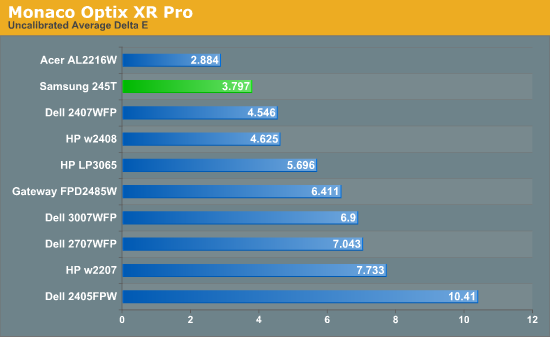
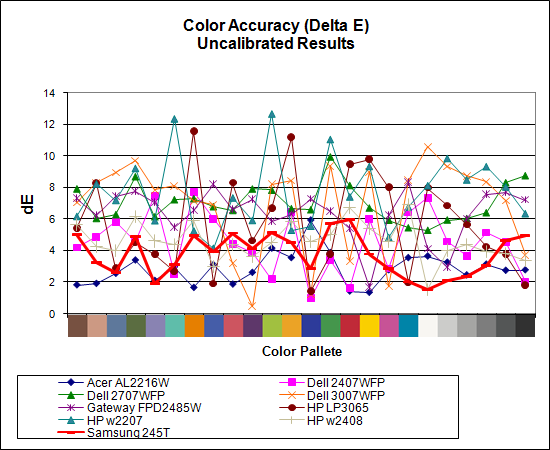
Without any form of color correction, the Samsung 245T rates a very good -- especially relative to the competition -- 3.80, ranking second overall with a relatively large gap between it and the nearest competitors. The Acer still scored better, but with that display had other concerns. The individual color scores are also very good, with the worst still only 6.0 and many others are below 3.0. So far, this is the best overall display when it comes to color accuracy -- provided of course that you stay away from the Dynamic CR setting. It's not perfect, but after seeing so many LCDs with uncalibrated Delta E of over 6.0 this is definitely a noteworthy achievement.
Originally published at https://www.anandtech.com/show/2440 (Wayback Machine).